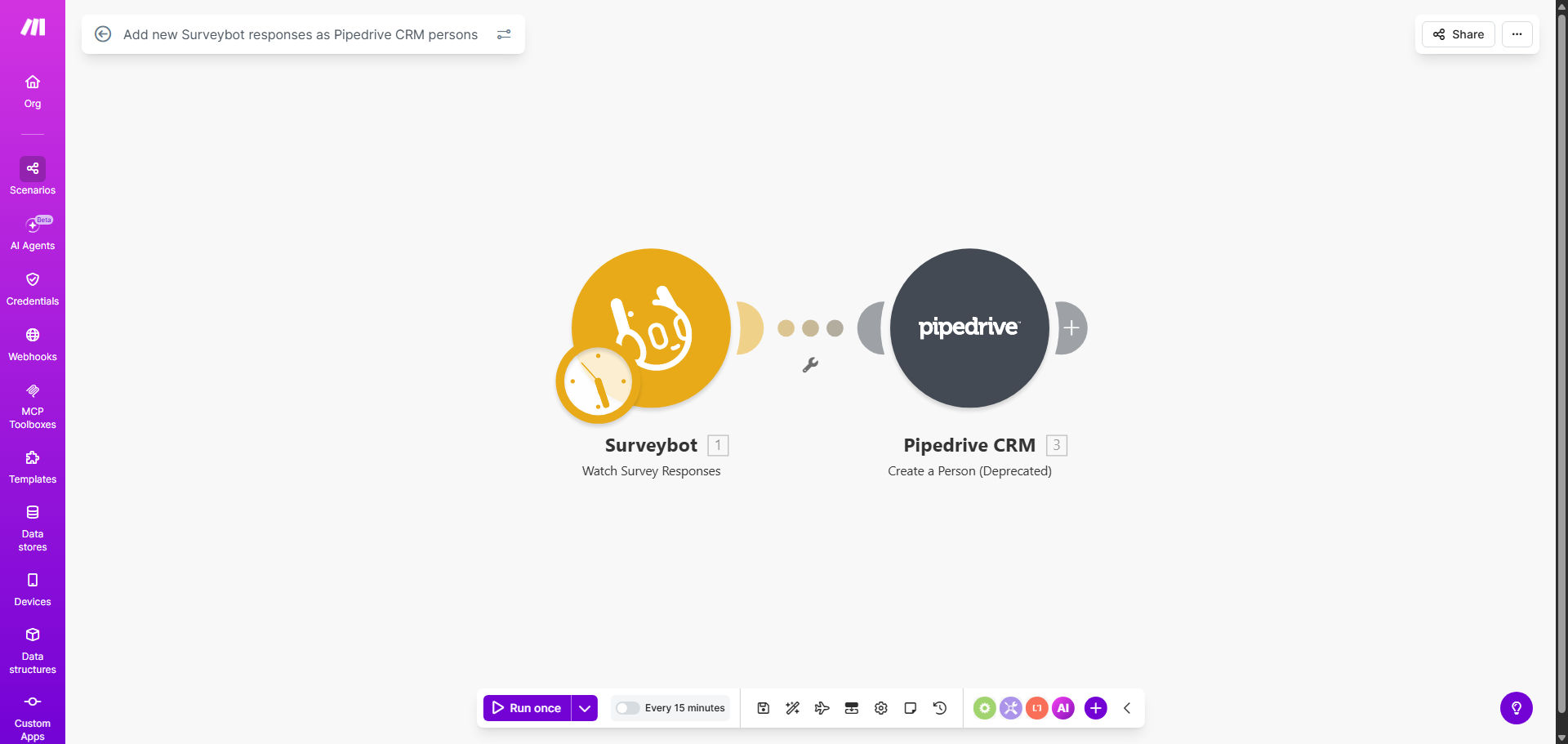
What This Workflow Does
Every time a potential customer fills out your survey, you have a golden opportunity—but only if you can reach them quickly. Manual data entry between your survey tool and your CRM is a slow, error-prone bottleneck that lets hot leads go cold. This automation solves that by creating a seamless bridge between Surveybot and Pipedrive.
The workflow listens for new responses in your Surveybot account. The moment a submission comes in, it automatically extracts the respondent's information—like name, email, company, and their specific answers—and creates a fully-fledged "Person" record in your Pipedrive CRM. This means your sales team has a warm, informed lead ready for follow-up in seconds, not hours or days.
Pro tip: Use this automation not just for lead capture, but for lead qualification. Structure your survey to ask key qualifying questions (e.g., budget, timeline, authority). The answers can be added to the Pipedrive person's notes or custom fields, allowing your team to prioritize outreach effectively.
How It Works
The automation is built on Make.com and runs on a simple trigger-action principle. Here’s the step-by-step process:
Step 1: The Trigger – A New Survey Response
The workflow is activated whenever a new response is submitted to a designated survey in your Surveybot account. Make.com watches for this event via a webhook or instant poll, capturing the entire response packet as soon as it's available.
Step 2: Data Parsing & Routing
The raw response data is parsed. The automation identifies key fields such as the respondent's email address, first and last name, company, and any other custom questions you've configured. This data is cleaned and formatted to match Pipedrive's expected input structure.
Step 3: Creating the Pipedrive Person
Using the prepared data, the automation makes an API call to your Pipedrive account. It creates a new "Person" record, populating the standard fields (name, email, phone) and can also map survey answers to custom fields or notes within the person's profile. The new lead is now visible to your entire sales team.
Step 4: Optional Enrichment & Notification
After the person is created, you can extend the workflow. For example, you could automatically add the new person to a specific deal or pipeline stage, assign them to a sales owner, or send a notification to your team's Slack channel announcing a new, qualified lead is ready for contact.
Who This Is For
This automation is a game-changer for businesses that rely on surveys for lead generation, customer feedback, or event registrations. It's ideal for:
- Sales & Marketing Teams: Who use gated content, webinars, or product demos accessed via a survey form and need to instantly funnel respondents into their sales pipeline.
- B2B Service Providers: Consultants, agencies, and SaaS companies that use qualification surveys to gauge client fit before scheduling a sales call.
- Event Organizers: Who capture attendee information through registration surveys and need to build a CRM list for post-event follow-up and nurturing.
- Startups & SMBs: Any growing business using Pipedrive that wants to eliminate manual data entry, reduce human error, and accelerate their lead response time to close more deals.
What You'll Need
To set up this automation, ensure you have the following ready:
- A Make.com account (free tier available).
- An active Surveybot account with a survey already created.
- A Pipedrive account with admin or API access to create persons.
- The API keys or OAuth credentials for both Surveybot and Pipedrive to authorize the connection in Make.com.
- A clear mapping plan of which survey questions correspond to which Pipedrive person fields (e.g., "Email" → "Email", "Company Name" → "Org name").
Quick Setup Guide
You can have this automation running in under 15 minutes by following these steps:
- Get the Template: Click the "Get This Workflow" button above to open the pre-built template in your Make.com account.
- Authorize Connections: In the Make.com scenario editor, connect your Surveybot and Pipedrive accounts by logging in and granting necessary permissions.
- Configure the Trigger: Select the specific survey in your Surveybot account that you want to monitor for new responses.
- Map the Data: In the "Create a Person" Pipedrive module, map the data from the Surveybot response to the correct Pipedrive fields (e.g., map `respondent.email` to the Pipedrive Email field).
- Test & Activate: Use the "Run once" feature to test the workflow with a real or test survey submission. Verify a person appears in Pipedrive. Once confirmed, turn the scenario "ON".
Key Benefits
Eliminate Manual Data Entry: Save 5–15 minutes per lead that would otherwise be spent copying and pasting information between tabs. For 20 leads a week, that's over 80 hours saved annually, allowing staff to focus on high-value sales activities.
Instant Lead Follow-Up: Speed is critical in sales. This automation ensures leads enter your CRM within seconds of submission, enabling same-day or even immediate follow-up, which can increase conversion rates by up to 400%.
Zero Lead Leakage: Manual processes inevitably drop leads. Automation guarantees 100% capture of every survey respondent, ensuring no potential customer falls through the cracks due to human oversight or backlog.
Richer Lead Profiles: Automatically attach the full survey response as notes or in custom fields in Pipedrive. This gives your sales team immediate context about the lead's needs and pain points, enabling more personalized and effective outreach from the first touch.
Scalable Process Foundation: This workflow is a building block. Once running, you can easily extend it to add leads to email sequences, create follow-up tasks, or segment leads into different pipelines based on their survey answers, creating a sophisticated, automated lead management system.