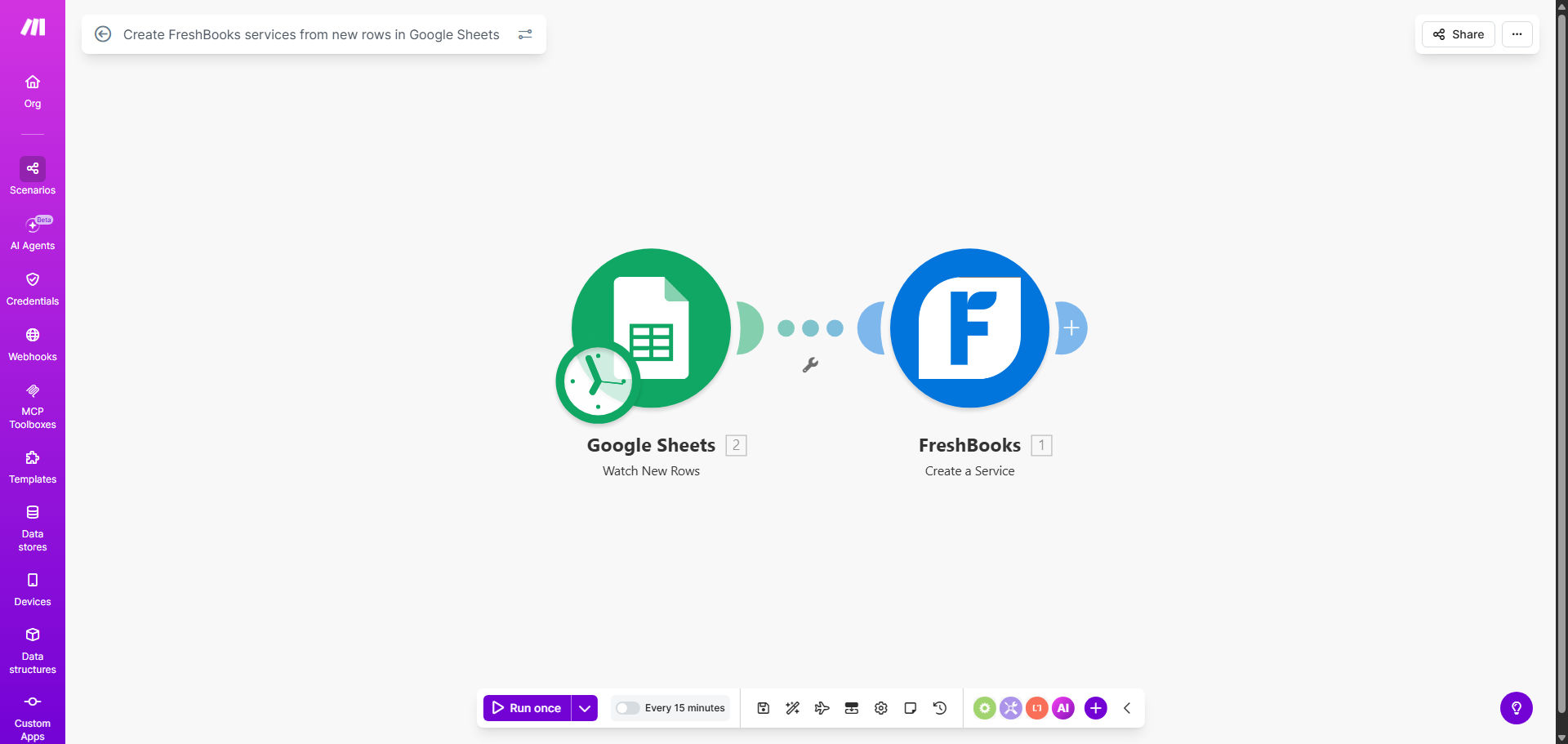
What This Workflow Does
For service-based businesses, maintaining an accurate and up-to-date catalog of billable items in your accounting software is crucial. Yet, this process is often manual: you add a new service or update a price in a spreadsheet, then you must log into FreshBooks, navigate to the services section, and manually create or edit the entry. This repetitive task consumes valuable time and introduces the risk of typos, incorrect pricing, or missed updates.
This automation solves that problem by creating a seamless, one-way sync from Google Sheets to FreshBooks. Every time you (or a team member) adds a new row to your designated "Services Master List" spreadsheet, this Make.com workflow instantly triggers. It reads the new data—service name, description, rate, SKU—and automatically creates a corresponding service item within your FreshBooks account. Your billing catalog is always accurate, without you ever having to switch tabs or copy-paste data again.
How It Works
The workflow acts as a intelligent bridge between your operational data (in Sheets) and your financial system (FreshBooks). It runs in the background, monitoring for changes and executing precise actions.
Step 1: Monitor the Google Sheet
The scenario starts by watching a specific Google Sheet for new rows. You define the spreadsheet and worksheet. Each time a row is added, the automation captures all the cell data from that new entry.
Step 2: Structure the Data
Make.com maps the columns from your sheet to the required fields for a FreshBooks service. For example, it takes the value from your "Price" column and formats it for the 'rate' field in FreshBooks, or uses the "Description" column to populate the service details.
Step 3: Create the Service in FreshBooks
Using the FreshBooks module, the workflow sends a secure API call to your account with the structured data. It creates a new service item with all the provided information, making it immediately available for use in estimates, invoices, and time tracking.
Pro tip: Structure your Google Sheet as a true master list. Use clear, consistent column headers (e.g., "Service Name", "Hourly Rate", "Description", "Taxable") to ensure flawless data mapping. This also makes it easy for non-technical team members to update the catalog.
Who This Is For
This automation is a game-changer for any business that bills for services and uses FreshBooks for accounting.
- Consulting Firms & Agencies: Quickly add new project types, consulting packages, or retainer options to your billing system as soon as they are approved.
- Freelancers & Solo Entrepreneurs: Keep your service menu updated without interrupting client work. Add a new offering in your sheet and it's instantly billable.
- Professional Service Providers: Lawyers, accountants, coaches, and therapists who have a set list of services or session rates that occasionally change.
- Businesses with Dynamic Pricing: Companies that frequently adjust rates or add seasonal services. Update the master sheet, and the change propagates automatically.
What You'll Need
- A Make.com account (free tier is sufficient to run this template).
- A Google Sheets document structured as a services list, with edit access granted to Make.com.
- A FreshBooks account (any paid plan that offers API access).
- Your FreshBooks API credentials or the ability to authenticate via OAuth through Make.com.
- A clear understanding of your service data: what fields are required (name, price) and which are optional (description, SKU).
Quick Setup Guide
- Get the Template: Click "Get This Workflow" to copy the scenario into your Make.com account.
- Connect Google Sheets: In the first module, authenticate and select your specific spreadsheet and worksheet that contains your services master list.
- Connect FreshBooks: In the second module, authenticate your FreshBooks account. Make.com will handle the secure OAuth connection.
- Map Your Data: Review the data mapping. Ensure the column names from your sheet (e.g., 'Column C') correctly correspond to the FreshBooks service fields (e.g., 'rate'). Adjust if necessary.
- Test Run: Add a test row to your Google Sheet with dummy data (e.g., "Test Service", $1). Run the scenario once to confirm a service is created in your FreshBooks sandbox or a test project.
- Activate & Schedule: Turn the scenario ON. It will now run automatically every few minutes, checking for and processing new rows.
Key Benefits
Eliminate 100% of manual data entry errors. No more typos in service names or misplaced decimal points in pricing. The automation transfers data digitally, ensuring perfect accuracy every time.
Save 2-5 hours per month of administrative work. The time spent logging in, navigating menus, and typing is completely reclaimed for revenue-generating activities or strategic work.
Ensure real-time consistency between your internal docs and client invoices. Your team always bills from the latest, approved rate sheet, eliminating confusion and potential client disputes over pricing.
Scale your service catalog management effortlessly. Adding 10 new services is as easy as adding 10 rows to a spreadsheet. The automation handles the heavy lifting, making growth seamless.
Improve operational control. Your Google Sheet becomes the single source of truth. You can control edits, track changes with version history, and manage approvals—all before changes ever hit your accounting system.