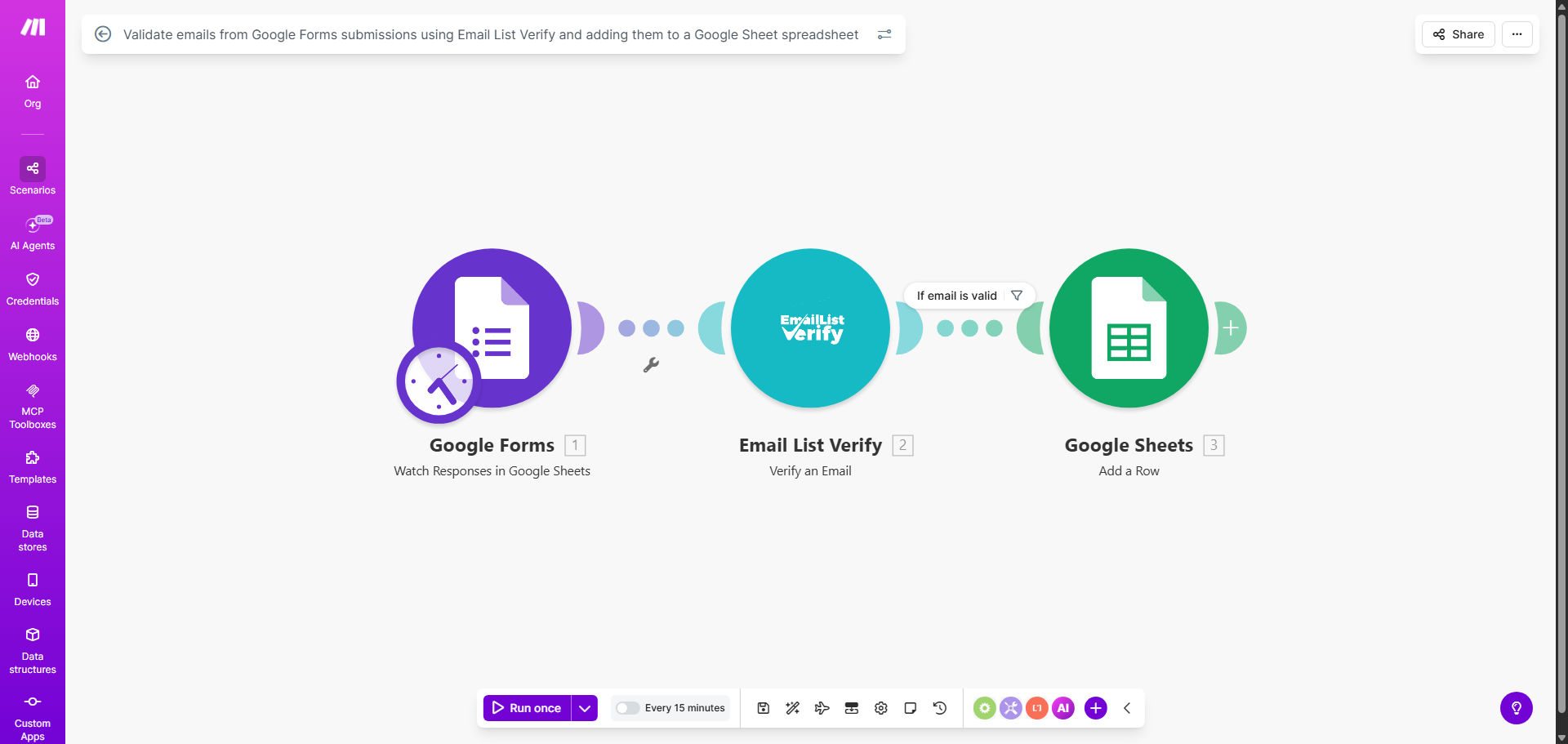
What This Workflow Does
Collecting email addresses through Google Forms is common for lead generation, event registrations, newsletter sign-ups, and customer feedback. However, a significant portion of submissions can contain fake, disposable, or invalid email addresses. These bad entries pollute your database, waste marketing resources, and can harm your sender reputation if used for email campaigns.
This automation solves that problem instantly. Every time a new response is submitted to your Google Form, the workflow automatically triggers. It sends the submitted email address to Email List Verify for real-time validation. If the email is verified as legitimate (not disposable, syntactically correct, and from a real domain), the entire form response data is added as a new row in your designated Google Sheet. Invalid emails are filtered out, keeping your spreadsheet clean and reliable from the moment data arrives.
The result is a seamless, trustworthy data collection pipeline. You no longer need to manually check emails or clean lists later. Your team can confidently act on new leads, send follow-ups, or analyze trends because every entry in your sheet has passed a quality check. This turns Google Forms from a simple collection tool into a powerful, validated lead source.
How It Works
The workflow operates in a clear, automated sequence. Here’s a step-by-step breakdown of the process.
Step 1: Trigger on New Form Submission
The Make.com scenario watches your Google Form for new responses. As soon as someone submits the form, the workflow is activated and receives all the submitted data, including the email address, name, answers, and timestamp.
Step 2: Validate the Email Address
The workflow passes the submitted email address to the Email List Verify module. This service checks the email against multiple criteria: whether it's from a disposable email service (like temporary mail providers), if the syntax is valid, if the domain exists, and if it's known to be a spam trap or fraudulent address. The verification returns a result (typically "valid" or "invalid").
Pro tip: You can configure the workflow to only proceed if the email status is "valid." This means invalid emails stop here, preventing any further actions and keeping your main sheet clean.
Step 3: Route Valid Data to Google Sheets
If the email is verified as valid, the workflow proceeds to the next module: Google Sheets. It maps the data from the form response (like name, email, answers) to corresponding columns in your predefined spreadsheet. A new row is added instantly, creating a live, updated database of verified contacts.
Step 4: Optional Handling for Invalid Emails
You can extend the workflow to handle invalid emails intelligently. For example, you could route them to a separate "Review" sheet, send a notification to your team, or even trigger a follow-up message to the submitter asking for a correct email. This flexibility allows you to monitor submission quality without corrupting your primary list.
Who This Is For
This automation is ideal for any business or individual that relies on email data collected through forms.
Marketing & Lead Generation Teams: Collecting webinar registrations, ebook downloads, or newsletter sign-ups. Ensuring every lead is a real person with a reachable email improves conversion rates and campaign ROI.
Event Organizers & Educators: Managing registrations for workshops, courses, or conferences. Validated emails guarantee communication reaches attendees and reduces administrative follow-up on incorrect details.
Customer Support & Feedback Collectors: Gathering customer satisfaction surveys or feedback forms. Valid emails ensure you can follow up on issues or thank respondents, enhancing customer relationship management.
Small Business Owners & Freelancers: Using Google Forms for client inquiries, project applications, or contact forms on websites. Automating validation saves time and ensures you only engage with serious, legitimate prospects.
Researchers & Data Analysts: Conducting surveys or studies where participant contact information is required for longitudinal communication. Data integrity is crucial for research validity.
What You'll Need
To set up this workflow, you'll need the following accounts and assets ready.
- A Google Forms form that collects email addresses as part of its responses.
- A Google Sheets spreadsheet where you want the validated data to be stored. Prepare the column headers to match your form fields.
- A Make.com account (free tier works for this template).
- An Email List Verify account or API key. This service provides the email validation check.
- Basic understanding of how to connect apps in Make.com (the template provides a guided setup).
Quick Setup Guide
Follow these steps to deploy the automation using the provided Make.com template.
- Clone the Template: Click "Get This Workflow" above to open the template on Make.com. Click the "Copy" button to create your own scenario based on it.
- Connect Your Google Forms: In your new scenario, update the Google Forms module to watch your specific form. Authorize Make.com to access your Google account.
- Configure Email List Verify: Add your Email List Verify API key to the module. You may need to sign up for their service if you haven't already.
- Map Your Google Sheet: Update the Google Sheets module to point to your specific spreadsheet and worksheet. Map the form response fields (like "Email", "Name") to the correct columns in your sheet.
- Test the Flow: Use the "Run once" feature in Make.com to test with a sample submission. Verify that a valid test email adds a row to your sheet and that an invalid email is handled as expected.
- Activate & Monitor: Turn the scenario on. It will now run automatically for every new form submission. Monitor your Google Sheet for new, verified entries.
Key Benefits
Immediate Data Quality Assurance: Every email is validated at the point of entry. Your database or contact list remains clean from the start, eliminating the need for periodic, manual data cleansing projects that consume hours of team time.
Increased Operational Efficiency: Automation removes the manual step of checking each submission. Your team can focus on engaging with verified leads rather than vetting data. This speeds up follow-up processes and improves response rates.
Protection of Marketing Resources: Sending emails to invalid or disposable addresses wastes budget and can damage your sender score with email providers. This workflow ensures your marketing emails only go to legitimate addresses, protecting your investment and reputation.
Enhanced Lead Confidence: Knowing that every contact in your sheet is verified allows your sales or marketing team to act with confidence. There's no hesitation about whether an email is real, which increases the aggressiveness and effectiveness of outreach campaigns.
Scalable Foundation: This workflow can be extended. Once validated data is in Google Sheets, you can trigger further automations—like adding contacts to a CRM, sending welcome emails, or creating analytics reports—creating a fully automated lead management system.