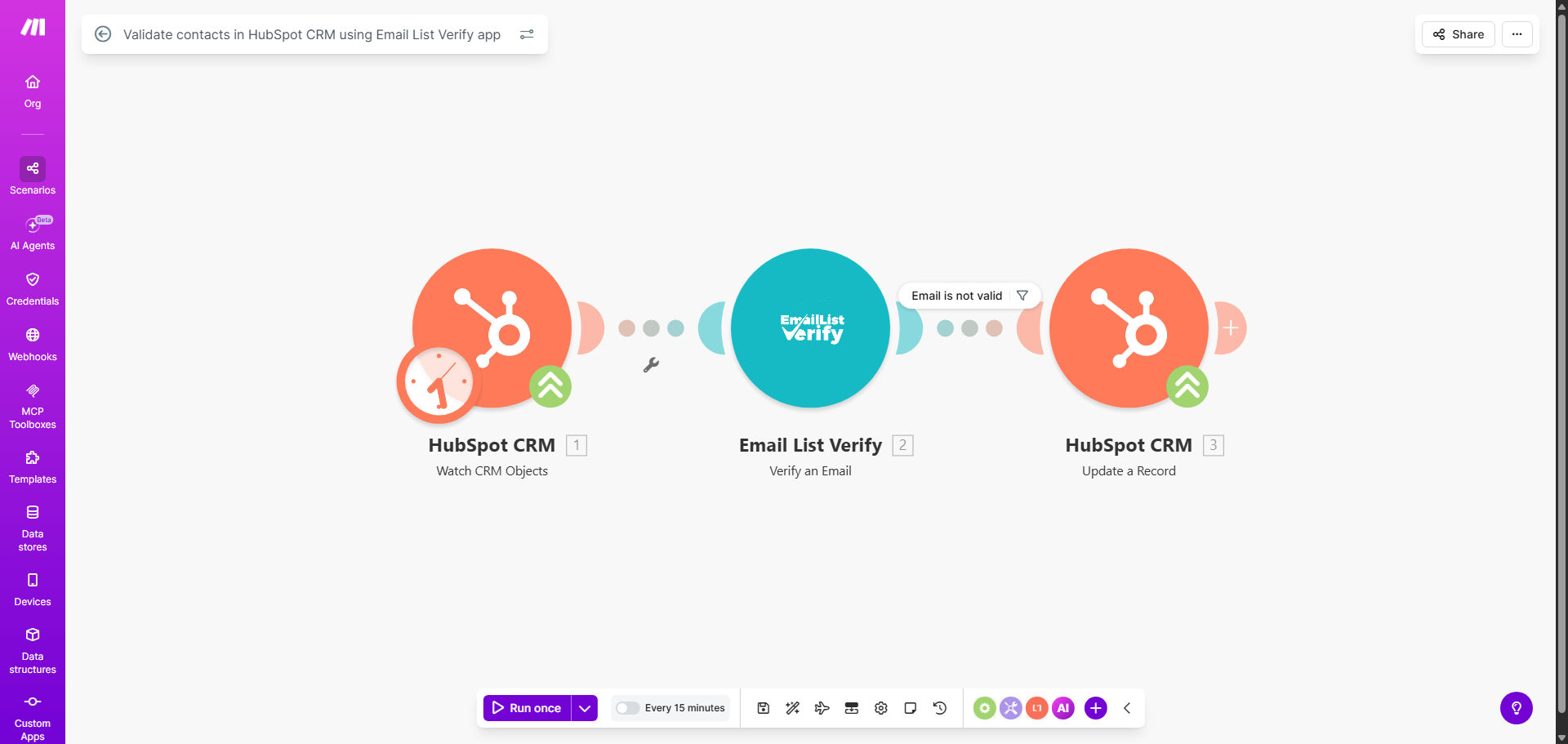
What This Workflow Does
Every business that collects leads faces the problem of dirty data. Invalid, misspelled, or fake email addresses enter your CRM through forms, imports, or integrations. These bad emails are more than just a nuisance—they actively damage your email deliverability, waste marketing budget, and frustrate sales teams who follow up on dead leads.
This automated workflow solves that problem at the source. Whenever a new contact is created in your HubSpot CRM, the system instantly sends that email address to the Email List Verify service for validation. If the email is confirmed as invalid (a hard bounce, spam trap, or non-existent domain), the workflow automatically deactivates or tags that contact in HubSpot. This ensures your sales and marketing teams only work with verified, reachable prospects, protecting your domain's sender reputation and maximizing campaign ROI.
How It Works
Step 1: Trigger on New HubSpot Contact
The workflow is activated the moment a new contact record is created in your HubSpot account. This can happen via a web form submission, a manual entry, an API integration, or a list import. The automation captures the contact's details, with the email address being the key data point for validation.
Step 2: Validate Email with External Service
The captured email address is sent to the Email List Verify app (or a similar email verification service). This service performs real-time checks against multiple criteria: syntax correctness, domain existence, mailbox availability, and whether the address is on a known disposable or spam trap list. It returns a clear result—valid, invalid, or risky.
Step 3: Automate CRM Action Based on Result
Based on the verification result, the workflow takes immediate action within HubSpot. For a valid email, the contact proceeds normally through your pipelines. For an invalid email, the workflow can deactivate the contact, move it to a specific list, add a "Invalid Email" tag, or update a custom property. This action happens without any manual intervention, keeping your database clean automatically.
Pro tip: Configure the workflow to also flag "risky" emails (like catch-all addresses) for manual review instead of outright deactivation. This balances list cleanliness with not losing potentially good leads.
Who This Is For
This automation is essential for any business using HubSpot as its primary CRM that relies on email for marketing or sales outreach. It's particularly valuable for:
- Marketing Teams: Who run email campaigns and need high deliverability rates.
- Sales Teams & SDRs: Who waste time calling or emailing leads that can't be reached.
- Growth & Operations Managers: Who are responsible for data quality and marketing ROI.
- Companies with High-Volume Lead Generation: Like SaaS businesses, agencies, or e-commerce stores where manual validation is impossible.
- Businesses Prioritizing Sender Reputation: Those who have experienced email deliverability issues or want to prevent them proactively.
What You'll Need
- A Make.com account (free tier works for low volume).
- A HubSpot account with admin access to create API connections and customize contact properties.
- An active subscription or API key for an email verification service like Email List Verify, ZeroBounce, or Hunter's Email Verifier.
- Basic understanding of your HubSpot contact properties and how you want invalid contacts to be handled (e.g., deactivated vs. tagged).
Quick Setup Guide
Follow these steps to implement this template in your own environment:
- Clone the Template: Use the "Get This Workflow" button to copy the scenario into your Make.com account.
- Connect HubSpot: In the first module, authenticate your HubSpot account and select the specific trigger event (e.g., "Contact Created").
- Configure Email Verification App: In the second module, connect your Email List Verify (or equivalent) account using your API key.
- Set Up Decision Logic: Configure the router to branch based on the validation result (Valid/Invalid).
- Map HubSpot Update Actions: In the branch for invalid emails, set up the HubSpot module to update the contact. Common actions are setting a "Contact State" to deactivated or adding a "Invalid Email" tag.
- Test & Activate: Create a test contact in HubSpot with a known invalid email (like [email protected]) and run the scenario once to ensure it works. Then turn on the schedule to run in real-time.
Key Benefits
Protect Your Sender Reputation: Internet Service Providers (ISPs) track your bounce rates. By preventing invalid emails from entering your campaign lists, you maintain a low bounce rate, which is critical for ensuring your legitimate marketing and transactional emails land in the inbox, not the spam folder.
Save Significant Manual Effort: Manually cleaning a CRM list is a tedious, ongoing task. This automation eliminates that chore entirely, saving your team hours per week that can be redirected towards strategic activities like lead nurturing or campaign optimization.
Improve Marketing ROI Immediately: Every email sent to a invalid address is wasted money. By cleaning your list at the point of entry, you ensure your email marketing budget is spent only on reachable contacts, directly boosting open rates, click-through rates, and conversion metrics.
Increase Sales Team Productivity: Sales development representatives (SDRs) can focus their energy on qualified, contactable leads instead of hitting dead ends. This leads to higher connect rates, more appointments set, and a more efficient sales pipeline.
Ensure Continuous Data Quality: Automation provides consistent, 24/7 enforcement of your data quality standards. Whether a lead comes in at midnight or through a weekend form submission, it's validated instantly, guaranteeing your CRM's health doesn't degrade over time.