What This Workflow Does
For businesses using Reamaze for customer support, a critical challenge is data silos. Valuable customer information from support chats and tickets lives separately from your main contact directory in Google Contacts. This disconnect forces teams to manually copy-paste contact details, a process that is time-consuming, prone to errors, and often leads to missed opportunities for follow-up.
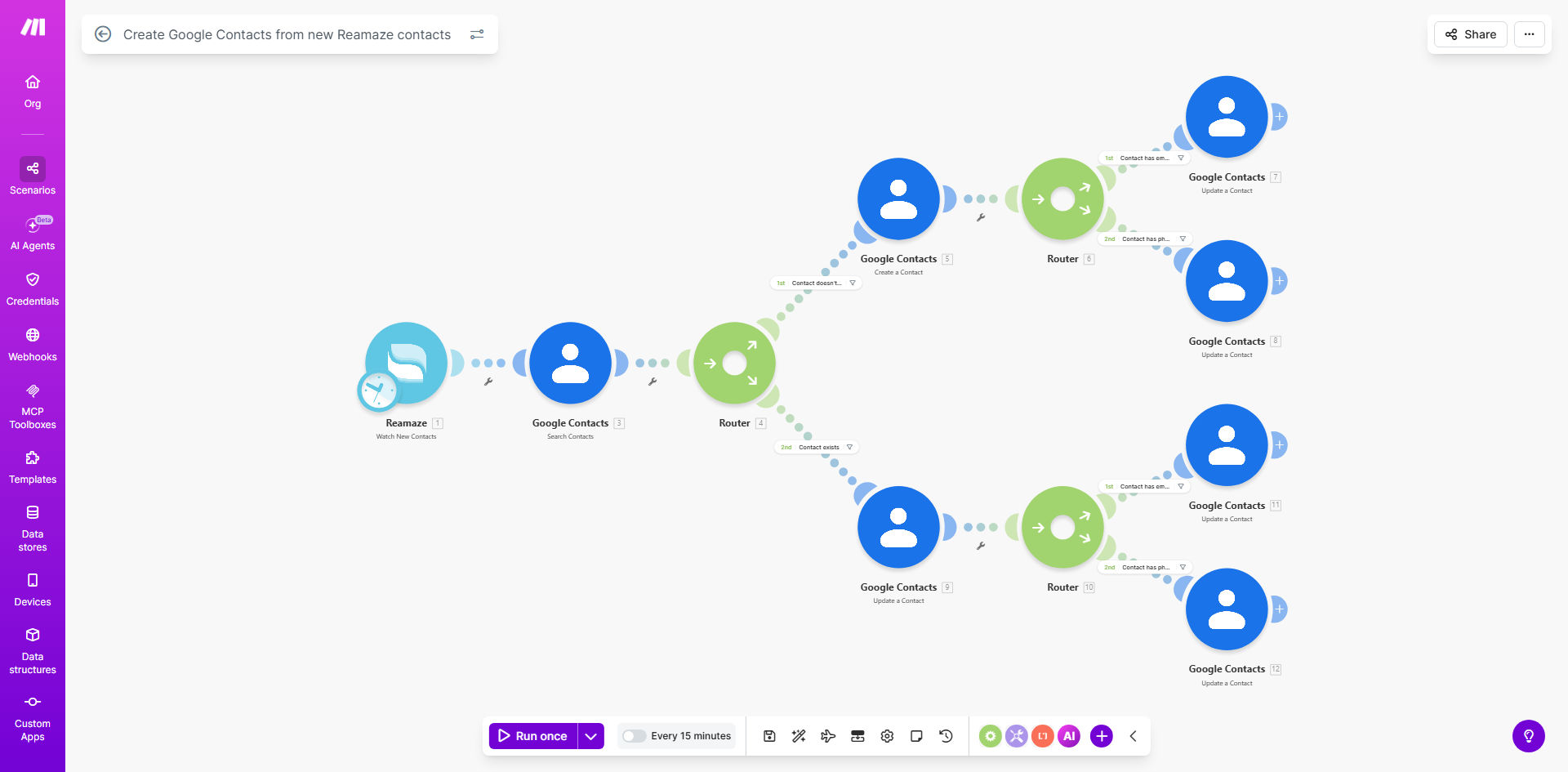
This automated workflow solves that by creating a seamless bridge between Reamaze and Google Contacts. Every time a new contact is created in your Reamaze helpdesk—whether from a new chat, email ticket, or social message—the automation instantly springs into action. It intelligently checks your Google Contacts for an existing entry to avoid duplicates, then either creates a fresh contact or updates an existing one with the latest details. The result is a unified, accurate, and automatically updated customer database.
How It Works
The workflow runs on Make.com, acting as the intelligent middleware between Reamaze and Google Contacts. It follows a logical sequence to ensure data integrity and efficiency.
Step 1: Trigger on New Reamaze Contact
The scenario is activated the moment a new contact record appears in your connected Reamaze account. Make.com watches for this event in real-time, capturing key data points like the contact's name, email address, and any associated company or notes.
Step 2: Search Google Contacts for a Match
Before creating anything, the automation performs a smart search within your Google Contacts. It uses the contact's name or email from Reamaze as the search key. This step is crucial for maintaining a clean CRM and preventing multiple entries for the same person.
Step 3: Decide: Update or Create
Based on the search result, a router module makes a decision. If a matching contact is found, the workflow proceeds to update that existing Google Contact with any new information from Reamaze. If no match is found, it takes the path to create a brand new contact in your Google address book.
Step 4: Execute the Sync
Finally, the appropriate Google Contacts module is called. It uses the official Google API to either patch an existing contact's details or insert a completely new one, populating fields like name, email, and organization as mapped from the Reamaze data.
Pro tip: Enhance this workflow by adding a step that logs every sync action (create/update) to a Google Sheet. This creates an audit trail, perfect for troubleshooting or reporting on new customer acquisition from support channels.
Who This Is For
This automation is a game-changer for customer-facing teams that rely on both a helpdesk and a centralized contact management system. It's ideal for support managers tired of manual data exports, sales teams who need immediate access to new leads from support queries, and small business owners wearing multiple hats who can't afford to let contact details slip through the cracks. Marketing teams also benefit from having a constantly refreshed list of engaged contacts for nurturing campaigns.
What You'll Need
To clone and use this template, you will need the following accounts and access:
- A Make.com account (free or paid plan).
- An active Reamaze account with admin or API access.
- A Google Workspace or standard Google account with Google Contacts.
- API credentials or OAuth 2.0 access for both Reamaze and Google Contacts, which you'll authorize within Make.com.
Quick Setup Guide
You can have this automation running in under 15 minutes by following these steps:
- Get the Template: Click the "Get This Workflow" button above to open the template in your Make.com account and create a copy.
- Connect Reamaze: In the first module, click to add a connection. Authorize Make.com to access your Reamaze account by logging in and granting the necessary permissions.
- Connect Google Contacts: Similarly, authorize the Google Contacts modules to access your Google account. You can control the level of access (e.g., read/write to contacts).
- Test the Flow: Turn on the scenario and create a test contact in Reamaze. Watch as Make.com processes the data and creates or updates the corresponding entry in Google Contacts.
- Activate & Monitor: Once testing is successful, ensure the scenario is set to "ON." The automation will now run continuously in the background. Check the scenario's history log periodically for any errors.
Key Benefits
Eliminate 2–3 hours of manual data entry per week. Your team no longer needs to switch between apps to copy contact information, freeing them up for higher-value tasks like customer engagement and problem-solving.
Achieve 100% data capture from support channels. Never lose a potential lead or customer detail that comes through a support ticket again. Every interaction automatically enriches your master contact list.
Maintain a pristine, duplicate-free CRM. The built-in search-and-update logic ensures your Google Contacts remain organized and accurate, improving the effectiveness of email campaigns and outreach.
Accelerate sales and marketing follow-up. With contacts syncing in real-time, your sales team can reach out to hot leads from support chats within minutes, dramatically increasing conversion opportunities.
Create a single source of truth for customer data. Break down silos between support and other departments, fostering better collaboration and a unified view of the customer journey across your entire organization.