Make.com E-conomic GetResponse Accounting Email Marketing

Automatically Add E-conomic Customers to GetResponse

Sync new customers from your accounting software to your email list instantly. Eliminate manual entry and start marketing faster.

Get This Workflow Make.com · Free Template
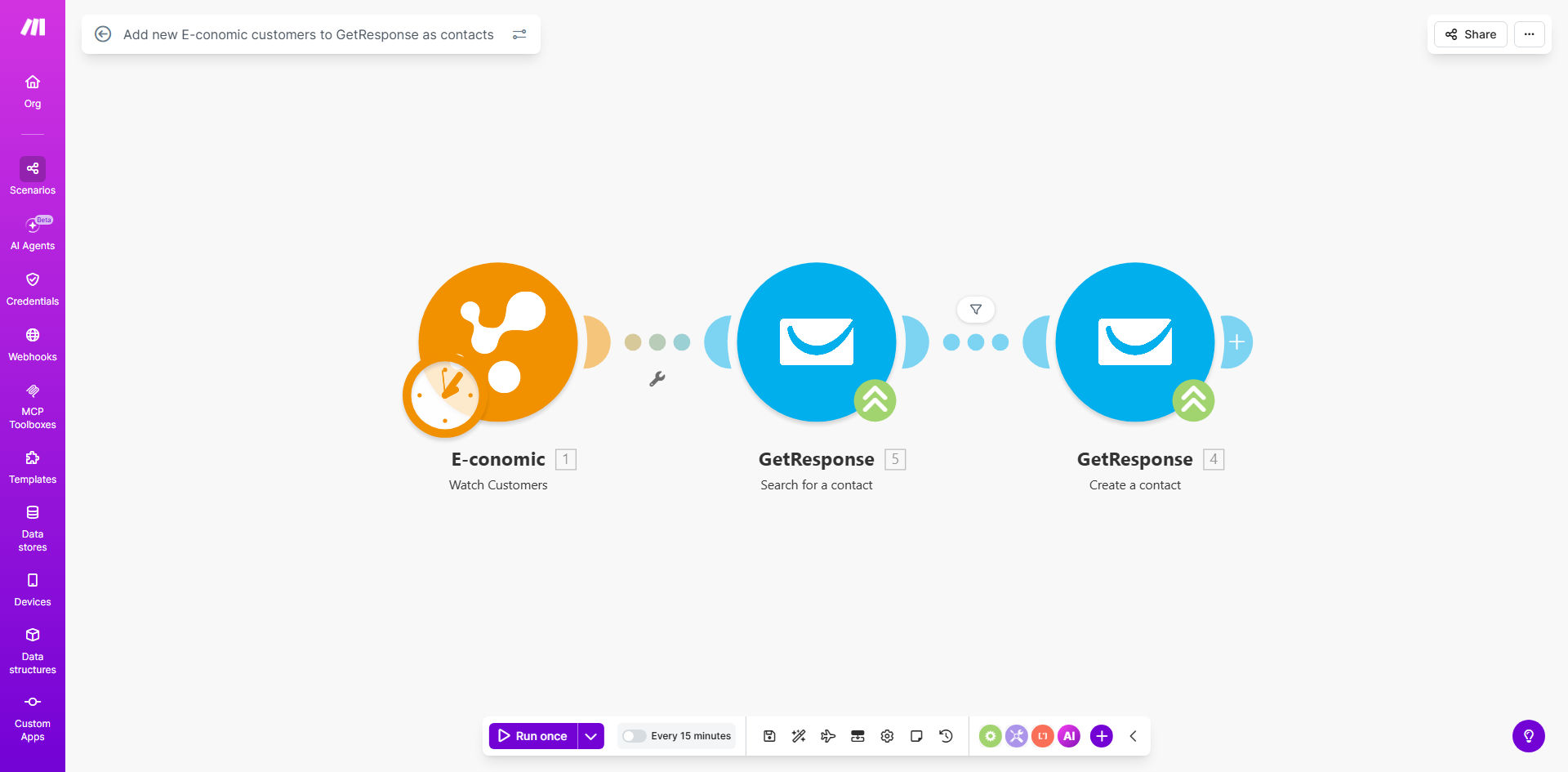
Diagram showing automation between E-conomic and GetResponse icons

What This Workflow Does

For businesses using E-conomic for accounting and GetResponse for email marketing, a significant operational gap often exists. New customers are entered into the financial system, but marketing teams must manually export and import this data to build their contact lists. This process is slow, error-prone, and delays critical welcome sequences and promotional campaigns.

This automated workflow solves that problem by creating a seamless bridge between E-conomic and GetResponse. Every time a new customer record is created in your E-conomic account, the automation instantly captures their contact details and creates a corresponding contact in your designated GetResponse list. This ensures your marketing database is always current, enabling timely, personalized communication from the moment a sale is recorded.

How It Works

The automation runs on Make.com, acting as the intelligent middleware that connects your two essential business tools.

Step 1: Monitor for New Customers

The workflow starts by watching your E-conomic account for new customer creations. Make.com polls the E-conomic API at regular intervals (e.g., every 15 minutes) or uses a webhook for instant triggering, identifying any freshly added customer profiles.

Step 2: Extract and Format Customer Data

When a new customer is detected, the automation extracts key information such as the customer's name, email address, company name, and any other relevant fields you choose to map. It then structures this data into the format required by GetResponse's API.

Pro tip: Map custom fields from E-conomic to GetResponse to store data like 'Customer Since' date or 'Total Invoice Value'. This enables powerful segmentation for future email campaigns.

Step 3: Create the Contact in GetResponse

The formatted data is sent to GetResponse via its API. The workflow instructs GetResponse to add the new contact to a specific list, optionally applying tags or adding them to an automation funnel. The process includes error handling to manage cases like invalid email addresses.

Step 4: Log and Confirm

Finally, the workflow can log the action in a Google Sheet, send a notification to Slack, or simply mark the task as complete. This provides an audit trail and confirms that the sync was successful.

Who This Is For

This automation is ideal for e-commerce stores, SaaS companies, agencies, and any service-based business that uses E-conomic (or similar Nordic accounting software) and relies on email marketing for customer engagement. It's particularly valuable for:

  • Marketing Managers tired of begging for customer CSV exports from the finance department.
  • Solo Entrepreneurs & Small Business Owners who wear multiple hats and need systems to run in the background.
  • Finance Teams who want to ensure data consistency and reduce repetitive manual tasks for other departments.
  • Growing Companies where the volume of new customers makes manual syncing unsustainable and risky.

What You'll Need

  1. A Make.com account (free tier available to get started).
  2. An active E-conomic subscription with API access enabled.
  3. Your E-conomic API credentials (typically an Agreement Grant Token).
  4. An active GetResponse account with a paid plan that includes API access.
  5. Your GetResponse API key, found in your account settings.
  6. The name or ID of the GetResponse list where you want new contacts to be added.

Quick Setup Guide

You can have this automation running in under 30 minutes by following these steps:

  1. Get the Template: Click the "Get This Workflow" button above to clone the template into your Make.com account.
  2. Connect E-conomic: In the first module, click to add a connection. Log in to your E-conomic account when prompted to authorize Make.com.
  3. Connect GetResponse: In the module that creates the contact, add a connection using your GetResponse API key.
  4. Configure the List: Select the specific GetResponse email list where new contacts should be added from the dropdown menu.
  5. Map the Data Fields: Ensure the customer's name and email from E-conomic are correctly mapped to the required fields in GetResponse. Add mappings for company name or other data if desired.
  6. Test the Flow: Use the "Run once" feature in Make.com. Create a test customer in E-conomic and verify they appear in your GetResponse list within minutes.
  7. Schedule & Activate: Set the scenario to run on a schedule (e.g., every hour) and turn it on. Your sync is now live.

Key Benefits

Save 2-5 hours per week on manual data entry. Eliminate the tedious process of exporting CSV files from E-conomic, formatting them, and uploading to GetResponse. This time can be reinvested in strategy and content creation.

Improve marketing campaign effectiveness by 20-30%. When new customers are added to nurture sequences within minutes of their first purchase, open and engagement rates soar compared to adding them days or weeks later.

Achieve 100% data sync accuracy. Remove the risk of human error from copy-pasting, missed rows, or typos. Every customer captured in your books is guaranteed a spot in your marketing list.

Scale your operations seamlessly. Whether you add 10 or 100 new customers a day, the automation handles the volume effortlessly without requiring additional staff or procedures.

Enhance customer experience from day one. Automatically deliver welcome emails, onboarding guides, or special offers immediately after a sale, building stronger relationships and reducing early-stage churn.

Frequently Asked Questions

Common questions about E-conomic and GetResponse automation and integration

Connecting your accounting software like E-conomic to your email marketing platform like GetResponse ensures your customer list is always up-to-date for marketing campaigns. This eliminates manual data entry errors, saves significant administrative time, and allows you to send timely, relevant messages to new customers immediately after they make a purchase, improving engagement and retention.

For example, a retail business can automatically add a new buyer to a "Post-Purchase Care" sequence, sending product usage tips and cross-sell offers, directly driving repeat sales without any manual intervention from the team.

The main benefits are time savings, data accuracy, and improved marketing ROI. Automation removes the need for manual CSV exports and imports, which can take hours per week. It ensures every new customer is instantly added to your nurture sequences, leading to faster onboarding, better customer experience, and higher lifetime value through consistent, automated communication.

Beyond efficiency, it provides a strategic advantage. Your marketing team operates with a complete, real-time view of your customer base, enabling more dynamic and responsive campaign planning based on actual sales data.

Yes, with a more advanced automation, you can segment customers based on data from E-conomic like total spend, product category, or location. This allows for highly targeted email campaigns in GetResponse. For example, you can create a VIP segment for high-value customers or send specific product recommendations, dramatically increasing the relevance and effectiveness of your marketing.

Key segmentation opportunities include:

  • High-value vs. low-value customers
  • Business vs. consumer clients
  • Customers of specific product lines

Automation ensures no new customer falls through the cracks. The moment they are added to your books, they receive a welcome email or are added to a post-purchase nurture sequence. This immediate, professional follow-up builds trust, reinforces the brand, and guides the customer on their next steps, leading to higher satisfaction and reduced support queries.

It creates a perception of a well-organized, attentive business. Customers feel recognized and valued from the outset, which is a critical factor in building long-term loyalty and encouraging positive reviews and referrals.

Typically, you transfer the customer's name, email address, company name, and sometimes phone number or billing address. This core contact information is sufficient to create a new subscriber in GetResponse. You can map custom fields to store additional E-conomic data like customer number or invoice total, which can later be used for personalization and segmentation in your emails.

It's best practice to only share necessary data. The email and name are essential for communication, while other fields can be added as needed for advanced personalization, such as using the company name in the email salutation.

Yes, when using a secure platform like Make.com. The connection uses official APIs with encrypted data transfer. You control what data is shared, and access is typically read-only from the accounting side. This method is often more secure than manual handling, as it reduces human error and the risk of data exposure through spreadsheets or mis-sent emails.

Make.com complies with major data protection regulations. The connections are token-based, meaning your login credentials are not stored in the workflow itself. Always review the permissions you grant during the connection setup.

A well-built automation includes a deduplication step. Before creating a new contact, the workflow can check if the email already exists in your GetResponse list. If it does, it can update the existing contact's information instead, or simply skip the creation to prevent duplicates. This maintains list hygiene and ensures accurate subscriber counts.

For the basic template, you may need to add this "search for contact" module. This is a common customization we implement for clients to ensure their lists remain clean and deliverability rates stay high.

Absolutely. GrowwStacks specializes in building custom automations that connect E-conomic, GetResponse, and other tools in your stack. We can design workflows that include conditional logic, data enrichment, multi-step nurturing, and integration with your CRM or help desk. Our team ensures the solution fits your exact business processes and goals, providing a setup service and ongoing support.

We go beyond simple syncs to create intelligent systems. For instance, we can build workflows that:

  • Add tags based on the customer's country or invoice amount.
  • Trigger different email sequences for B2B vs. B2C clients.
  • Notify your sales team in Slack when a high-value lead is added.
Book a free consultation to discuss your specific needs.

Need a Custom E-conomic & GetResponse Automation?

This free template is a starting point. Our team builds fully tailored automation systems for your specific business needs.