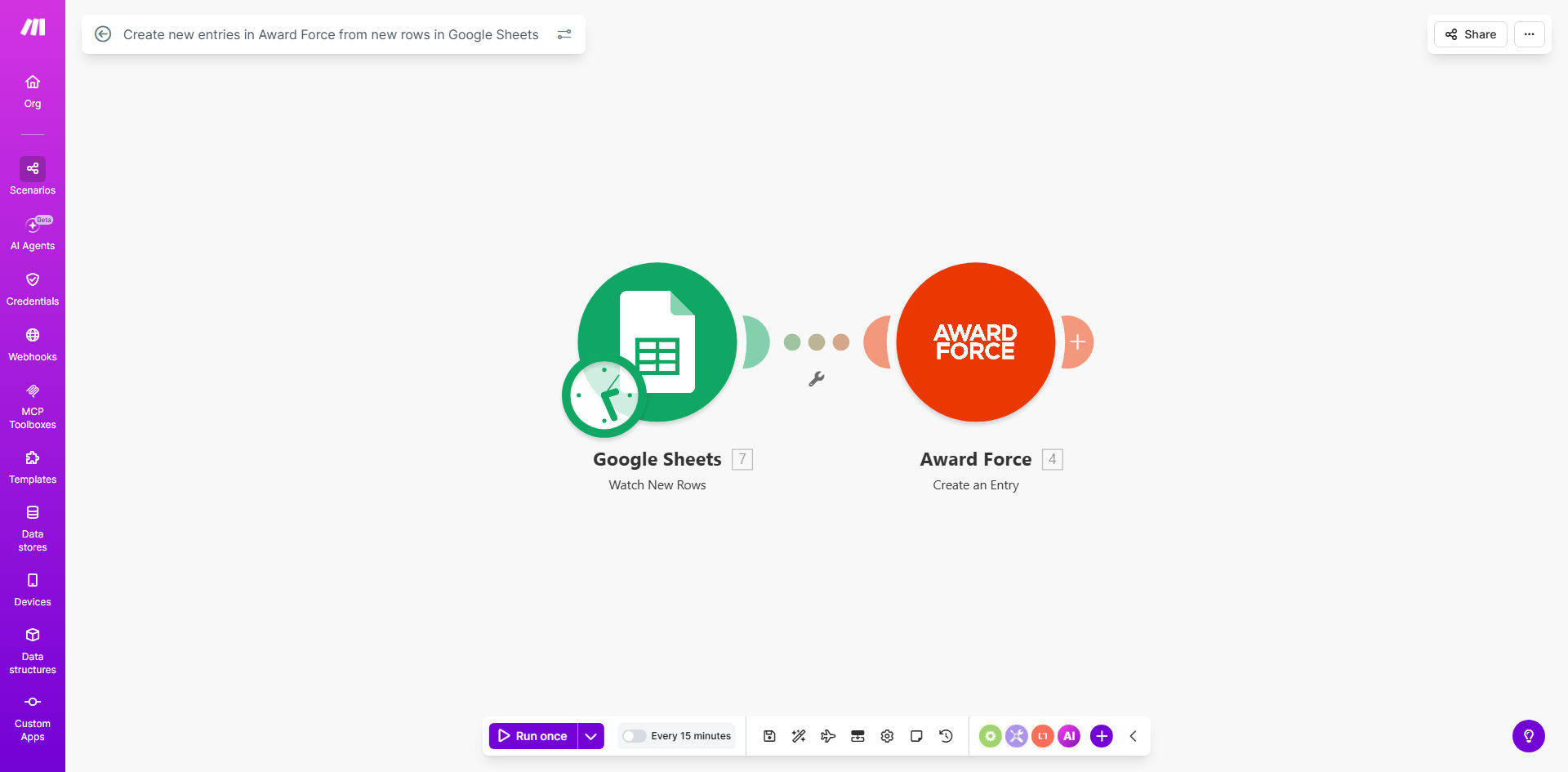
What This Workflow Does
Managing award submissions, grant applications, or scholarship entries often involves a disjointed process. Data is collected via forms, emails, or internal spreadsheets (like Google Sheets), and then an administrator must manually copy each entry into the judging platform (Award Force). This manual transfer is time-consuming, prone to errors, and delays the evaluation process.
This automation workflow solves that problem by creating a direct, real-time bridge between Google Sheets and Award Force. Whenever a new application row is added to your designated Google Sheet—whether from a form submission, an imported list, or manual entry—the workflow automatically detects it, extracts the relevant data, and creates a corresponding new entry in Award Force. It turns your spreadsheet into a live submission portal.
The template runs on a schedule (default every 15 minutes), ensuring submissions are processed promptly without requiring any human intervention. This not only saves hours of administrative work each week but also guarantees that all data is transferred accurately and consistently, improving the integrity of your entire award program.
How It Works
Step 1: Schedule Trigger Checks Google Sheets
A scheduled trigger module acts as the workflow's heartbeat. At regular intervals (configurable from minutes to hours), it activates and instructs the next module to check your specified Google Sheet for changes.
Step 2: Google Sheets Module Retrieves New Rows
The Google Sheets module connects to your spreadsheet and scans for new rows added since the last check. It reads the data from each column—such as applicant name, email, project title, category, and scores—and prepares it for transfer.
Pro tip: Structure your Google Sheet with clear column headers that match the field names in Award Force. This makes mapping data seamless and reduces configuration errors.
Step 3: Data Mapping and Transformation
The workflow maps each column from the Sheets row to the corresponding field in Award Force. You can configure transformations if needed, such as formatting dates, concatenating text, or assigning default values for optional fields.
Step 4: Award Force Module Creates the Entry
The core action module uses the Award Force API to create a new entry (submission) within your designated program or award. It passes all the mapped data, instantly populating the entry in Award Force exactly as it appears in your sheet.
Step 5: Error Handling and Logging
The workflow includes error-handling routes. If a row fails to process (due to missing data, API issues, or duplicates), it can log the error to another sheet or send a notification, ensuring you can address issues without losing submissions.
Who This Is For
This automation is designed for any organization or team that uses Award Force to manage submissions and collects data externally in Google Sheets.
Award & Grant Program Managers: Streamline the intake of hundreds of applications for competitions, grants, or industry awards. Eliminate the manual backlog that occurs before deadline dates.
Educational Institutions & Scholarship Committees: Automatically transfer student application data from collection forms (linked to Sheets) into Award Force for review and scoring, ensuring timely processing.
Non-Profit Organizations: Handle community grant or funding applications efficiently, especially when working with volunteer administrators who have limited time for manual data entry.
Corporate Innovation or R&D Teams: Manage internal award programs for employee projects, where nominations are gathered via internal surveys or sheets and need to be formalized in a judging platform.
What You'll Need
- A Make.com account (free or paid) to host and run the automation scenario.
- A Google Sheets spreadsheet where new submission data is added. You must have access to the sheet and its sharing settings.
- An Award Force account with an active program or award setup where you want entries created.
- API credentials or connection details for both Google Sheets (via Google account) and Award Force (API key or OAuth).
- A clear understanding of the data structure—which columns in your sheet correspond to which fields in Award Force.
Quick Setup Guide
Follow these steps to deploy this template for your own award management process.
- Clone the Template: Click "Get This Workflow" to open the template on Make.com. Create a copy in your own Make.com workspace.
- Connect Your Google Sheet: In the Google Sheets module, replace the example spreadsheet URL with your own. Authenticate with your Google account and specify the sheet name and range to watch (e.g., "Sheet1!A:F").
- Connect Your Award Force Account: In the Award Force module, add your Award Force API credentials or authenticate via OAuth. Specify the exact Award Force program ID where entries should be created.
- Map Your Data Fields: Carefully map each column from your Google Sheet (Applicant Name, Email, Project Title, etc.) to the corresponding field ID in Award Force. Test with one sample row to confirm the mapping works.
- Set the Schedule: Adjust the schedule trigger interval to match your needs—every 15 minutes for real-time processing, or hourly/daily for batch processing.
- Test and Activate: Add a test row to your Google Sheet, run the scenario once manually, and verify the entry appears correctly in Award Force. Then turn the scenario on to run automatically.
Key Benefits
Eliminate Manual Data Entry: Save 5–10 hours per week for administrators who previously copied data from sheets to Award Force. This time can be redirected to program management, judge coordination, or applicant support.
Ensure Timely Submission Processing: Applications are created in Award Force within minutes of being added to the sheet, not days. This accelerates the entire judging timeline and improves applicant satisfaction.
Maintain Data Accuracy and Consistency: Automated transfer prevents transcription errors, missed fields, or formatting mistakes that occur with manual entry. Every submission is created exactly as provided.
Scale Your Submission Volume Effortlessly: Handle hundreds or thousands of applications during peak periods without adding staff. The automation processes each row identically, regardless of volume.
Create a Transparent Submission Pipeline: You gain a clear, automated workflow from data collection (Sheets) to judging platform (Award Force), making the process auditable and reliable for stakeholders.