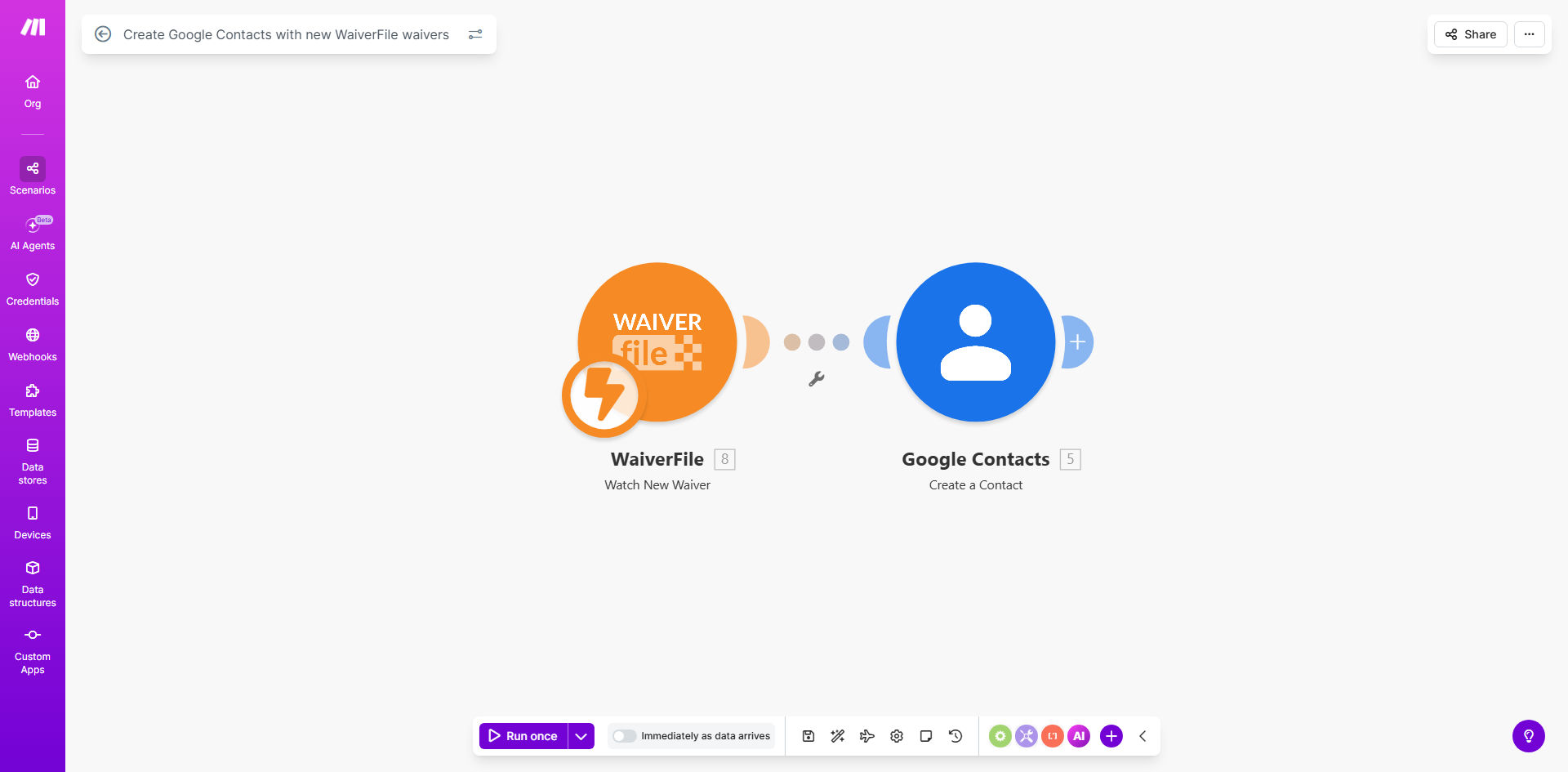
What This Workflow Does
For businesses that rely on waivers—like gyms, event companies, clinics, or tour operators—managing the influx of new client information is a constant administrative headache. Every time a waiver is signed, you gain a new participant or customer, but manually copying their name, email, and phone number from WaiverFile into Google Contacts (or any address book) eats up valuable time and introduces errors.
This automation workflow solves that problem completely. It acts as a silent, efficient bridge between WaiverFile and Google Contacts. Whenever a new waiver is completed and signed via WaiverFile, this system instantly captures the event, extracts the signer's contact details, and creates a corresponding, fully formatted contact in your Google Contacts list. The process is fully automatic, running 24/7, ensuring no signer is ever missed and your contact database grows organically with your business.
The result is a perfectly synchronized contact management system. Your marketing team can immediately segment new signers for welcome emails. Your admin staff no longer wastes hours on data entry. And your sales team has a clean, updated list of leads and clients to follow up with. It transforms a routine administrative task into a seamless, value-adding business process.
How It Works
The workflow is built on Make.com, a powerful automation platform. It follows a simple, reliable sequence to transfer data from one system to another without any human intervention.
Step 1: Trigger on New Waiver
The automation starts by monitoring your WaiverFile account. It watches for the specific event of a "new waiver signed." This is the trigger—the moment the workflow begins its work. Make.com connects to WaiverFile via its API, waiting patiently for this signal.
Step 2: Extract Contact Details
Once triggered, the workflow retrieves the complete waiver data. It focuses on the key contact fields you need: the signer's full name, email address, phone number, and any other custom information you've configured (like membership type or event date). This data is parsed and prepared for the next step.
Pro tip: You can configure the workflow to only extract specific fields, ignoring sensitive waiver content. This keeps your Google Contacts clean and focused on communication details.
Step 3: Format & Create Google Contact
The extracted data is then mapped to the correct fields in Google Contacts. The name is formatted, the email is validated, and the phone number is standardized. Make.com then uses its Google Contacts module to create a new contact in your specified Google account or contact group. The contact is saved with labels or notes if configured, making it easy to identify later.
Step 4: Error Handling & Logging
The workflow includes logic to handle exceptions. If a contact already exists (duplicate email), it can update the record instead of creating a duplicate. If data is missing, it can skip or send an alert. All actions are logged, so you have a clear audit trail of every automated contact creation.
Who This Is For
This automation is a game-changer for any business or organization that collects digital waivers as part of its operations.
Fitness & Wellness Studios: Gyms, yoga studios, and personal trainers who require liability waivers from new members. Automatically add every new member to your client list for class reminders and promotions.
Event & Adventure Companies: Tour operators, rafting companies, festival organizers, and escape rooms. Participants sign waivers before activities; instantly turn them into contacts for post-event feedback and future marketing.
Educational & Clinical Institutions: Schools, workshops, clinics, and therapists that use waivers for consent. Streamline student or patient onboarding by adding them directly to your communication directory.
Administrators & Office Managers: Any professional tired of manually transferring data from forms to contact lists. This workflow eliminates a repetitive, low-value task, freeing up time for more important work.
What You'll Need
To set up and run this automation, you'll need a few key tools and access points ready.
- A WaiverFile Account: You must be using WaiverFile to collect and manage digital waivers. The automation connects to your account via API.
- A Google Account with Contacts: A Google account (like Gmail or Google Workspace) where you want the new contacts to be created. You'll need API access enabled.
- A Make.com Account: The free or paid Make.com platform where the workflow template will be deployed. This is the "brain" that connects the two apps.
- Basic API Credentials: You'll need to provide connection keys (API tokens or OAuth) for both WaiverFile and Google Contacts within Make.com. The setup guide walks you through this.
- Clear Data Mapping Plan: Decide which waiver fields (name, email, phone, custom answers) should map to which Google Contact fields.
Quick Setup Guide
Getting the workflow live is straightforward. Follow these steps to configure the template for your specific use.
- Clone the Template: Use the "Get This Workflow" button to open the template on Make.com. Click "Copy" to create your own version (scenario) in your Make.com account.
- Connect Your Apps: In your new scenario, establish the connections (modules) to WaiverFile and Google Contacts. Enter your API credentials or log in via OAuth for each service.
- Configure the Trigger: Set the WaiverFile module to watch for "New Waiver Signed" events. You may specify a particular waiver template if needed.
- Map the Data Fields: In the Google Contacts "Create a Contact" module, map the incoming data from WaiverFile. Drag the waiver fields (like `signerEmail`) to the corresponding Google Contact fields (like `Email Address`).
- Set Labels & Filters: Optionally, add a label (e.g., "Waiver Signer 2025") to newly created contacts. You can also add filters to skip incomplete data.
- Test & Activate: Run a test with a recent waiver from your account. Check that a contact appears correctly in Google Contacts. Once verified, activate the scenario to run automatically.
Key Benefits
Save 2–5 hours per week on manual data entry. No more copying and pasting information from waivers to your contact list. The automation does it instantly, freeing your team for higher-value tasks.
Ensure 100% data capture and zero missed signers. Every waiver signer becomes a contact automatically. You never lose a potential client due to administrative backlog or oversight.
Improve data accuracy and eliminate transcription errors. Automated transfer means exact spelling, correct email addresses, and proper formatting. Your contact list is cleaner and more reliable.
Enable immediate follow-up and marketing opportunities. New contacts are available in Google Contacts within seconds, allowing you to send welcome emails, offers, or reminders right away, increasing engagement.
Scale effortlessly with your business growth. Whether you get 10 waivers a day or 100, the system handles them all without additional effort or cost, supporting your business as it grows.