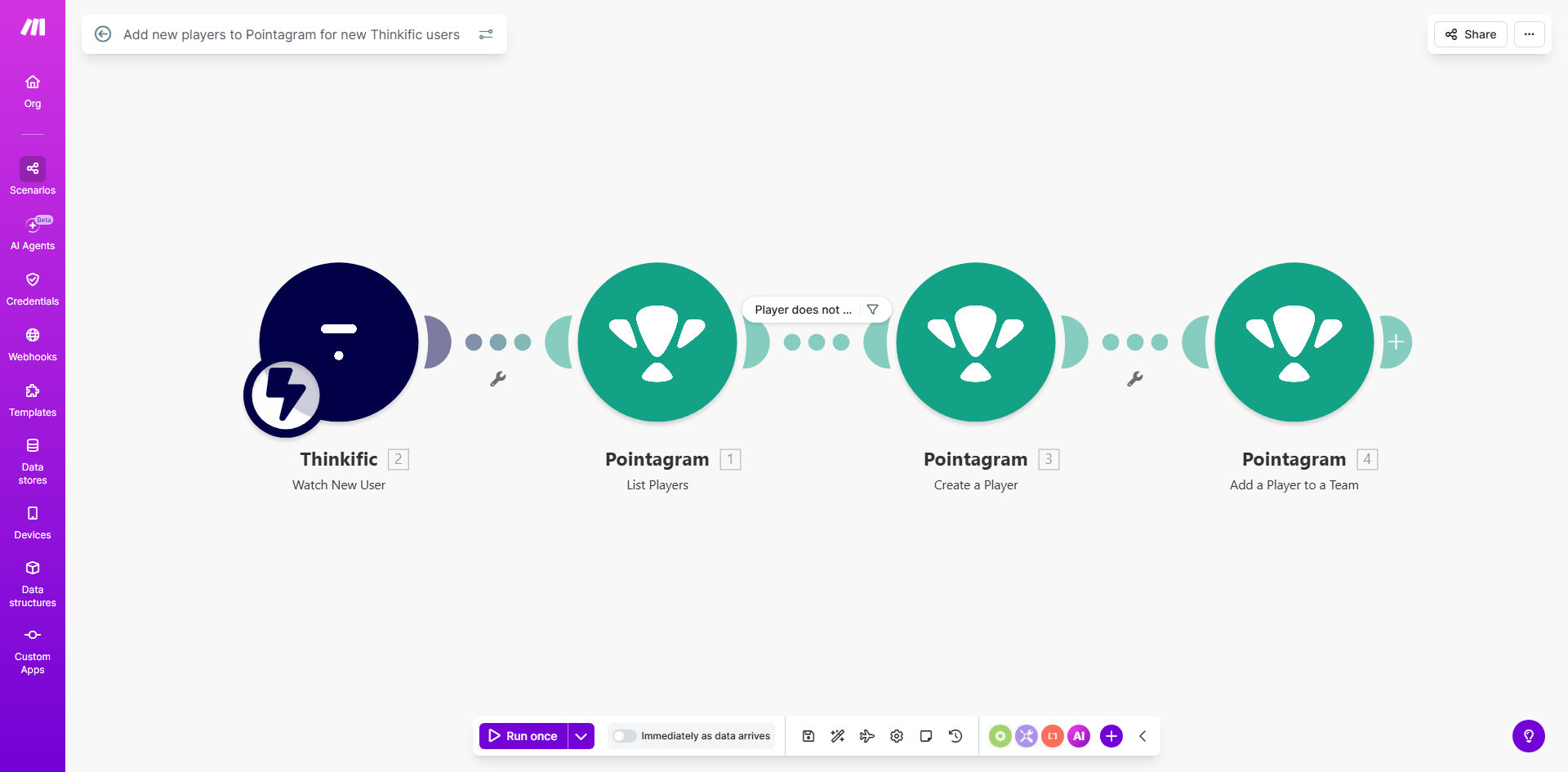
What This Workflow Does
For online course creators using Thinkific, student engagement doesn't stop at enrollment. Gamification platforms like Pointagram are powerful tools to boost completion rates and foster community through points, badges, and leaderboards. However, manually adding every new student from Thinkific into Pointagram is a tedious, error-prone task that wastes valuable time you could spend creating content.
This automation solves that problem entirely. Every time a new user signs up or enrolls in a course on your Thinkific site, this Make.com workflow springs into action. It automatically checks if that student already exists in your Pointagram community. If they're not found, it instantly creates a new player profile for them. This ensures your gamified learning environment is always current, and every student can start their engaging journey immediately, without any delay or administrative overhead.
How It Works
The workflow is a smart, efficient sequence that acts as a bridge between your learning management system and your engagement platform.
Step 1: Trigger on New Thinkific User
The automation is initiated by the "Watch Users" module in Make.com, which monitors your Thinkific account for new student sign-ups. The moment a new user profile is created, the workflow captures key details like their name, email address, and user ID.
Step 2: Search for Existing Pointagram Player
Before creating a duplicate, the workflow takes the student's email and searches your Pointagram account. This check is crucial for maintaining data integrity, especially if a student uses the same email for multiple courses or if you run manual imports occasionally.
Step 3: Create Player if Not Found
If the search comes up empty, the workflow proceeds to the "Create a Player" module in Pointagram. It passes the student's information from Thinkific to create a new, fully-fledged player profile. If the student already exists, the workflow simply ends, preventing any duplicate entries.
Pro tip: You can enhance this workflow by adding a step to assign the new player to a specific "group" or "cohort" in Pointagram based on the Thinkific course they enrolled in, enabling targeted challenges and quests from day one.
Who This Is For
This automation is a game-changer for online educators, coaches, and training businesses that leverage both Thinkific for course delivery and Pointagram for gamification. It's perfect for solo creators who are scaling their student base and can't afford manual admin, as well as for larger education teams looking to streamline operations. If you believe in using gamification to increase student motivation, completion rates, and community spirit, but dread the manual syncing process, this workflow is built for you.
What You'll Need
- A Thinkific account with active courses and student sign-ups.
- A Pointagram account where you manage your gamified community and players.
- A Make.com account (free tier available) to host and run the automation.
- API connections for both Thinkific and Pointagram, which you'll configure within Make.com using your admin credentials.
Quick Setup Guide
Getting this automation live takes less than 30 minutes. Follow these steps:
- Get the Template: Click the "Get This Workflow" button above to clone the template into your Make.com account.
- Connect Thinkific: In the first module, click to add your Thinkific connection. You'll need your Thinkific domain and an API key from your Thinkific admin settings.
- Connect Pointagram: In the search and create modules, add your Pointagram connection using your Pointagram API key (found in your account settings).
- Test the Flow: Use the "Run once" feature in Make.com to test with a recent student. Check your Pointagram account to confirm the player was created successfully.
- Activate & Forget: Turn the scenario "ON" in Make.com. It will now run automatically in the background, keeping your platforms in perfect sync.
Key Benefits
Eliminate Manual Data Entry: Save 2-5 hours per month (or more, depending on enrollment volume) that you would have spent copying and pasting student emails between platforms. This time can be reinvested into course creation or student support.
Ensure 100% Student Onboarding: No student ever slips through the cracks. Every new enrollee is instantly welcomed into your gamified community, maximizing their potential for engagement from the very first moment.
Improve Data Accuracy: Remove the risk of human error from manual entry. Automated syncing guarantees that names and emails are transferred correctly, maintaining the professionalism of your community.
Enhance Student Experience: Immediate access to points and badges creates a powerful first impression. Students feel recognized and part of the community instantly, which increases perceived value and boosts retention.
Scalable Foundation: This workflow handles 10 students or 10,000 students with the same reliability. It's a set-and-forget system that supports your business growth without requiring additional administrative resources.