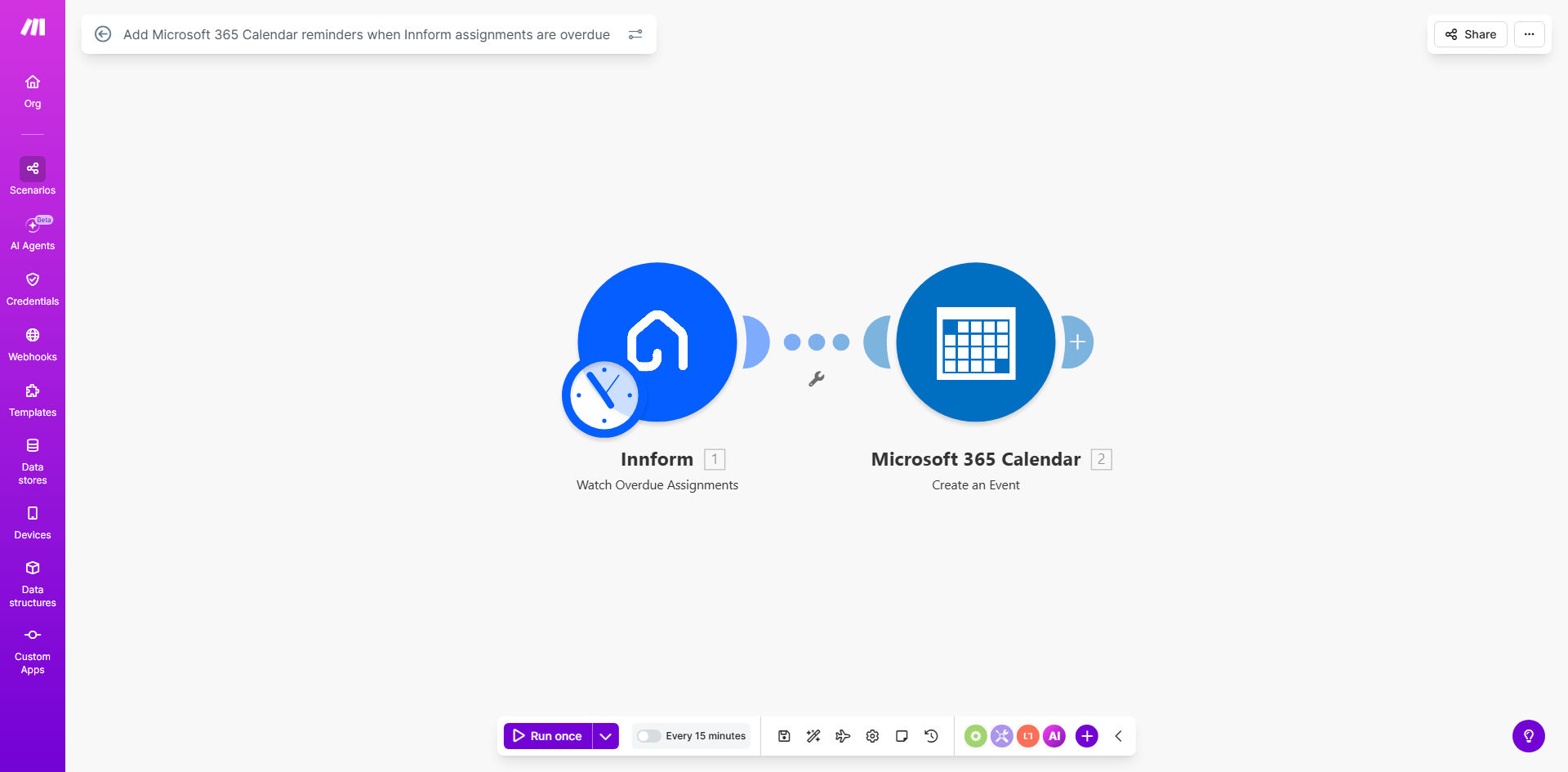
What This Workflow Does
For HR teams, L&D managers, and team leaders, tracking overdue training assignments is a constant, manual chore. You might rely on Innform's dashboard reports or hope that notification emails don't get lost in inboxes. This reactive approach leads to compliance risks, skill gaps, and last-minute scrambles to complete mandatory training.
This automation solves that by creating a proactive, fail-safe system. Every time an assignment is marked as overdue in your Innform Learning Management System (LMS), this Make.com workflow instantly creates a corresponding event in your Microsoft 365 Calendar. This transforms an invisible administrative task into a visible, time-blocked reminder that demands attention alongside your other daily priorities.
The business value is clear: it enforces accountability and closes the loop on training compliance. Instead of logging into multiple systems to chase progress, managers see overdue items directly in the tool they use to plan their day. This seamless integration ensures critical learning deadlines are never forgotten, protecting the organization and empowering employees to stay on track.
How It Works
The workflow operates on a simple but powerful trigger-action principle, connecting two critical business tools without any manual intervention.
Step 1: Monitoring Innform for Overdue Assignments
The scenario begins by periodically checking your Innform account via the Make.com Innform module. It searches for any new assignments that have passed their due date and are now flagged as "overdue." This trigger can be scheduled to run hourly, daily, or at any interval that matches your follow-up urgency.
Step 2: Formatting the Reminder Data
For each overdue assignment found, Make.com gathers key details: the course name, the assigned user's name, the original due date, and a direct link to the assignment. This data is then structured into a clear and actionable format, ready to be sent to your calendar.
Pro tip: Customize the calendar event title to include the employee's name and the word "OVERDUE" for immediate visual priority when scanning your weekly schedule.
Step 3: Creating the Microsoft 365 Calendar Event
Finally, the workflow uses the Microsoft 365 Calendar module in Make.com to create a new calendar event. The event is typically set for the current day or the next business day, with a duration that signifies a "follow-up block." The description can include all the relevant details and links, making it a one-click portal to resolve the issue.
Who This Is For
This template is ideal for any organization using Innform for employee training and development. It provides disproportionate value to:
- Human Resources & Compliance Officers: Who need to ensure 100% completion of mandatory training (e.g., safety, ethics, harassment prevention) to meet audit and legal requirements.
- Learning & Development Managers: Responsible for the ROI of training programs and need to drive completion rates to justify investment and measure effectiveness.
- Department Heads & Team Managers: Who oversee their direct reports' professional development and need a simple system to nudge their team without micromanaging.
- Fast-growing Companies: Where manual processes break down as employee numbers increase, creating a scalable solution for tracking onboarding and ongoing training.
What You'll Need
To implement this automation, you will need the following accounts and permissions:
- A Make.com account (free or paid plan).
- An active Innform subscription with administrator or API access to read assignment data.
- A Microsoft 365 account (business or personal) with Calendar access, and permission to create events.
- The ability to create secure OAuth connections between Make.com and both Innform and Microsoft 365. This is a standard, click-through process within Make.
Quick Setup Guide
You can have this automation running in under 15 minutes by following these steps:
- Clone the Template: Click the "Get This Workflow" button above to open the template in your Make.com account and create a copy.
- Connect Innform: In the first module, click to add your Innform connection. Authorize Make.com to access your Innform data (typically read-only for assignments).
- Connect Microsoft 365: In the Calendar module, add and authorize your Microsoft 365 account, granting permissions to create calendar events.
- Test the Trigger: Run the scenario once manually to check if it can find an overdue assignment in your Innform account. Use a test assignment if necessary.
- Customize the Event: Adjust the calendar event title, description, and timing to fit your preferred follow-up style. You can set the event for 15 minutes later today or block 30 minutes tomorrow.
- Schedule & Activate: Set the scenario to run on a schedule (e.g., every 6 hours) and turn it on. It will now run automatically, creating reminders as needed.
Key Benefits
Eliminate Manual Tracking & Save 5+ Hours Monthly: Managers and HR staff no longer waste time cross-referencing reports and sending individual reminder emails. The automation handles the detection and alerting process, reclaiming valuable time for strategic work.
Improve Training Completion Rates by up to 40%: By placing reminders directly in the primary tool people use to manage their time—their calendar—overdue items get addressed faster. The visual cue and time block significantly increase follow-through compared to passive email notifications.
Create an Audit Trail for Compliance: The calendar events themselves serve as a record of management follow-up. This demonstrates proactive oversight to auditors and leadership, showing a systematic approach to ensuring mandatory training is completed.
Scale Your L&D Program Effortlessly: As your company grows, the manual burden of tracking training does not. This automation scales with you, handling 10 or 1,000 overdue assignments with the same reliability, ensuring your training culture remains strong.
Centralize Your Workflow: Reduce context-switching and app fatigue by bringing a critical task from a specialized LMS (Innform) into a universal productivity tool (Microsoft 365 Calendar). This simplifies the managerial workflow and increases adoption of both systems.