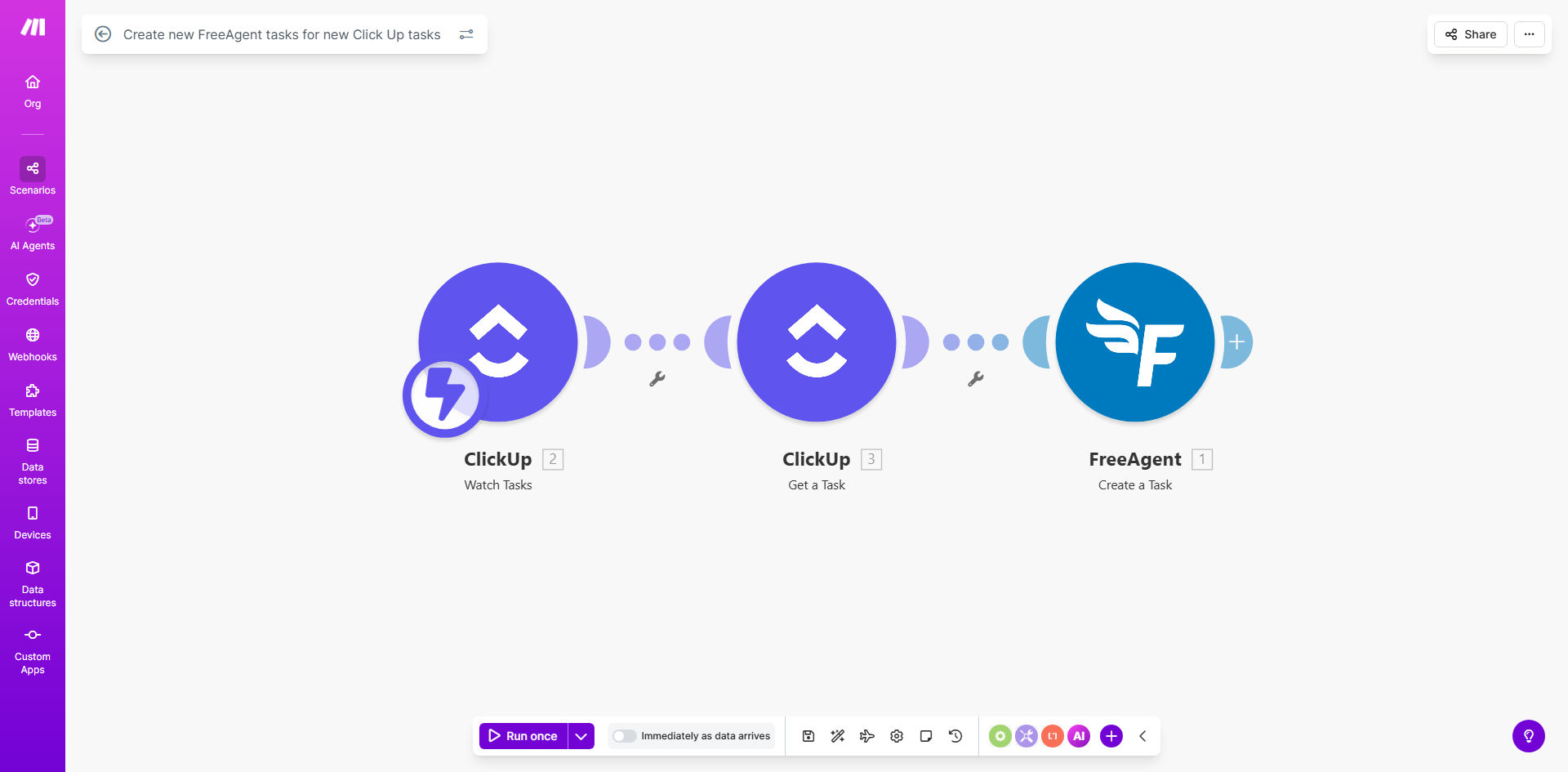
What This Workflow Does
For service businesses, agencies, and freelancers, a critical gap often exists between where work is planned (ClickUp) and where it's accounted for (FreeAgent). Manually recreating tasks in your accounting software is a tedious, error-prone process that leads to missed billable hours, inaccurate project costing, and delayed invoicing. This disconnect directly impacts your revenue and profitability.
This automated workflow solves that problem by creating a live bridge between ClickUp and FreeAgent. Every time a new task is created in a specified ClickUp space, list, or folder, Make.com instantly captures it and creates a corresponding task within the correct project in FreeAgent. This ensures that from the moment work begins, it is financially tracked, making time logging, billing, and project analysis seamless and accurate.
Pro tip: Use this automation for all client projects. It transforms your workflow from reactive billing to proactive financial management, giving you real-time visibility into which projects are profitable.
How It Works
The automation runs on a simple but powerful trigger-action principle, requiring zero manual intervention once set up.
Step 1: Monitoring ClickUp for New Tasks
The Make.com scenario watches your chosen ClickUp location (e.g., a "Client Work" folder or a specific project list) for new tasks. It uses ClickUp's instant webhooks or scheduled checks to detect new entries the moment they are added by your team.
Step 2: Extracting Key Task Details
When a new task is found, the workflow pulls essential information like the task name, description, assignee, due date, and any custom fields. This data is formatted and prepared for FreeAgent, ensuring no critical details are lost in the transfer.
Step 3: Creating the Task in FreeAgent
Make.com then authenticates with your FreeAgent account and creates a new task. It can intelligently place this task under the correct FreeAgent project and contact, link it to a specific category, and set the billing status, creating a perfect mirror of the project task in your accounting system.
Who This Is For
This automation is a game-changer for any business that bills for time and manages projects separately from finances.
Digital Agencies & Marketing Firms: Keep client campaign tasks in ClickUp automatically linked to the correct client project in FreeAgent for precise time tracking and invoicing.
Freelancers & Consultants: Ensure every client request or deliverable logged in ClickUp is immediately ready for time recording in FreeAgent, eliminating forgotten billable items.
IT & Software Development Teams: Sync development tasks or support tickets to internal projects for accurate cost allocation and departmental budgeting.
Small Business Owners: Bridge the gap between your operational to-do list and your financial books, gaining a clear picture of how daily tasks translate into costs and revenue.
What You'll Need
- A Make.com account (free tier available to get started).
- An active ClickUp account with tasks you wish to sync.
- A FreeAgent account with existing projects and contacts set up.
- API keys or OAuth access for both ClickUp and FreeAgent (Make.com guides you through this simple connection process).
- Decide which ClickUp list/folder will trigger the automation and which FreeAgent project the tasks should belong to.
Quick Setup Guide
You can have this automation running in under 15 minutes by following these steps.
- Get the Template: Click the "Get This Workflow" button above to clone the template into your Make.com account.
- Connect Your Apps: In the Make.com scenario editor, click the ClickUp module and authorize it to access your workspace. Repeat the process for the FreeAgent module.
- Configure the Trigger: Select the specific ClickUp Space, Folder, or List that contains the tasks you want to sync. You can choose to watch for all new tasks or filter by specific criteria.
- Map the Data: In the FreeAgent "Create a Task" module, map the fields from ClickUp. At a minimum, map the task name and description. For advanced use, map the assignee to a FreeAgent contact and select the corresponding FreeAgent project.
- Test & Activate: Turn on the scenario and create a test task in your chosen ClickUp list. Within seconds, check the corresponding FreeAgent project to confirm the new task appeared. Once verified, your automation is live.
Pro tip: Start by automating a single, non-critical client project. This allows you to test the data flow and ensure mappings are correct before rolling it out across your entire operation.
Key Benefits
Save 5–10 hours per month on administrative data entry. Eliminate the repetitive task of copying information between platforms, freeing up your team to focus on high-value work.
Eliminate revenue leakage from forgotten or lost billable tasks. When every project task is instantly logged in your accounting software, you capture 100% of your billable time, directly improving your bottom line.
Improve project profitability accuracy by 100%. With costs (time) automatically attached to the correct project from day one, you get a real-time, accurate view of which clients and projects are most profitable.
Accelerate invoicing cycles by days. Since tasks and time are pre-logged in FreeAgent, creating detailed, accurate invoices becomes a quick process at the end of the billing period, improving cash flow.
Create a single source of truth. Reduce confusion and errors by ensuring your project management and financial systems are always synchronized, providing clarity for your entire team.