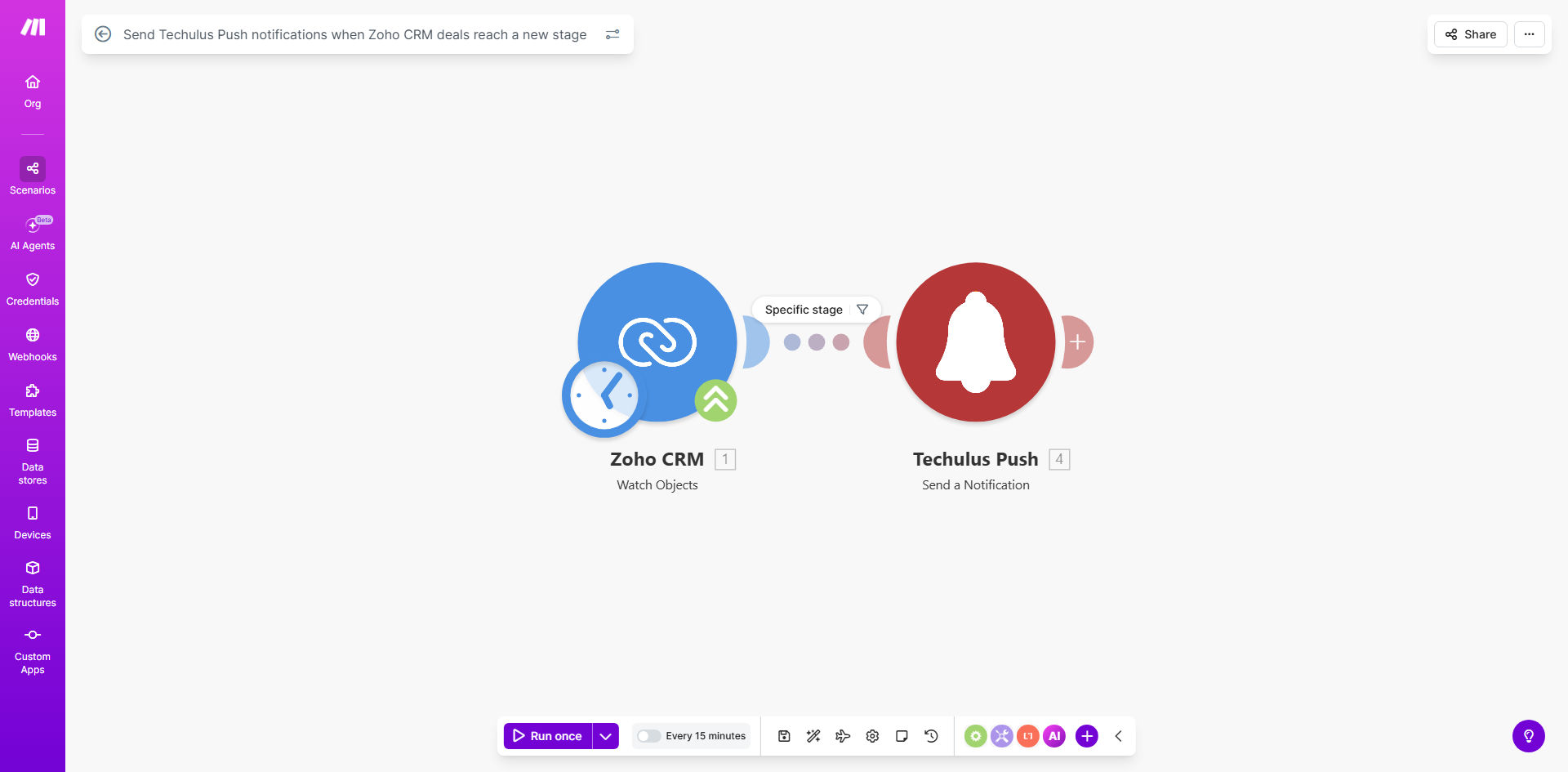
What This Workflow Does
Sales teams often miss critical momentum moments because deal stage changes in CRM systems like Zoho aren't communicated instantly. Reps and managers must manually check the CRM or wait for email reports, causing delayed follow-ups and lost opportunities. This automation solves that by creating a real-time bridge between your Zoho CRM pipeline and your team's mobile devices.
Every time a deal in Zoho CRM advances—from "Qualification" to "Proposal," or "Negotiation" to "Closed Won"—this Make.com workflow automatically captures the change and sends a targeted push notification via Techulus Push to the relevant salesperson or manager. It transforms static CRM data into actionable, immediate alerts, ensuring your team acts while the deal is hot.
The business value is clear: reduced response time, increased deal velocity, and better pipeline visibility. Instead of spending hours monitoring CRM updates, your team receives concise, context-rich notifications on their phones, enabling them to prioritize and act instantly. This workflow turns your CRM into a proactive sales engine rather than a passive database.
How It Works
The automation follows a simple, reliable sequence to ensure notifications are delivered accurately and promptly.
Step 1: Monitoring Zoho CRM for Deal Changes
The workflow starts with a Make.com module that watches your Zoho CRM for specific deal record updates. It can be configured to trigger only when the "Stage" field changes, ignoring other minor edits. This focused monitoring prevents unnecessary alerts and conserves system resources.
Step 2: Filtering and Processing the Deal Data
Once a change is detected, the workflow filters the incoming data. It extracts key details: deal name, company, new stage, assigned owner, and potential value. You can add conditions to only notify for deals above a certain value or for specific stages you consider critical, like moving to "Closed Lost" or "Contract Sent."
Pro tip: Set up a filter to only send notifications for deals assigned to active sales reps, avoiding alerts for archived or test records.
Step 3: Crafting the Push Notification Message
The processed data is formatted into a clear, concise message for the push notification. The template can include a direct link back to the Zoho CRM deal record for quick access. You can customize the message tone and information to match your team's communication style.
Step 4: Sending via Techulus Push
Finally, the formatted message is sent through the Techulus Push API to deliver the notification to registered mobile devices. The alert appears instantly on the recipient's phone, even if they're not actively checking email or CRM. This step ensures the information reaches the right person at the right moment.
Who This Is For
This automation is ideal for sales-driven organizations that rely on Zoho CRM to manage their pipeline. Sales teams of 5 or more members benefit greatly, as manual update communication becomes chaotic. Sales managers and directors who need real-time pipeline visibility without constant dashboard checking will find this workflow transformative.
Companies with high-volume deal flow, such as B2B SaaS, consulting firms, or agencies, where multiple deals move through stages daily, require this instant notification system to maintain responsiveness. Remote or distributed sales teams, who may not have immediate access to a shared CRM screen, gain equal visibility through mobile alerts.
Ultimately, any business that wants to reduce the time between a deal progressing and a team member acting upon it should implement this workflow. It's particularly valuable for industries where deal momentum directly correlates with closing probability, like real estate, financial services, or enterprise software sales.
What You'll Need
To implement this workflow successfully, you'll need a few prerequisites set up beforehand.
- A Zoho CRM account with active deals and defined sales stages.
- Make.com account (free tier sufficient for basic usage).
- Techulus Push account or app installed on team members' mobile devices.
- API credentials for Zoho CRM and Techulus Push, which are typically available in your account settings.
- Clear definition of which deal stages are considered "notification-worthy" for your team.
- Team consensus on who should receive alerts (e.g., assigned rep, manager, entire team).
Quick Setup Guide
Configuring this automation is straightforward. Follow these steps to get it running in under 30 minutes.
- Duplicate the template: Click "Get This Workflow" above to open the template on Make.com and duplicate it into your own scenario.
- Connect Zoho CRM: In the first module, add your Zoho CRM account via OAuth. Set the trigger to monitor "Deals" for updates on the "Stage" field.
- Set up filters: Add a filter module to specify which stage changes trigger alerts. For example, you might only want alerts for moves to "Negotiation" or "Closed Won."
- Configure Techulus Push: In the notification module, connect your Techulus Push account. Customize the message template using data from Zoho CRM (deal name, stage, owner).
- Test the flow: Manually change a deal stage in Zoho CRM and verify that the push notification arrives correctly on your test device.
- Deploy and monitor: Activate the scenario and monitor the logs for a few days to ensure stability. Adjust filters or message content based on team feedback.
Key Benefits
Reduce deal response time from hours to minutes. Instant notifications mean sales reps can call a client immediately after a deal advances, significantly increasing the chance of a successful close.
Eliminate daily CRM check-ins for your team. Salespeople save 15–30 minutes per day previously spent manually scanning the CRM for updates, freeing them for actual selling activities.
Improve sales forecasting accuracy with real-time data. Managers receive immediate visibility into pipeline movement, allowing for more dynamic and accurate revenue predictions.
Enhance team alignment and accountability. Everyone knows when a deal progresses, creating a culture of transparency and shared responsibility for pipeline health.
Scale your sales process without adding administrative overhead. As your team grows, this automated notification system ensures communication remains efficient without manual coordination.