Make.com Telegram Data24-7 Security Automation IP Intelligence

Get IP Address Info in Telegram from Data24-7

Automatically enrich IP addresses received in Telegram with geolocation, ISP, and threat data—instantly turning chat messages into actionable security intelligence.

Get This Workflow Make.com · 1 min setup · Free Template
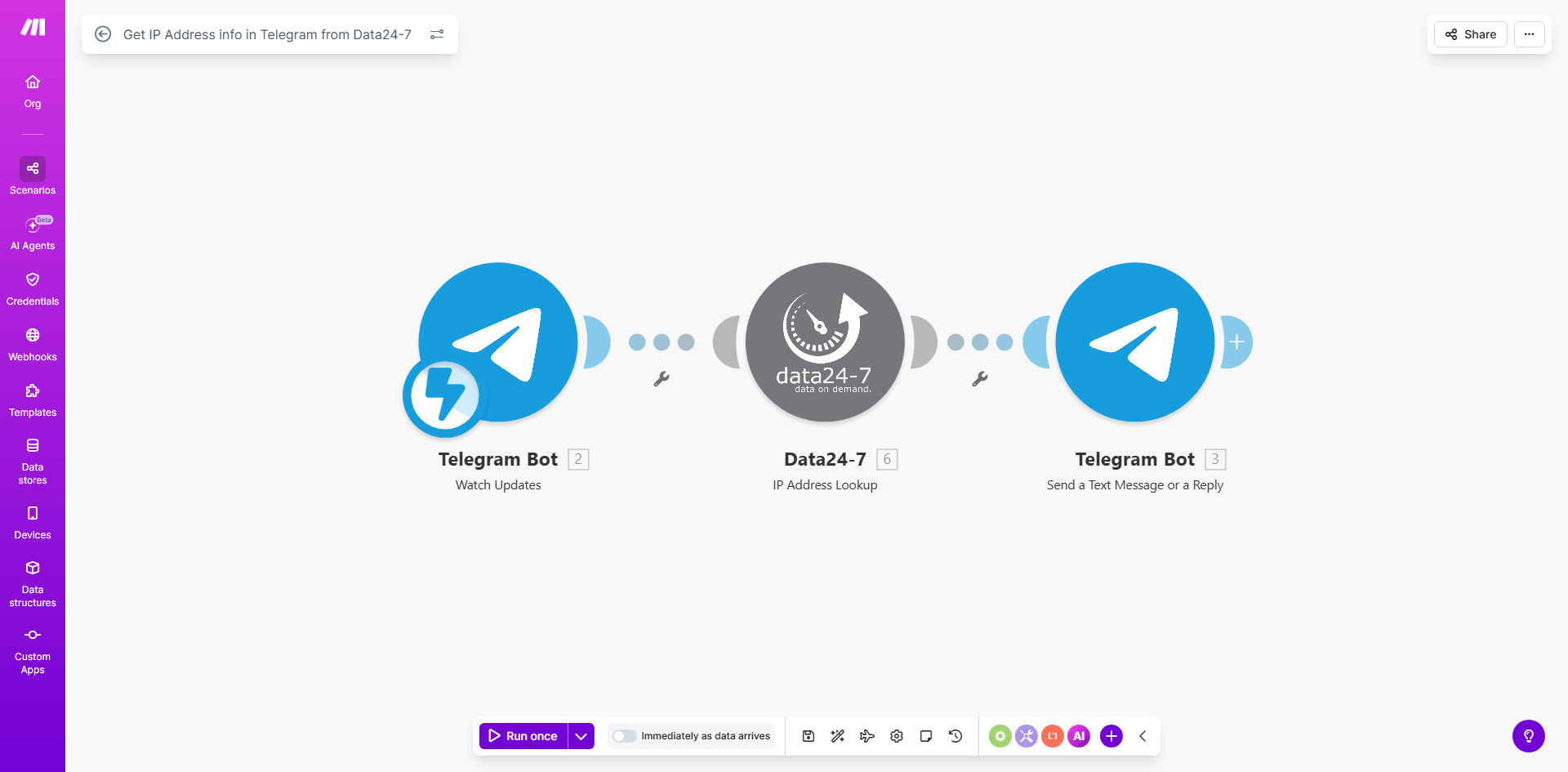
Make.com workflow diagram showing Telegram bot receiving an IP address and querying Data24-7 for information

What This Workflow Does

For IT, security, and DevOps teams, responding to alerts often starts with a simple question: "Where is this IP address coming from?" Manually looking up IP addresses across geolocation databases, threat feeds, and WHOIS records is a repetitive, time-consuming task that delays critical decisions. This automation solves that by creating a seamless bridge between your team's communication hub (Telegram) and powerful IP intelligence (Data24-7).

Every time an IP address is sent to your designated Telegram bot or chat, this Make.com workflow automatically triggers. It extracts the IP, queries the Data24-7 API for comprehensive details—including country, city, ISP, organization, and potential threat flags—and formats the results into a clear, immediate reply back in Telegram. This transforms raw data points into contextualized intelligence in under 10 seconds, empowering your team to assess risks, validate alerts, and take action without leaving their primary collaboration tool.

Pro tip: Use this not just for security alerts, but also for troubleshooting user login issues, analyzing website traffic sources mentioned in team chats, or quickly vetting IPs during vendor onboarding discussions.

How It Works

The workflow operates on a simple trigger-process-respond model, fully automated within Make.com's visual interface.

Step 1: Trigger from Telegram

The scenario monitors a specific Telegram bot or chat you configure. When a message containing an IP address (IPv4 or IPv6) is detected, it instantly captures the message content and the sender's details. The IP address is automatically parsed using a regex filter, ensuring only valid IPs proceed to the next step.

Step 2: Enrich with Data24-7

The parsed IP is sent as a query to the Data24-7 API. In a single call, it retrieves a rich dataset: precise geolocation (coordinates, city, region), network ownership (ISP, ASN, organization), connection type (mobile, corporate, hosting), and crucial security indicators like VPN, proxy, or Tor usage.

Step 3: Format & Deliver Intelligence

The raw API response is transformed into a human-readable summary. The workflow structures the key findings—highlighting location, ISP, and any threat flags—into a concise Telegram message. This formatted intelligence is then sent as a reply directly to the original chat, providing immediate context to the person who requested it.

Who This Is For

This template delivers immediate value to teams that handle digital operations, security, and support.

Security Operations Centers (SOCs) & IT Teams: Triage firewall alerts, failed login attempts, or suspicious activity logs discussed in team chats by instantly enriching IPs with threat data.

DevOps & Site Reliability Engineers: Quickly investigate the origin of anomalous server traffic or DDoS alerts mentioned during incident response calls in Telegram groups.

E-commerce & Fraud Prevention Teams: Assess the risk of customer orders or login attempts by checking if IPs are associated with VPNs or high-risk locations during manual review discussions.

Digital Agencies & Webmasters: Provide clients or team members with quick insights about website traffic sources or comment spam directly within project communication channels.

What You'll Need

  1. A Make.com Account: Free tier is sufficient to run this workflow.
  2. A Telegram Bot Token: Created via @BotFather on Telegram. This gives your workflow permission to read messages and send replies.
  3. A Data24-7 API Key: A subscription plan from Data24-7 to access their IP geolocation and threat intelligence API.
  4. A Dedicated Telegram Chat or Group: Where your team will send IPs for lookup. This could be a private group with the bot added or a direct message to the bot.

Quick Setup Guide

You can have this automation running in under 10 minutes.

  1. Clone the Template: Click "Get This Workflow" and clone it into your Make.com account.
  2. Connect Telegram: In the first module, add your Telegram connection using the bot token from @BotFather. Specify the chat or group to watch.
  3. Configure Data24-7: In the HTTP request module, insert your Data24-7 API key. The endpoint URL is pre-configured.
  4. Test the Flow: Send a test IP (like 8.8.8.8) to your Telegram chat. The workflow should run and return a detailed report within seconds.
  5. Activate & Deploy: Turn on the scenario in Make.com. It will now run automatically for every IP address received.

Key Benefits

Reduce incident response time from minutes to seconds. Security analysts no longer need to switch tabs, copy-paste IPs, and interpret raw API data. Context is delivered instantly where the discussion is happening, accelerating decision-making during critical events.

Eliminate manual, repetitive lookup tasks. This automation handles the grunt work, freeing up skilled team members for higher-value analysis and strategic security work. It's like having a dedicated research assistant for every IP address your team encounters.

Improve accuracy and consistency of intelligence. Manual lookups can lead to errors or missed data points. This workflow ensures every IP is checked against the same authoritative source (Data24-7) and that the full set of relevant data—geolocation, ISP, and threat flags—is always presented.

Create an auditable log of IP investigations. Every lookup triggered from Telegram is automatically logged within Make.com's history, creating a timestamped record of which IP was queried, by whom, and what the result was—valuable for compliance and post-incident reviews.

Foster collaborative security culture. By putting powerful intelligence directly into team chats, you democratize access to IP data. Everyone from junior analysts to managers can understand the context of alerts, leading to more informed discussions and shared responsibility for security.

Frequently Asked Questions

Common questions about IP intelligence automation and integration

Automating IP lookups saves significant time for IT and security teams by instantly providing context on suspicious activity, reducing manual research from minutes to seconds. This enables faster incident response, helps identify potential threats like botnets or VPNs, and creates an audit trail for security investigations without requiring team members to switch between tools.

For example, a team discussing a spike in failed logins can paste the suspect IP into their Telegram group and immediately see if it originates from a known hostile network or a commercial VPN service, allowing them to decide on a block rule within the same conversation.

A comprehensive IP lookup provides geolocation data (country, city, coordinates), network details (ISP, organization, connection type), and security intelligence. This includes whether the IP is associated with a VPN, proxy, Tor node, or known malicious activity, helping you assess risk and understand the origin of website traffic, login attempts, or system alerts.

Beyond the basics, services like Data24-7 can provide data accuracy scores, mobile carrier info, and even the type of hosting environment. This depth transforms a simple string of numbers into a rich profile that informs both security posture and business decisions like geo-targeting.

Integrating Telegram with IP intelligence creates a real-time security command center. Alerts from firewalls, intrusion detection systems, or failed login attempts sent to Telegram can automatically trigger enriched IP lookups, providing context directly in the chat. This eliminates the need to copy-paste IPs into separate tools, speeding up triage and enabling collaborative decision-making within your team's existing communication channel.

The conversational interface lowers the barrier to entry for non-specialists. A support agent can quickly check an IP while assisting a user, and the entire team benefits from the shared intelligence, fostering a more proactive and informed security culture.

Data24-7 offers highly accurate, real-time IP geolocation and threat data, which is crucial for making informed security decisions. For businesses, this means better fraud prevention, improved network security monitoring, and enhanced user experience through location-based services. The automation ensures you're acting on reliable data without manual verification delays.

Using a reputable provider reduces false positives in threat detection. For instance, accurately distinguishing between a corporate VPN (likely legitimate) and an anonymous public VPN (higher risk) helps avoid blocking legitimate users while catching actual threats.

Yes, automated IP logging creates structured records for compliance requirements like GDPR data transfer monitoring, security incident reporting, or audit trails. By automatically capturing IP details, timestamps, and threat classifications, you build a searchable history that demonstrates due diligence in monitoring access and investigating security events, saving hours on manual report compilation.

This automated log can be easily connected to data warehouses or SIEM systems. During an audit, you can quickly generate reports showing all IPs investigated for a specific incident, the intelligence gathered, and the actions taken, all timestamped and attributable.

Beyond Telegram, you can connect this workflow to ticketing systems like Jira or Zendesk to auto-create incidents, Slack for team notifications, Google Sheets for logging, or CRM platforms to flag suspicious customer accounts. You can also trigger actions like blocking IPs in firewalls (Cloudflare, AWS WAF) or enriching user sessions in analytics platforms based on the lookup results.

The modular nature of Make.com allows you to build complex, multi-step processes. For example, if an IP is flagged as high-risk, you could automatically create a ticket, notify the on-call engineer via SMS, and add the IP to a block list—all from a single message in Telegram.

Modern IP geolocation services like Data24-7 provide city-level accuracy around 85-95% for most regions, which is sufficient for many business use cases like content localization, fraud pattern detection, and regional access control. For critical decisions, best practice is to combine IP data with other signals (user account info, behavior analytics) rather than relying on it exclusively.

Accuracy varies by region and connection type. Mobile IPs often locate to the carrier's network center, while business IPs are typically precise. Understanding these limitations helps set appropriate expectations—using IP data for investigative leads rather than definitive proof in most scenarios.

Absolutely. GrowwStacks specializes in building tailored IP intelligence and security automation systems that integrate with your specific tools and workflows. We can design solutions that automatically analyze login attempts, monitor for suspicious traffic patterns, enrich alerts in your SOC platform, or trigger custom responses based on IP reputation scores, all configured to your unique security policies and team structure.

Our consultants work with you to map your existing processes—from alert generation in tools like Splunk or Datadog to team communication in Slack or Microsoft Teams—and design an automation layer that reduces manual work while improving response accuracy. We handle the complex integrations, error handling, and scaling so your team gets intelligence where they need it, without the technical overhead.

  • Integration with your existing security stack (SIEM, firewalls, IDS)
  • Custom alerting and escalation rules based on threat scores
  • Automated reporting and dashboard creation for management

Need a Custom IP Intelligence Automation?

This free template is a starting point. Our team builds fully tailored automation systems for your specific business needs.