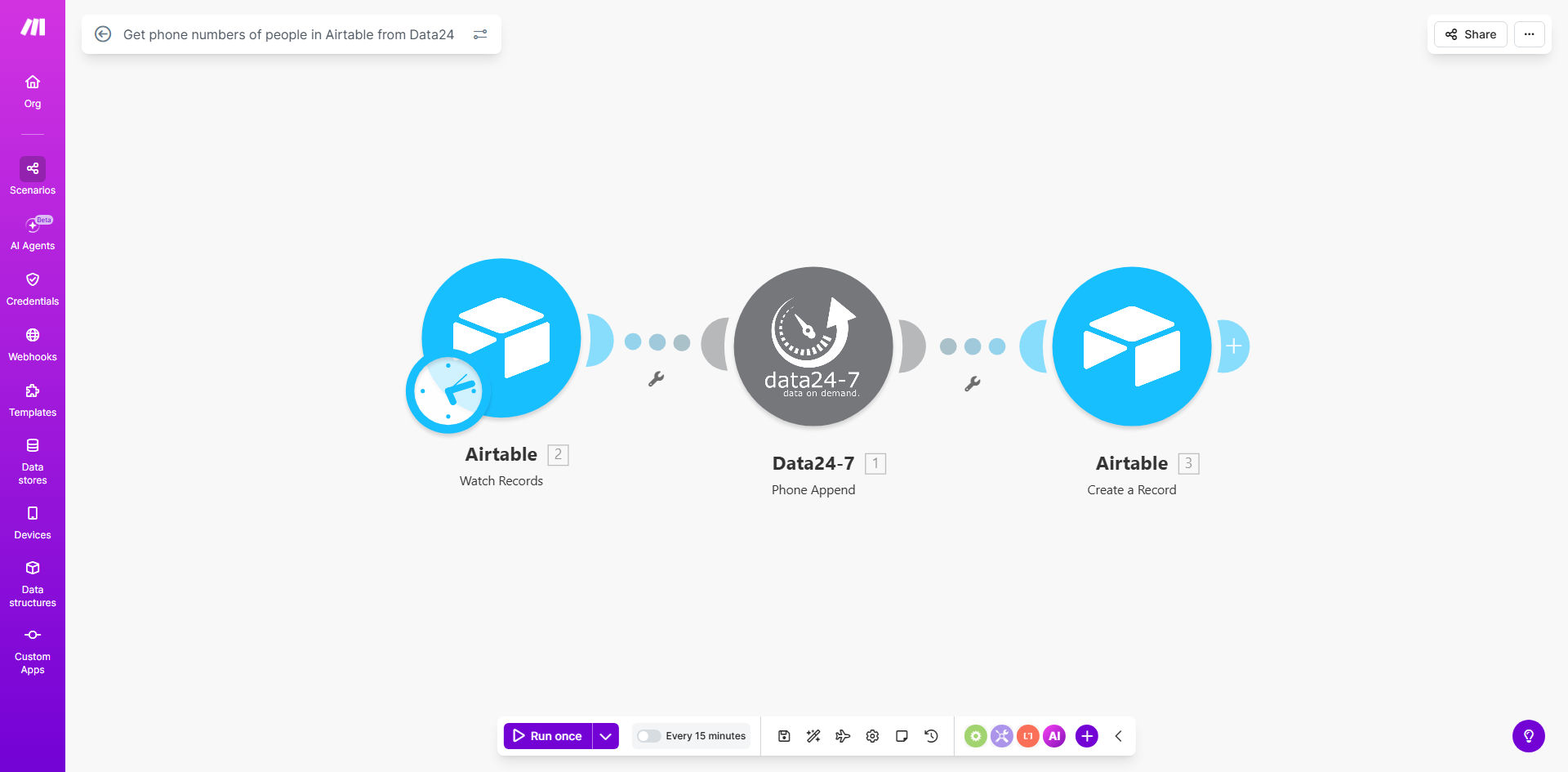
What This Workflow Does
Incomplete contact data is a silent revenue killer for sales and marketing teams. Manually searching for phone numbers for every new lead is tedious, error-prone, and slows down your response time dramatically. This automation solves that by creating a seamless bridge between your Airtable database and Data24's extensive contact directory.
Every time a new person is added to your specified Airtable base—whether from a web form, imported list, or sales tool—this Make.com scenario instantly triggers. It takes the available contact details (like name, company, email, or location) and queries the Data24 API to find and retrieve the associated phone number. The number is then written back into the original Airtable record, completing the contact profile automatically. This turns your Airtable from a static list into a dynamically enriched powerhouse, ready for immediate outreach.
How It Works
The workflow operates on a simple but powerful trigger-action model, ensuring your data is enriched in real-time without any manual intervention.
Step 1: Airtable Watches for New Records
The scenario starts with the Airtable module set to "Watch Records." It monitors a specific table in your base, waiting for a new row to appear. This is the trigger that kicks off the entire enrichment process.
Step 2: Data Preparation and API Call
Make takes the data from the new record, such as first name, last name, email, and company name. It structures this information into a precise query format required by the Data24 "Find Person" API module. The API call is sent to Data24's servers to search for a matching profile.
Step 3: Phone Number Extraction and Validation
Data24 returns a response containing the found person's details, including phone numbers. The Make scenario includes a router to handle the outcome: if a match is found, it proceeds to parse the response and extract the most relevant phone number (e.g., a mobile or direct line).
Step 4: Update the Original Airtable Record
Finally, the workflow uses another Airtable module to "Update a Record." It targets the original record that triggered the scenario and writes the newly acquired phone number into a designated column. Your Airtable is now updated with enriched data, ready for your team to use.
Pro tip: Use a "Last Enriched Date" column in Airtable. Update it each time this workflow runs. This creates a clear audit trail and helps you avoid wasting API credits on re-enriching the same records repeatedly.
Who This Is For
This template is a game-changer for any business that relies on accurate contact data for outbound communication. It's perfect for Sales Teams and SDRs who need direct phone numbers to hit their call quotas faster. Recruitment Agencies can use it to find candidate contact details quickly. Marketing Agencies running lead generation campaigns can instantly qualify leads with complete data. Small Business Owners managing their own CRM in Airtable will save countless hours of manual searching. Essentially, if you use Airtable as a source of truth for people and need their phone numbers, this automation is for you.
What You'll Need
- A Make.com Account: A free or paid plan to build and run the automation scenario.
- An Airtable Account & Base: With a table containing contact records. Ensure your table has columns like First Name, Last Name, Email, and Company to maximize match rates with Data24.
- A Data24 API Key: You'll need an active subscription with Data24 to access their "Find Person" API. Sign up on their website and obtain your authentication key.
- A Dedicated Phone Number Column: In your Airtable table, create a column (e.g., "Phone" or "Direct Number") where the enriched data will be written.
Quick Setup Guide
Follow these steps to get your phone number enrichment live in under 30 minutes.
- Clone the Template: Click "Get This Workflow" and duplicate the scenario into your own Make.com workspace.
- Connect Airtable: In the first module, authorize Make to access your Airtable account and select the specific base and table you want to monitor.
- Configure Data24: In the "Find Person" module, paste your Data24 API key. Map the incoming fields from Airtable (name, email, company) to the corresponding search parameters in Data24.
- Map the Output: In the final Airtable "Update Record" module, ensure the phone number extracted from Data24's response is correctly mapped to your target column in Airtable.
- Test and Activate: Add a test record to your Airtable table. Run the scenario once to see it in action. If successful, turn the scenario to "ON" to let it run automatically for all future records.
Key Benefits
Save 5–10 hours per week per salesperson previously spent on manual data lookup. This time can be redirected towards actual selling and relationship-building activities, directly impacting revenue.
Increase call connect rates by up to 40% by using verified, direct-dial numbers instead of generic office lines. Accurate data means less time wasted on wrong numbers and gatekeepers.
Improve data hygiene automatically, ensuring your Airtable CRM remains a reliable single source of truth. Automated enrichment reduces human error and keeps contact records consistently complete.
Accelerate sales response time to minutes instead of hours or days. The moment a lead enters your system, their phone number is appended, allowing for immediate, high-conversion outreach.
Scale your outbound efforts without scaling your team. This automation handles the data grunt work, enabling your existing team to manage a larger volume of qualified leads effectively.