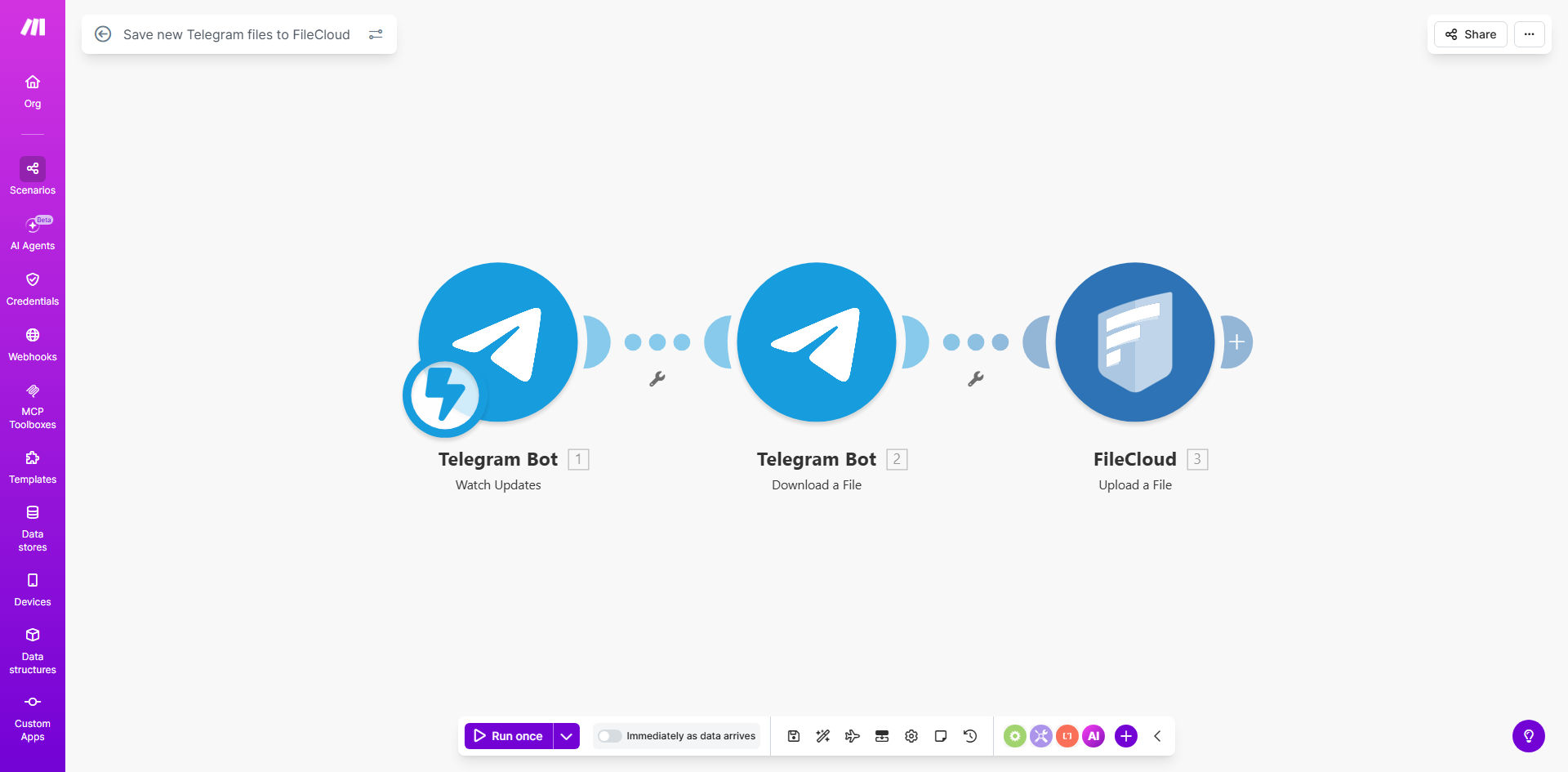
What This Workflow Does
Telegram channels and groups are powerful tools for team communication and community building, often used to share critical business documents, marketing assets, support tickets, and media files. However, relying on Telegram as a primary file repository is risky. Files can be deleted, lost in chat history, or inaccessible to team members without Telegram access. Manually downloading and organizing these files is a tedious, error-prone task that wastes valuable time.
This automated workflow solves that problem permanently. It acts as a silent, diligent assistant that monitors your specified Telegram channel. The moment a new file is posted—whether it's a PDF report, a product image, a video tutorial, or a spreadsheet—the automation instantly captures it and uploads it to a designated folder in your FileCloud account. This creates a secure, centralized, and searchable archive of all shared content, completely independent of Telegram.
The business value is immediate: you eliminate the risk of data loss, free up your team from repetitive manual work, and ensure everyone has access to the files they need in a professional cloud storage environment. It turns a chaotic stream of Telegram files into a structured, company-wide asset library.
How It Works
The automation runs on Make.com, connecting Telegram and FileCloud with a simple, reliable sequence.
Step 1: Monitor the Telegram Channel
The workflow starts with a Telegram module configured as a "Watch Updates" trigger. It continuously polls your connected Telegram channel or group for new messages containing files. It detects new posts in real-time, ready to process any document, photo, video, or other file type.
Step 2: Filter and Extract the File
When a new post is detected, the automation checks if it contains a file. It then extracts crucial data: the file itself (its binary content or a downloadable link), the file name, the caption or message text, and the date/time of posting. This data is passed to the next step for processing.
Pro tip: Use Make's filter tool immediately after the trigger to ignore text-only messages or messages from specific users, ensuring the workflow only runs for relevant file posts and saves processing credits.
Step 3: Upload to FileCloud
The core action module is the FileCloud "Upload a File" operation. The automation takes the extracted file from Telegram and uploads it directly to a pre-defined folder path in your FileCloud account. You can set a static folder (e.g., "/Telegram Backups/") or create dynamic folders based on the date or channel name for perfect organization.
Step 4: Optional Logging & Notification
After a successful upload, the workflow can be extended to log the action in a Google Sheet, send a confirmation alert to a Slack channel, or even rename the file in FileCloud to include the original post date. This provides an audit trail and peace of mind that the system is working.
Who This Is For
This automation is a game-changer for any team or business that uses Telegram as a hub for sharing files.
Marketing & Content Teams: Archive user-generated content, campaign assets, and social media visuals shared in planning channels.
Remote & Distributed Teams: Ensure work documents, design files, and meeting notes shared in internal groups are automatically backed up to a company-controlled cloud drive.
Support Communities & Educators: Automatically save tutorial resources, assignment submissions, or bug report files posted by users or students, creating a structured knowledge base.
Project Managers & Coordinators: Maintain a permanent, organized record of all project-related files shared in communication channels, accessible to all stakeholders.
What You'll Need
- A Make.com Account: A free or paid plan to build and run the automation.
- Telegram Access: Administrator or member access to the Telegram channel, group, or chat you want to monitor. You'll need to create a Telegram Bot via @BotFather and add it to the channel to grant API access.
- A FileCloud Account: An active FileCloud subscription or instance. You'll need an API key or OAuth credentials from FileCloud to establish the connection in Make.
- A Destination Folder: Decide on the folder structure in FileCloud where you want the files to be saved (e.g.,
/Company/Telegram_Imports/).
Quick Setup Guide
- Get the Template: Click "Get This Workflow" to copy the ready-made template into your Make.com account.
- Connect Telegram: In the first module, click to add a connection. Follow Make's OAuth flow to authorize your Telegram Bot. Select the specific channel you want to watch.
- Connect FileCloud: In the upload module, add a new FileCloud connection using your API key or by logging into your FileCloud instance through Make's secure portal.
- Set the Destination Path: In the FileCloud module, specify the full folder path where files should be saved. You can use text or map dynamic data like the posting date.
- Test and Activate: Run the scenario once manually by posting a file to your Telegram channel. Verify it appears in your FileCloud folder. Then, schedule the scenario to run automatically (e.g., every few minutes) and turn it on.
Key Benefits
Eliminate Manual Work & Save 5+ Hours Per Month: No more downloading, renaming, and moving files. This automation handles it all, giving your team back time for high-value tasks.
100% Data Security & Loss Prevention: Creates an instant backup in your secure, controlled FileCloud environment. Files are safe even if they are deleted from Telegram or a team member leaves the group.
Improved Team Collaboration & Accessibility: Files stored in FileCloud can be accessed, shared, and searched by anyone in your organization with the right permissions, breaking down silos caused by Telegram access limits.
Professional File Organization: Automatically sort files into dated or categorized folders in FileCloud, transforming a random collection into a professionally managed digital asset library.
Scalable & Reliable Operation: The workflow runs 24/7 without fatigue, handling one file or one thousand with the same consistency, ensuring no important asset slips through the cracks as your community grows.