What This Workflow Does
Teams and communities increasingly use Telegram for quick collaboration and file sharing. However, important documents, photos, and videos shared in channels can quickly get buried in chat history, leading to lost assets, wasted time searching, and no centralized backup. This creates operational inefficiency and risk.
This automation solves that by creating a seamless bridge between Telegram and Nextcloud. Every time a new file is posted to a connected Telegram channel, the workflow instantly detects it and saves a copy to a specified folder in your Nextcloud instance. It turns a chaotic stream of shared files into a neatly organized, secure, and searchable digital library.
The business value is clear: it automates a tedious manual process, eliminates the risk of data loss from relying solely on chat history, and ensures all team assets are stored in a controlled, company-owned environment like Nextcloud. This saves hours per week in manual file management and provides peace of mind.
How It Works
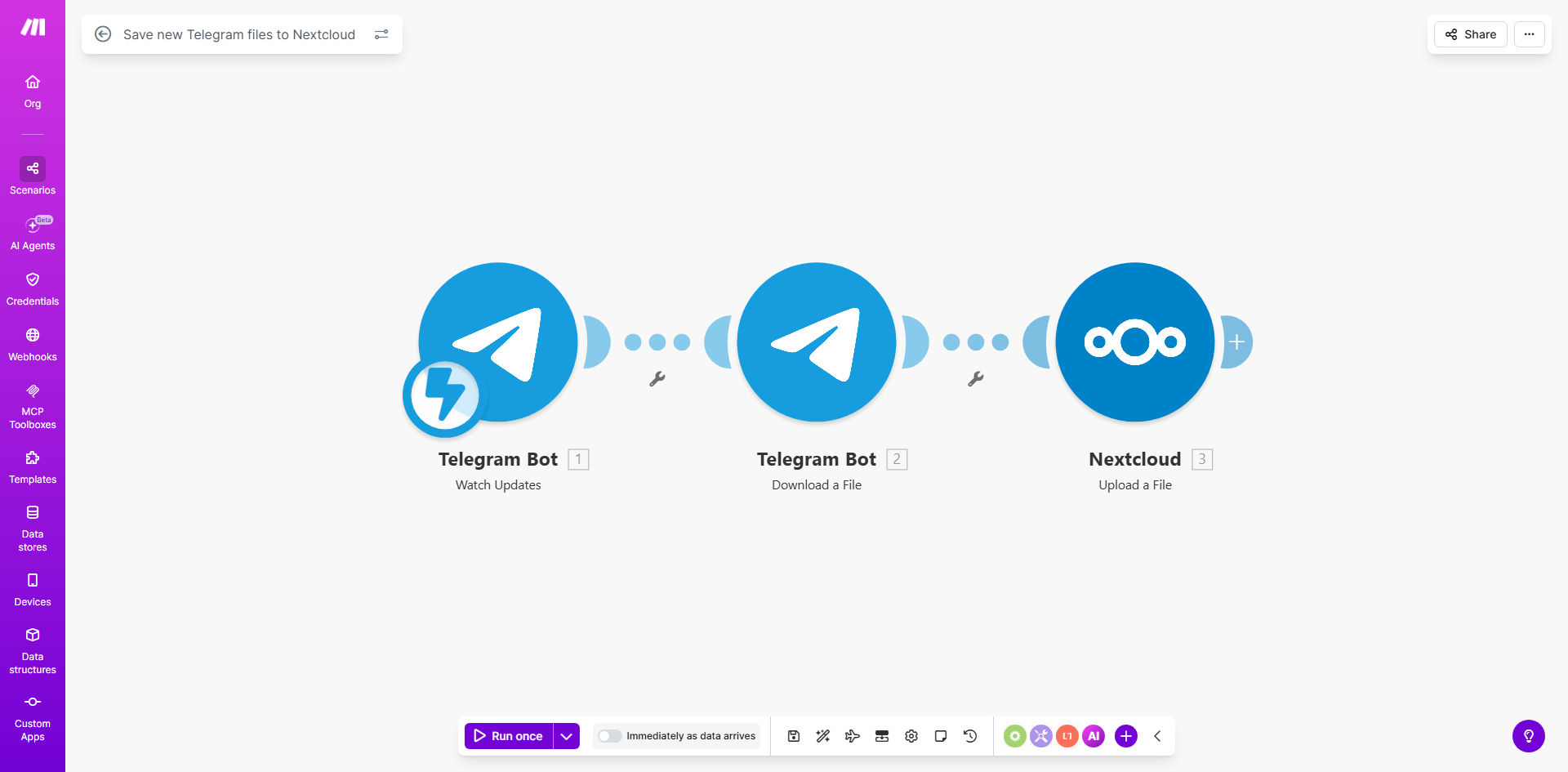
The workflow runs on Make.com, acting as the intelligent middleware between Telegram and Nextcloud. It follows a simple but powerful sequence.
Step 1: Monitoring the Telegram Channel
The scenario starts by watching a specific Telegram channel or group you configure. It uses Telegram's Bot API to instantly detect whenever a new message containing a file (like a document, photo, or video) is posted.
Step 2: Capturing File Details
Once a file is detected, Make.com extracts all relevant information: the file itself, its name, type, size, and any accompanying caption or message. This data is prepared for transfer.
Step 3: Uploading to Nextcloud
The workflow then connects to your Nextcloud instance via its WebDAV or REST API. It authenticates securely and uploads the captured file directly to a pre-defined folder path you set up, such as /Telegram Backups/2024/.
Step 4: Confirmation & Logging
After a successful upload, the workflow can be set to log the action, send a confirmation to another channel, or update a spreadsheet. This completes the cycle, ensuring every file is accounted for.
Pro tip: Extend this workflow by adding a filter module. You can set rules to only save specific file types (e.g., only PDFs) or files from certain senders, making your backup even more intelligent and organized.
Who This Is For
This automation is incredibly valuable for any business or team that uses Telegram for internal or external communication.
Marketing & Content Teams: Agencies sharing design drafts, videos, and campaign assets via Telegram can automatically archive all creative work in Nextcloud for easy client handovers and asset management.
Remote & Hybrid Teams: Distributed teams using Telegram for daily updates can ensure all shared documents—like reports, spreadsheets, and meeting notes—are safely backed up in the company's Nextcloud, accessible to everyone.
Community Managers & Creators: Individuals running Telegram channels who share resources, guides, or media with their audience can maintain a personal, organized backup of all distributed content.
IT & Operations: Teams that receive log files, screenshots, or diagnostic data via Telegram can have them automatically filed into a structured Nextcloud directory for analysis and record-keeping.
What You'll Need
To set up this automation, you will need the following accounts and access:
- A Make.com account (free tier available).
- Administrator or owner access to a Telegram channel or group you wish to monitor.
- A Telegram Bot Token, which you can easily create via BotFather on Telegram.
- An active Nextcloud instance (self-hosted or from a provider like Hetzner, IONOS, etc.).
- Your Nextcloud login credentials (username/password) or a dedicated App Password for API access.
- The folder path in your Nextcloud where you want the files to be saved (e.g.,
/Shared/Telegram/).
Quick Setup Guide
You can have this automation running in under 15 minutes by following these steps:
- Get the Template: Click the "Get This Workflow" button above to open the pre-built template on Make.com.
- Create Your Telegram Bot: Message @BotFather on Telegram, create a new bot, and copy the provided API token.
- Add Bot to Channel: Add your new bot as an administrator to the Telegram channel you want to monitor.
- Connect Telegram in Make: In the Make.com template, add your bot token to the "Telegram" module and select your channel.
- Connect Nextcloud: In the "Nextcloud" module, enter your instance URL, username, and password/app password.
- Set the Destination Folder: Specify the exact folder path in your Nextcloud where files should be saved.
- Turn It On: Activate the scenario. Test it by posting a file to your Telegram channel—it should appear in your Nextcloud shortly!
Key Benefits
Eliminate Manual Backup Drudgery: Save 2-5 hours per week otherwise spent manually downloading files from Telegram and uploading them to another service. The automation works 24/7 without supervision.
Guarantee Zero Data Loss: Create a failsafe archive of all shared business assets. Files are no longer at risk of being deleted in Telegram or lost in endless scroll, ensuring compliance and knowledge retention.
Centralize Team Assets: Break down information silos. All files from Telegram become instantly available in your company's central Nextcloud storage, searchable and accessible to authorized team members on any device.
Improve Operational Security: Maintain control over your data. Instead of files living only on a third-party messaging platform, they are securely copied to your own Nextcloud, where you manage access, backups, and retention policies.
Scale Seamlessly: The workflow handles any volume of files automatically. Whether your team shares 10 or 1000 files a week, the process remains consistent and reliable, freeing your team to focus on higher-value work.