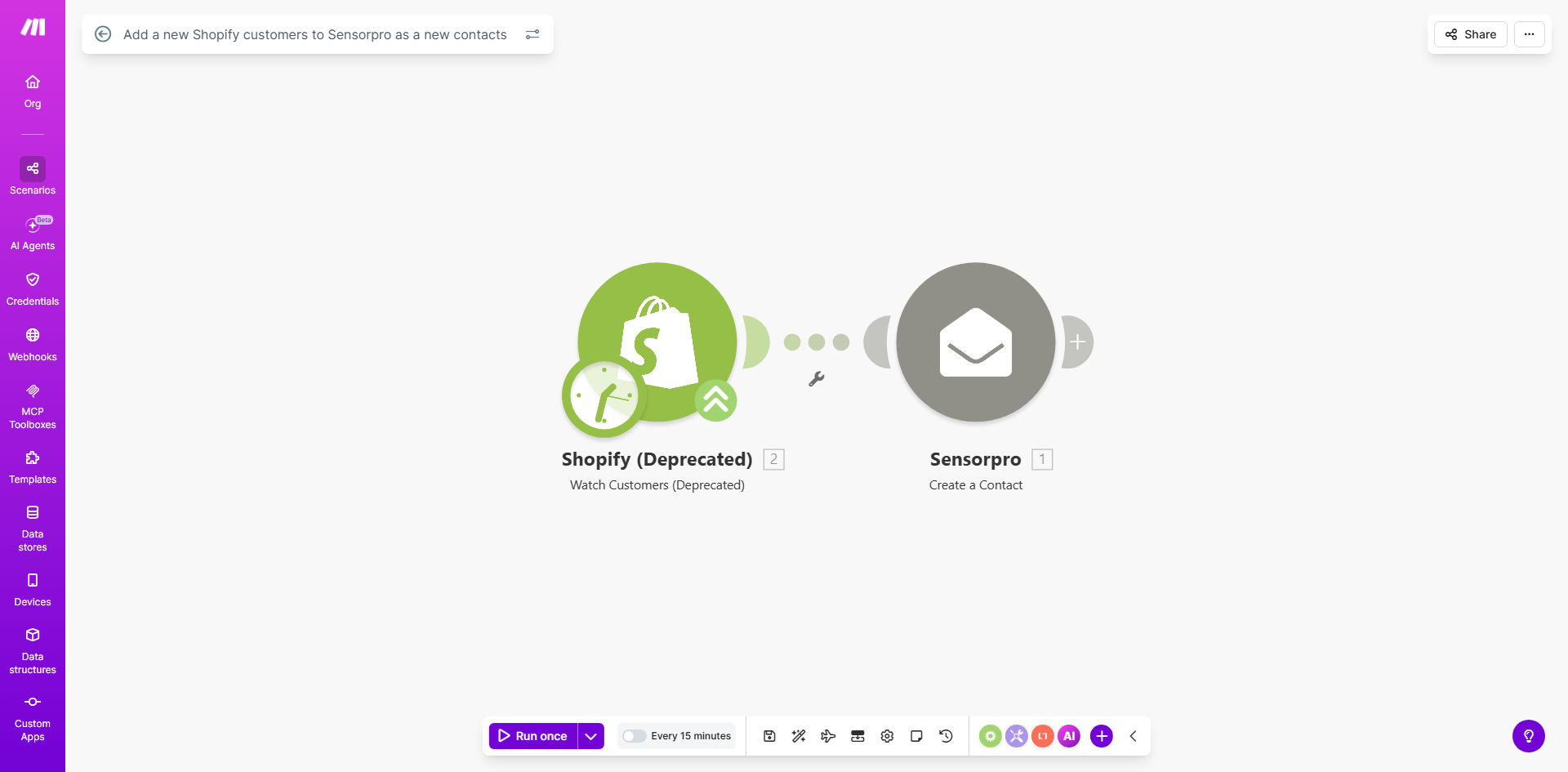
What This Workflow Does
For e-commerce businesses using Shopify, every new customer represents a potential long-term relationship. However, if your customer data is trapped solely in Shopify, your sales and support teams in Sensorpro are working with an incomplete picture. Manually copying customer details between platforms is a tedious, error-prone task that wastes valuable time and leads to data decay.
This automated workflow solves that problem by creating a seamless bridge between Shopify and Sensorpro. Whenever a new customer completes a purchase or creates an account in your Shopify store, this Make.com scenario instantly captures their information—name, email, phone, address—and creates a corresponding, fully populated contact record in your Sensorpro CRM. It turns a multi-step manual process into a silent, reliable background operation.
The result is a unified customer database. Your marketing team can segment audiences based on purchase history, your support team has immediate context for incoming queries, and your sales team can follow up with leads without switching between apps. The automation ensures no customer falls through the cracks due to human oversight.
How It Works
The workflow follows a simple "trigger-action" sequence, orchestrated by Make.com to ensure reliability and speed.
Step 1: Monitoring Shopify for New Customers
The scenario starts with a Shopify module set to watch for the "Create a customer" event. This trigger can be configured to fire whenever a customer registers an account or completes a checkout as a guest. Make.com polls your Shopify store at regular intervals or uses webhooks for instant notification, ensuring minimal delay.
Step 2: Extracting and Structuring Customer Data
Once triggered, the workflow pulls the complete set of data for the new customer. This includes their first and last name, email address, phone number, default shipping and billing addresses, and any notes or tags assigned in Shopify. The data is then parsed and formatted to match the expected field structure in Sensorpro.
Pro tip: Use this step to filter or enrich data. For example, you can add a rule to only sync customers from specific countries or append a "Source: Shopify" tag to the contact in Sensorpro for better tracking.
Step 3: Creating the Contact in Sensorpro
The formatted data is sent to Sensorpro via its API using the "Create a contact" action. The workflow maps each piece of Shopify data (e.g., customer.email) to the correct Sensorpro contact field (e.g., Email). A successful creation returns the new Sensorpro contact ID, which can be logged for audit trails.
Step 4: Error Handling and Logging
Robust automation includes error management. If the Sensorpro API call fails—perhaps due to a duplicate email or a server issue—the workflow can be set to retry, send an alert to your team via email or Slack, or log the error to a spreadsheet for later review. This ensures you're always informed of sync issues.
Who This Is For
This automation is ideal for any business that uses Shopify for sales and Sensorpro for customer relationship management. It's particularly valuable for:
- E-commerce Store Owners: Who want their CRM to automatically reflect their growing customer base without manual updates.
- Marketing Teams: Needing accurate, real-time customer lists in Sensorpro to execute email campaigns, segment audiences, and track customer journeys.
- Customer Support Managers: Whose agents need instant access to a customer's Shopify order history when they call or email for support.
- Sales Teams: That follow up on new customers or high-value orders and need all contact details readily available in their primary sales tool.
- Operations Managers: Looking to eliminate repetitive administrative tasks and reduce data entry errors across their tech stack.
What You'll Need
To clone and use this template, you will need the following accounts and access:
- A Make.com account (free or paid plan).
- An active Shopify store with admin access to generate API credentials.
- A Sensorpro account with administrative privileges to create and manage API connections.
- (Recommended) A basic understanding of where to find API keys or OAuth setup in Shopify and Sensorpro.
Quick Setup Guide
You can have this automation running in under 15 minutes by following these steps:
- Get the Template: Click the "Get This Workflow" button above to open the template in your Make.com account.
- Authorize Shopify: In the first module, click to add a connection. You'll be redirected to log into your Shopify store and grant Make.com the necessary permissions to read customers.
- Authorize Sensorpro: In the Sensorpro module, create a new connection using your Sensorpro API key (found in your Sensorpro settings under Integrations/API).
- Map the Fields (Optional): Review the data mapping between Shopify and Sensorpro. The template provides a standard mapping, but you can customize it if your Sensorpro uses custom field names.
- Test and Activate: Turn on the scenario and perform a test by creating a dummy customer in Shopify. Check Sensorpro to confirm a new contact appears. Once verified, your automation is live.
Key Benefits
Save 5-10 hours per week on manual data entry. This time can be reallocated to strategic tasks like customer engagement, marketing analysis, or business development, directly impacting your bottom line.
Eliminate human error in contact data transfer. Automated sync ensures that email addresses, phone numbers, and names are copied perfectly every time, improving data quality and the effectiveness of your communications.
Enable real-time, informed customer interactions. Your support and sales teams have immediate access to a customer's Shopify profile in Sensorpro, allowing for personalized service that can increase customer satisfaction and loyalty.
Create a single source of truth for customer data. By centralizing information from Shopify into Sensorpro, you break down data silos, giving everyone in your company a unified, accurate view of the customer.
Scale your operations effortlessly. Whether you gain 10 or 1000 new customers a day, the automation handles the sync without any additional effort or cost from your team, supporting business growth seamlessly.