What This Workflow Does
For podcast creators using Transistor.fm, growing an audience is exciting, but managing subscriber data can become a tedious administrative task. Every time a listener subscribes, their information—email, name, subscription date—needs to be recorded. Manually copying this data from Transistor.fm into a spreadsheet is time-consuming, prone to errors, and often gets delayed, leaving you with an incomplete picture of your audience growth.
This automation solves that problem by creating a seamless bridge between your podcast hosting platform and your data hub. Whenever a new subscriber joins your podcast on Transistor.fm, this workflow instantly captures their details and adds them as a new row in a designated Google Sheets spreadsheet. It turns a manual, repetitive process into an automatic, reliable data pipeline.
The business value is clear: you save hours each month on data entry, ensure your subscriber list is always accurate and up-to-date, and create a centralized dataset ready for analysis. You can finally track subscription trends, measure campaign effectiveness, and understand your audience demographics without any extra work.
How It Works
The workflow is a simple yet powerful chain of events triggered by a new subscriber event.
Step 1: Trigger on New Subscriber
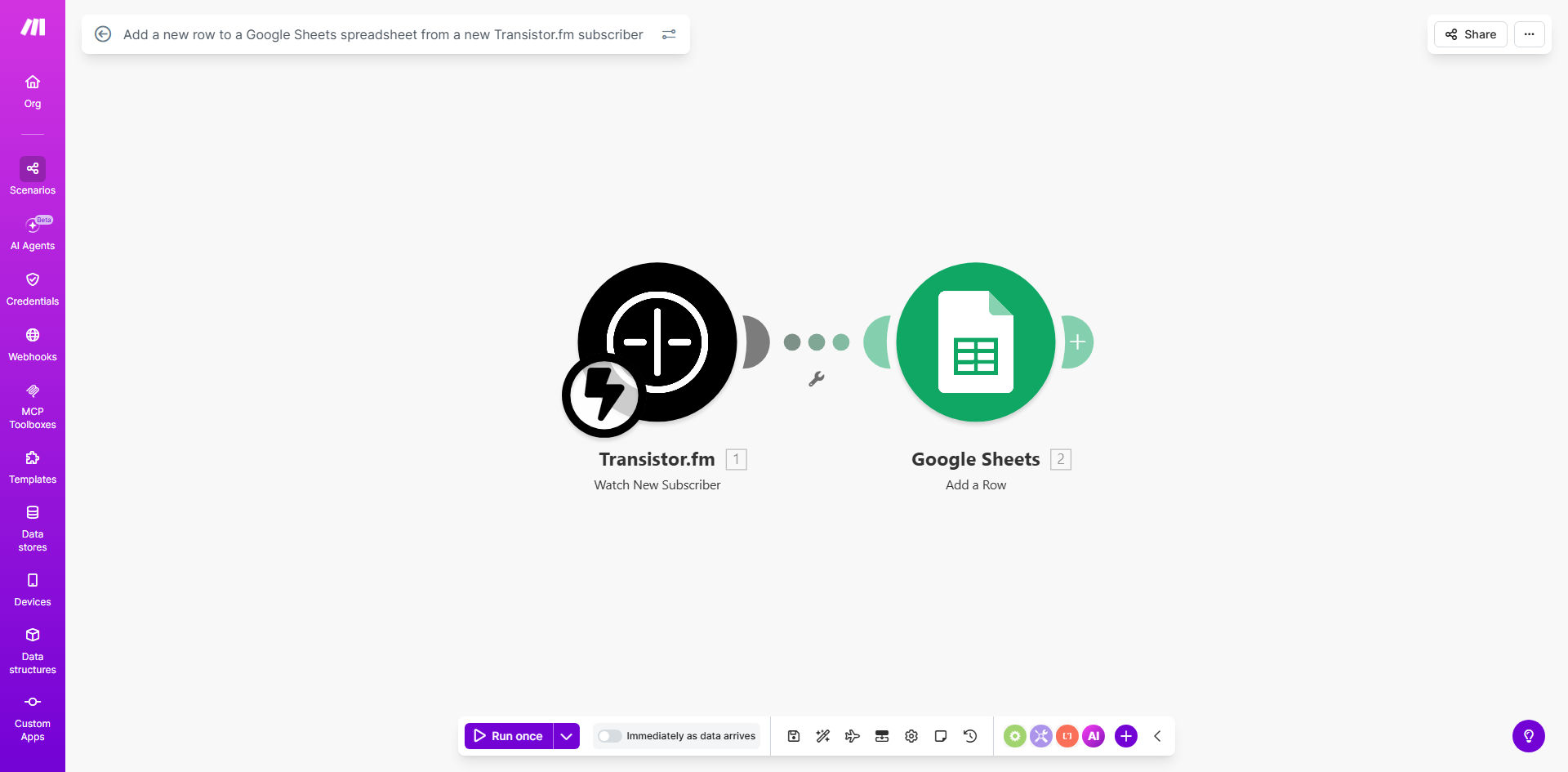
The automation starts with the "Watch Subscribers" module in Make.com, connected to your Transistor.fm account. It monitors your podcast for new subscription events. As soon as someone subscribes, the workflow is activated, and the subscriber's data is passed to the next step.
Step 2: Map the Subscriber Data
The workflow then structures the incoming data. It extracts key fields like the subscriber's email address, their name (if provided), the exact date and time of subscription, and the podcast they subscribed to. This data is formatted neatly for insertion into a spreadsheet.
Step 3: Add Row to Google Sheets
Finally, the formatted data is sent to Google Sheets via the "Add a Row" module. The workflow specifies your target spreadsheet and sheet, and inserts the subscriber's details as a new row. Each new subscriber creates a new, timestamped entry in your log.
Pro tip: You can extend this workflow easily. For example, after adding the row to Sheets, you could trigger a personalized welcome email via Gmail or Mailchimp, or add the subscriber to a CRM like HubSpot, creating a full-fledged onboarding sequence.
Who This Is For
This automation is ideal for any podcast creator or manager who values data-driven growth and efficiency.
Independent Podcasters: Solo creators who spend too much time on administrative tasks instead of content creation. This automation gives them a clean, automatic audience log without manual effort.
Podcast Networks & Agencies: Teams managing multiple shows need centralized subscriber data for cross-show analysis and reporting. This workflow provides a unified data feed for all their podcasts on Transistor.fm.
Marketing & Growth Teams: Professionals who rely on subscriber data for campaign analysis, audience segmentation, and measuring ROI on podcast promotions. Automated data collection ensures they have real-time, accurate numbers.
Content Businesses: Companies that use podcasting as a lead generation or community-building tool. Automatically logging subscribers integrates podcast growth data directly into their broader business analytics.
What You'll Need
- A Transistor.fm Account: You need an active Transistor.fm account hosting at least one podcast. The workflow will connect to it via API.
- A Google Sheets Spreadsheet: A destination spreadsheet in your Google Drive. You can use the provided sample template or create your own with columns for Email, Name, Subscription Date, Podcast Name, etc.
- Make.com Account: A free or paid Make.com account to build and run the automation. The platform handles the connection between Transistor.fm and Google Sheets.
- API Connections: You'll need to authorize the Make.com scenario to access your Transistor.fm account and your Google Sheets. This is a secure, standard process within Make.com's interface.
Quick Setup Guide
Configuring this template is straightforward. Follow these steps to get it running in minutes.
- Duplicate the Template: Click the "Get This Workflow" button above to open the template on Make.com. Click "Duplicate" to copy it into your own Make.com workspace.
- Connect Transistor.fm: In the duplicated scenario, click the Transistor.fm module. You'll be prompted to create a connection. Log in to your Transistor.fm account and authorize Make.com to access your subscriber data.
- Set Up Google Sheets: Click the Google Sheets module. Create a connection to your Google account. Then, specify the exact spreadsheet ID and sheet name where you want the data to go. You can use the sample spreadsheet link provided in the template description as a reference.
- Map the Data Fields: Ensure the data from Transistor.fm (like email, name, date) is correctly mapped to the corresponding columns in your Google Sheets. The template is pre-configured, but you can adjust the column mapping if your sheet has a different structure.
- Test and Activate: Turn on the scenario. To test, you can simulate a new subscriber event or wait for a real subscription. Check your Google Sheets to confirm a new row appears with the correct data. Once verified, the automation will run continuously.
Pro tip: Before activating, make a copy of the sample Google Sheets spreadsheet (linked in the template description) and use it as your destination. It has the perfect column structure ready to receive the data, saving you setup time.
Key Benefits
Save 2–5 Hours Per Month on Manual Data Entry. Eliminate the tedious process of checking Transistor.fm and copying subscriber info into a spreadsheet. The automation does it instantly, freeing up your time for content creation and strategy.
Achieve 100% Data Accuracy and Completeness. Manual processes lead to missed entries and typos. This workflow captures every subscriber exactly as they appear in Transistor.fm, ensuring your audience list is perfectly accurate and always up-to-date.
Gain Real-Time Insights into Audience Growth. With data flowing automatically into Sheets, you can set up live charts or dashboards to visualize subscription trends. See daily growth, correlate spikes with episode releases, and make faster, data-backed decisions.
Create a Foundation for Advanced Audience Engagement. A clean, automated subscriber list is the first step toward segmentation, personalized email sequences, and integrated CRM workflows. This automation provides the reliable data source needed for those next-level strategies.
Scale Effortlessly as Your Podcast Grows. Whether you get ten subscribers or ten thousand, the workflow handles them all without any additional effort from you. It scales perfectly with your success, maintaining organization even during rapid growth periods.