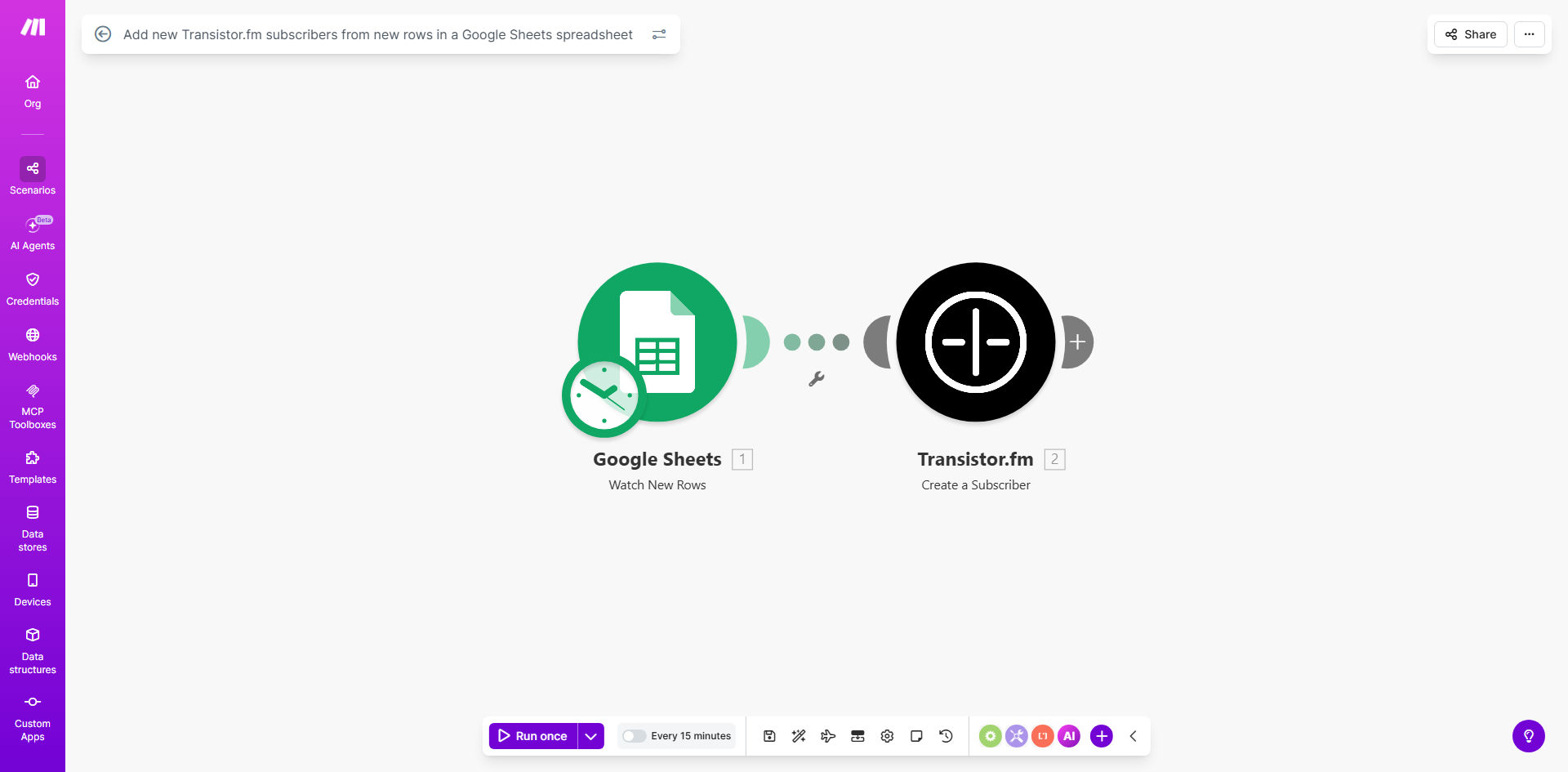
What This Workflow Does
For podcasters and content creators, growing an audience means collecting emails from various sources—website forms, lead magnets, live events, or partnerships. Manually copying and pasting this data from spreadsheets into your podcast hosting platform like Transistor.fm is tedious, error-prone, and steals time from content creation.
This automation solves that problem. It acts as a silent assistant that periodically checks a designated Google Sheets spreadsheet for new subscriber entries. Whenever a new row is added—containing details like email, name, and optional custom fields—the workflow instantly creates a corresponding subscriber in your Transistor.fm account. This ensures your audience list is always current, enabling timely communication and better listener engagement without any manual intervention.
The process is scheduled to run automatically every 15 minutes (configurable), providing a near real-time sync. It eliminates data silos, reduces the risk of human error, and ensures no potential listener falls through the cracks because someone forgot to update the list.
How It Works
The workflow follows a simple, reliable sequence to bridge your data collection point (Sheets) and your audience management platform (Transistor.fm).
Step 1: Monitor Google Sheets for New Rows
The automation starts by connecting to your Google Sheets spreadsheet. It checks the specified worksheet for any rows that have been added since its last run. It intelligently tracks the last processed entry to avoid duplicates, ensuring each subscriber is added only once.
Step 2: Parse and Validate Subscriber Data
For each new row found, the workflow extracts the relevant data columns, typically email address and name. It can also handle additional metadata you might collect. The data is formatted and prepared to meet Transistor.fm's API requirements for creating a subscriber.
Pro tip: Structure your Google Sheet with clear column headers (e.g., 'Email', 'First Name'). This makes mapping the data in the automation straightforward and foolproof.
Step 3: Create Subscriber in Transistor.fm
Using the Transistor.fm module, the workflow sends an API call to create a new subscriber with the data from the spreadsheet. The subscriber is instantly added to your Transistor.fm dashboard, ready to receive updates, newsletters, or podcast notifications as you've configured.
Step 4: Log and Schedule the Next Run
After processing, the workflow can log the action for your records. It then waits for the next scheduled interval (default 15 minutes) before checking the spreadsheet again, creating a continuous, hands-off loop.
Who This Is For
This automation is a game-changer for anyone using Transistor.fm to host their podcast and collecting audience data outside the platform.
Independent Podcasters & Creators: If you're managing your show solo, this automation reclaims hours each month. Whether subscribers come from a website form, a ConvertKit landing page, or an event sign-up sheet, they flow directly into your podcast audience list.
Marketing Teams & Agencies: For teams running podcast campaigns for clients, this ensures seamless list management across tools. You can maintain a master lead list in Sheets while automatically building the podcast subscriber base, providing clear analytics on growth sources.
Businesses with Lead-Generating Content: Companies that use webinars, e-books, or courses to attract an audience can automatically funnel those leads into their podcast subscriber list, nurturing them with valuable audio content and building a stronger community.
What You'll Need
To set up this workflow, you'll need a few accounts and a prepared data source.
- A Make.com account (free tier available).
- A Google account with access to the spreadsheet containing your subscriber list.
- A Transistor.fm account with an active podcast.
- A Google Sheets spreadsheet with your subscriber data. You can use the provided sample template or your own.
- Basic information like your Transistor.fm Show ID (found in your account settings).
Quick Setup Guide
You can have this automation running in under 10 minutes by following these steps.
Pro tip: Before you start, make a copy of the sample Google Sheet linked in the template description. This gives you a correctly formatted starting point.
- Get the Template: Click the "Get This Workflow" button above. This will open the template in your Make.com account.
- Connect Google Sheets: In the first module, click to add a connection. Authorize Make.com to access the Google Sheet where your subscriber data lives.
- Connect Transistor.fm: In the second module, add your Transistor.fm API key (found in your Transistor.fm account under Settings > API) to establish the connection.
- Map Your Data: Point the Google Sheets module to your specific spreadsheet and worksheet. Then, map the spreadsheet columns (e.g., column A for email) to the corresponding fields in the Transistor.fm "Create a Subscriber" module.
- Set the Schedule: The scenario is set to run every 15 minutes by default. You can adjust this schedule in the Make.com scheduler to run hourly, daily, or on any custom interval that fits your needs.
- Turn it On: Save your scenario and toggle the switch to "ON." The automation will run immediately for the first time and then on your chosen schedule.
Key Benefits
Eliminate Manual Data Entry: Save 2-5 hours per month typically spent on copying, pasting, and verifying subscriber information. This time can be redirected towards planning episodes or engaging with your community.
Ensure 100% Data Accuracy: Remove the risk of typos, duplicate entries, or missed subscribers that are common with manual processes. The automation transfers data exactly as it appears in your source sheet.
Accelerate Audience Engagement: New subscribers are added to Transistor.fm within minutes of signing up, not days. This allows you to trigger automated welcome sequences or new episode notifications immediately, improving listener retention.
Centralize Your Growth Efforts: Use Google Sheets as a flexible, universal hub for collecting leads from any source (Typeform, Eventbrite, social media), while your podcast subscriber list in Transistor.fm stays perfectly synchronized.
Scale Your Podcast Effortlessly: As your audience grows from hundreds to thousands, this automation scales with you at zero additional effort. The process remains just as fast and reliable, freeing you to focus on content, not admin.