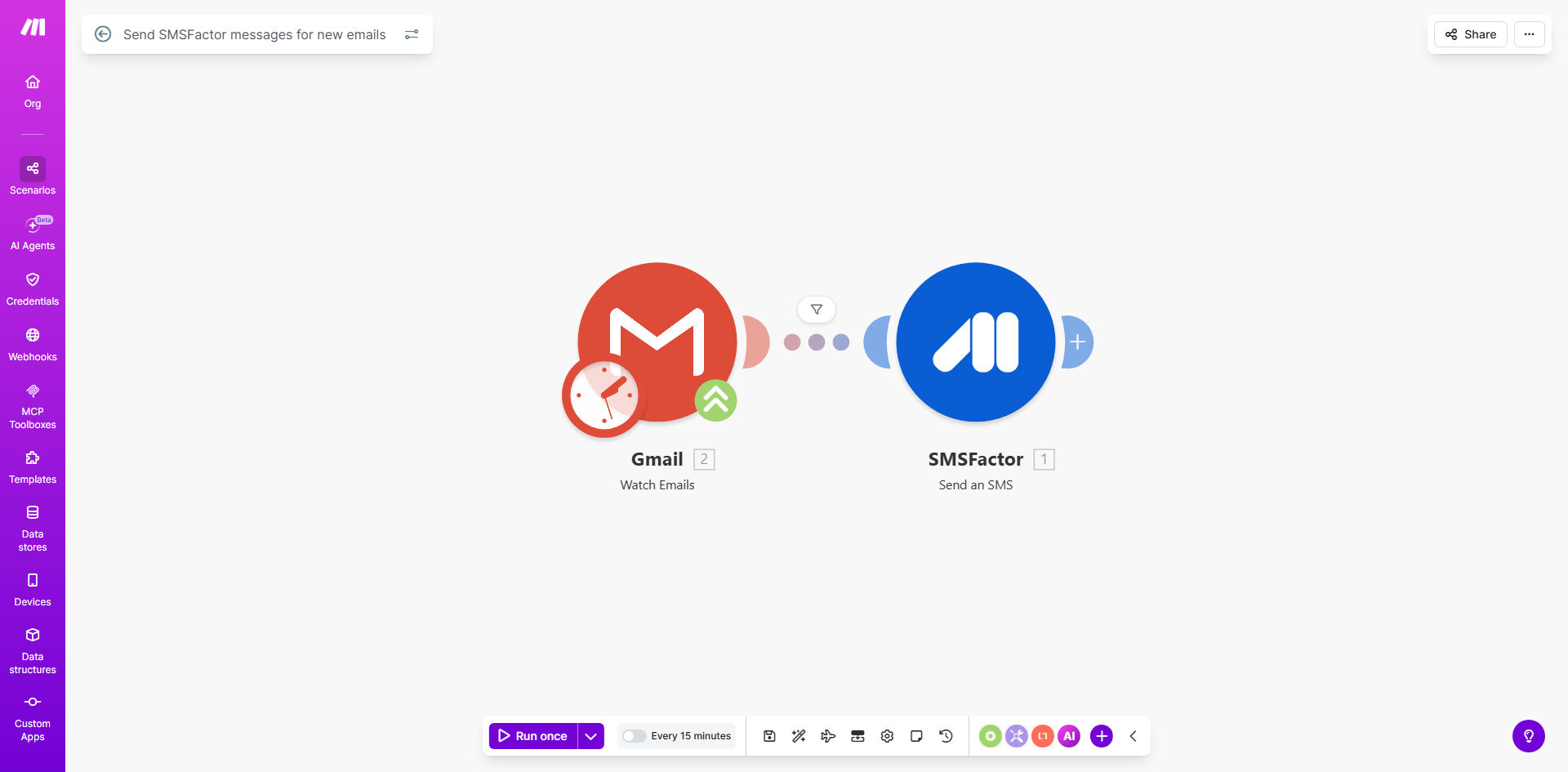
What This Workflow Does
In today's fast-paced business environment, critical emails can get buried in a crowded inbox, leading to delayed responses, missed opportunities, and frustrated customers. Relying solely on email notifications means you're tied to your computer, and urgent messages might wait for hours.
This automated workflow solves that problem by creating a direct bridge between your Gmail and your mobile phone via SMS. Every time a new email arrives that matches your specific criteria (like a particular label or sender), Make.com instantly triggers an SMS alert through the SMSFactor gateway. This transforms an asynchronous email into an immediate, high-priority notification that you can act on from anywhere.
The business value is clear: it turns your email into a real-time communication channel. Sales teams can respond to leads instantly, support agents can address urgent tickets faster, and managers can be alerted to critical operational issues without constantly checking their inbox. It's about reclaiming time and ensuring nothing important slips through the cracks.
How It Works
The automation runs on a simple but powerful trigger-action sequence, managed entirely by Make.com without any manual intervention.
Step 1: Monitor Your Gmail Inbox
The workflow starts by watching your Gmail account for new emails. Using Make.com's Gmail module, it can poll your inbox at regular intervals or use a webhook for instant detection. You configure it to look for specific triggers, such as emails assigned a label like "Urgent," "Lead," or "Support Ticket."
Step 2: Filter and Process the Email Data
Once a matching email is found, Make.com extracts key information like the sender's address, email subject, and a snippet of the body. You can add additional filters here—for example, only proceed if the subject contains certain keywords or if the email is from a VIP contact list. This step ensures only truly important messages trigger an SMS.
Step 3: Format and Send the SMS via SMSFactor
The extracted data is then formatted into a concise SMS message. You can customize the template, including details like "New lead from [Sender Name]: [Subject]." Make.com then connects to your SMSFactor account via its API, authenticates using your credentials, and dispatches the SMS to your pre-defined mobile number (or a list of numbers for a team).
Pro tip: Keep your SMS alerts concise and actionable. Include just enough information—sender and subject—so the recipient knows the priority and context without needing to open the full email immediately.
Who This Is For
This automation is a game-changer for any business professional or team where timely response to email is critical.
Sales & Business Development: Teams that need to respond to inbound leads within minutes to maximize conversion rates. An SMS alert ensures the lead owner is notified instantly, even when away from their desk.
Customer Support & Success: Agents managing high-priority support channels. Getting an SMS for emails labeled "Critical" or from key accounts allows for rapid triage and response, dramatically improving customer satisfaction.
Executives & Managers: Leaders who need to be aware of urgent operational, financial, or PR-related communications but cannot monitor email constantly. It provides peace of mind and control.
Freelancers & Small Businesses: Solopreneurs who wear many hats and need a simple, reliable system to ensure they never miss a client inquiry or important update, helping them compete with larger teams.
What You'll Need
- A Make.com Account: A free or paid plan to host and run the automation scenario.
- A Gmail Account (or Google Workspace): The source email account where you receive the emails you want to monitor.
- An SMSFactor Account: An active account with SMSFactor, including API credentials (API key) and sufficient SMS credits.
- A Destination Phone Number: The mobile number (or numbers) that will receive the SMS alerts. Ensure it's in a format supported by SMSFactor.
- Defined Filter Criteria: A clear idea of which emails should trigger an alert (e.g., "Apply label 'Alert Me' to important emails in Gmail").
Quick Setup Guide
Follow these steps to deploy this template in under 15 minutes:
- Clone the Template: Click "Get This Workflow" to open the template on Make.com. Sign in and create a copy in your own workspace.
- Connect Gmail: In the first module, click to add a connection. Authenticate your Gmail account with Make.com and grant the necessary permissions to read email labels and content.
- Configure the Trigger: Set the Gmail module to watch for new emails in a specific label. You can create a new label in Gmail (like "SMS-Alert") specifically for this purpose.
- Connect SMSFactor: In the SMS sending module, add a new connection to SMSFactor. You will need to enter your SMSFactor API key, which you can find in your account dashboard.
- Customize the SMS Message: Map the data from the Gmail module (like `From`, `Subject`) into the SMS message body field. Keep it under 160 characters for a single SMS.
- Add the Recipient Number: Enter the phone number that should receive the alerts in the designated field in the SMSFactor module, using the international format (e.g., +441234567890).
- Test and Activate: Run a single cycle to test. Send a test email to yourself with the configured label. If successful, activate the scenario. It will now run automatically based on your schedule (e.g., every 5 minutes).
Key Benefits
Cut Response Time from Hours to Minutes: By receiving an SMS the moment a critical email lands, you can respond immediately. This is crucial for lead conversion and customer support, where speed directly impacts revenue and satisfaction.
Eliminate Manual Inbox Monitoring: Free yourself or your team from the constant, stressful need to refresh the inbox. This automation acts as your 24/7 virtual assistant, saving several hours per week per person that can be redirected to higher-value tasks.
Ensure Critical Messages Are Never Missed: SMS has a 98% open rate, compared to the 20-30% typical for email. This near-guaranteed delivery ensures that urgent alerts about system outages, high-value leads, or executive requests are always seen, regardless of email overload or being out of office.
Improve Team Coordination and Accountability: You can configure the workflow to send alerts to multiple team members or a dedicated duty phone. This creates a reliable escalation path for urgent issues, ensuring someone is always aware and can take action.
Leverage Existing Tools with Zero Code: This integration connects two powerful platforms—Gmail and SMSFactor—without requiring any custom development. It's a scalable, maintainable solution that uses the robust infrastructure of Make.com, reducing IT overhead and complexity.