Make.com Stripe HubSpot CRM Payment Automation Data Sync

Automatically Sync Stripe Payments to HubSpot CRM

This free template creates or updates HubSpot contacts the moment a Stripe payment succeeds—eliminating manual data entry and keeping your CRM perfectly updated.

Get This Workflow Make.com · 2 Modules · Free Template
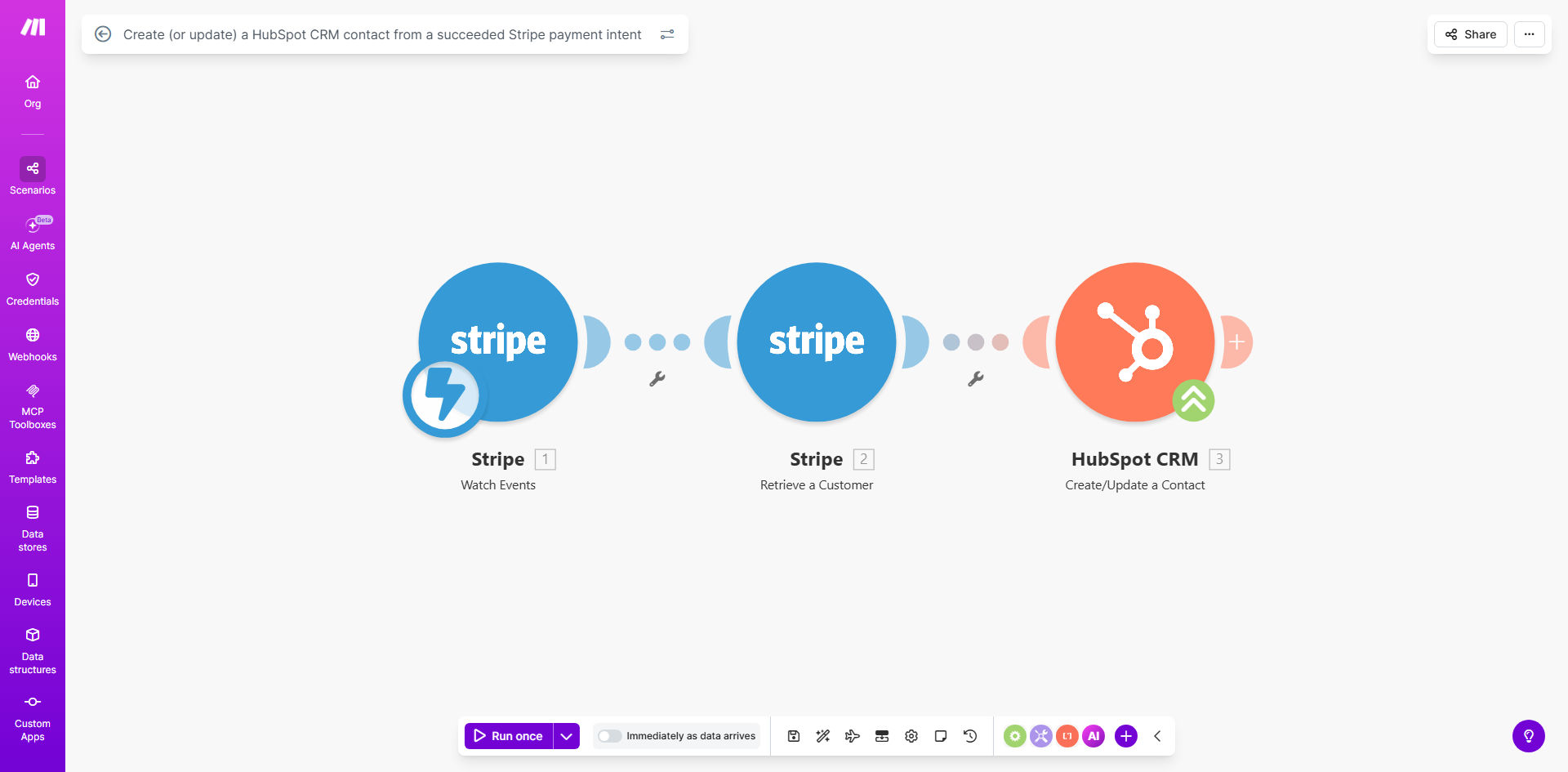
Diagram showing automation flow from Stripe payment success to HubSpot CRM contact creation

What This Workflow Does

For any business using Stripe for payments and HubSpot for CRM, a critical gap often exists: customer payment data lives in Stripe, while sales and marketing activities happen in HubSpot. Manually transferring this information is a tedious, error-prone task that wastes valuable time and leads to outdated or incorrect customer records. This disconnect can result in missed follow-up opportunities, poor customer service, and inaccurate revenue reporting.

This automation solves that problem instantly. It acts as a real-time bridge between your finance and sales/marketing systems. Whenever a customer's payment intent succeeds in Stripe, the workflow automatically triggers. It takes the customer's details—like their name, email, and transaction information—and either creates a brand new contact in your HubSpot CRM or updates an existing one if they've purchased before. This ensures your entire team has immediate, accurate visibility into who is paying for what, directly within the tools they use every day.

How It Works

The workflow is elegantly simple, running silently in the background to keep your data perfectly synchronized.

Step 1: Monitor Stripe for Successful Payments

The automation is constantly listening for a specific webhook event from Stripe: payment_intent.succeeded. This is the precise moment a customer's payment is fully processed and confirmed. The workflow captures all the relevant data from this event.

Step 2: Prepare and Map the Customer Data

The data from Stripe is then formatted for HubSpot. Key fields like the customer's email, first name, last name, and the payment amount are extracted. The email address is used as the unique identifier to prevent duplicates.

Step 3: Create or Update the HubSpot Contact

Here's the intelligent part: the workflow checks your HubSpot CRM to see if a contact with that exact email already exists. If it doesn't, a new contact is created, instantly populating their profile with the payment information. If the contact does exist, their record is updated with the details of this new transaction, building a complete history of their purchases over time.

Pro tip: Use the payment timestamp from Stripe to create a "Last Purchase Date" property in HubSpot. This allows your marketing team to segment customers by recency and run highly effective re-engagement campaigns.

Who This Is For

This automation is a game-changer for SaaS companies, e-commerce stores, digital agencies, and any subscription-based or online service business that uses Stripe and HubSpot. It's especially valuable for founders, operations managers, and sales leaders who are tired of exporting CSV files or relying on memory to track which customers have paid. If you have a sales team that needs to know who your active customers are, or a marketing team that wants to send targeted emails to recent buyers, this workflow is for you.

What You'll Need

  1. A Make.com account (free tier available).
  2. A Stripe account with live or test-mode transactions.
  3. A HubSpot CRM account (the free version works perfectly).
  4. API connections for both Stripe and HubSpot set up within Make.com.

Quick Setup Guide

  1. Clone the template: Click "Get This Workflow" and duplicate the scenario into your Make.com workspace.
  2. Connect your apps: Authorize the Stripe and HubSpot modules within Make.com by logging into your accounts.
  3. Configure the webhook: In your Stripe dashboard, ensure the payment_intent.succeeded event is being sent to Make.com's webhook URL (the template typically handles this).
  4. Map your fields: Review the data mapping to ensure the correct Stripe fields (customer email, name, amount) are being sent to the corresponding HubSpot contact properties.
  5. Test and activate: Run a test transaction in Stripe's test mode and verify that a contact appears or updates correctly in your HubSpot CRM. Once confirmed, turn the scenario on.

Key Benefits

Eliminate 100% of manual data entry. Your team will never have to copy-paste customer details from Stripe to HubSpot again, reclaiming hours each week for higher-value tasks.

Achieve perfect CRM accuracy. With real-time syncing, your HubSpot data always reflects the latest payment status, ensuring sales outreach is based on current information and marketing lists are always accurate.

Accelerate your sales cycle. The moment a payment clears, that customer is immediately visible to your sales team in HubSpot, allowing for instant welcome calls, onboarding, or upselling opportunities.

Build richer customer profiles. Every successful payment automatically adds to a contact's record in HubSpot, creating a historical view of their lifetime value and purchase behavior for better segmentation and personalization.

Scale your operations effortlessly. Whether you process 10 or 10,000 payments a month, this automation handles the data sync seamlessly, removing a major bottleneck as your business grows.

Frequently Asked Questions

Common questions about Stripe and HubSpot CRM automation and integration

Syncing Stripe payments to HubSpot CRM is crucial for maintaining a single source of truth for customer data. It ensures your sales and marketing teams have immediate access to accurate payment history and customer information, enabling personalized follow-ups, better customer support, and more effective upselling strategies without manual data transfer errors.

Without this sync, teams work in silos. Marketing might email customers whose subscriptions have lapsed, or sales might miss a high-value lead because the payment data hasn't been logged yet. Automation bridges this gap, turning payment events into actionable intelligence.

Typically, this automation syncs the customer's name, email address, payment amount, invoice ID, payment status, and timestamp from Stripe to HubSpot. You can also map custom fields like product purchased, subscription plan, or billing country to create rich, segmented contact profiles in your CRM for targeted marketing campaigns.

The key is to sync data that adds business context. For example, syncing the product name allows you to create lists of "Customers who bought Product X" for targeted onboarding or cross-selling emails directly from HubSpot.

  • Core data: Email, Name, Amount, Date.
  • Extended data: Product/Plan, Invoice Link, Customer ID.
  • Use custom properties for business-specific fields.

Yes, a well-built automation uses the customer's unique email address as a key identifier. It first checks if a contact with that email already exists in HubSpot. If found, it updates the existing contact record with the new payment information. If not, it creates a new contact, effectively preventing duplicate entries and keeping your CRM clean.

This "search then create/update" logic is fundamental. It means a customer's HubSpot profile becomes a living record of all their interactions and transactions with your business, rather than a series of disconnected entries each time they pay.

Automating the Stripe-to-HubSpot sync eliminates the need for manual copy-pasting, which can take 5-10 minutes per customer and is prone to typos or missed entries. For a business with 50 monthly transactions, this saves over 4 hours of administrative work and ensures 100% data accuracy, leading to reliable reporting and customer insights.

The cost of manual errors is high—sending marketing to the wrong email, missing a high-value client, or misreporting revenue. Automation provides consistent, reliable data transfer 24/7, freeing your team to focus on analysis and action instead of data entry.

Real-time payment data in your CRM allows for instant segmentation of customers by purchase behavior, enabling timely 'thank you' emails, onboarding sequences, or renewal reminders. Sales teams can identify high-value customers immediately, and support can quickly verify payment status, drastically improving customer experience and operational efficiency.

Imagine a new customer pays. Within seconds, they're added to a "New Customer" list in HubSpot, triggering a personalized welcome series. Your sales rep gets a notification and can place a quick "thanks for your purchase" call. This level of responsiveness builds loyalty and increases lifetime value.

Yes, when built on platforms like Make.com, the integration uses secure API connections. Sensitive payment details like credit card numbers are not transferred to the CRM; only necessary customer and transaction metadata is shared. Both Stripe and HubSpot are enterprise-grade platforms with robust security and compliance certifications (like SOC 2), ensuring data is handled safely.

The automation follows the principle of least privilege—it only accesses the specific data needed for the task (e.g., customer email, invoice ID) and does not store full payment details. The connection is encrypted end-to-end, maintaining the high security standards you expect from your financial and CRM tools.

Absolutely. This automation can be extended to trigger multi-step workflows. For example, after creating the HubSpot contact, you can automatically add them to a specific email list, create a support ticket, notify your sales team in Slack, or send a personalized welcome email via your ESP, creating a seamless post-purchase customer journey.

This is where automation becomes truly powerful. The payment event becomes the trigger for an entire operational sequence. One successful payment can update the CRM, notify the team, enroll the customer in onboarding, and schedule a follow-up—all without human intervention.

  • Trigger email sequences in Mailchimp or HubSpot Marketing.
  • Create tasks or deals in your project management tool.
  • Send internal alerts to specific team channels.

Yes, GrowwStacks specializes in building custom automation solutions that connect Stripe, HubSpot, and other tools in your stack. We can tailor the workflow to sync specific custom fields, handle complex subscription logic, integrate with your internal tools, and design the entire process to fit your unique business operations and goals.

While this free template is an excellent starting point, many businesses need more—like syncing refunds, handling multi-currency, updating deal stages, or integrating with a fulfillment system. Our team analyzes your process and builds a robust, scalable automation that works exactly how you need it to, saving you time and driving growth.

  • Custom field mapping for your unique data.
  • Integration with your internal notification systems.
  • Ongoing support and optimization.

Need a Custom Stripe-HubSpot Automation?

This free template is a starting point. Our team builds fully tailored automation systems for your specific business needs.