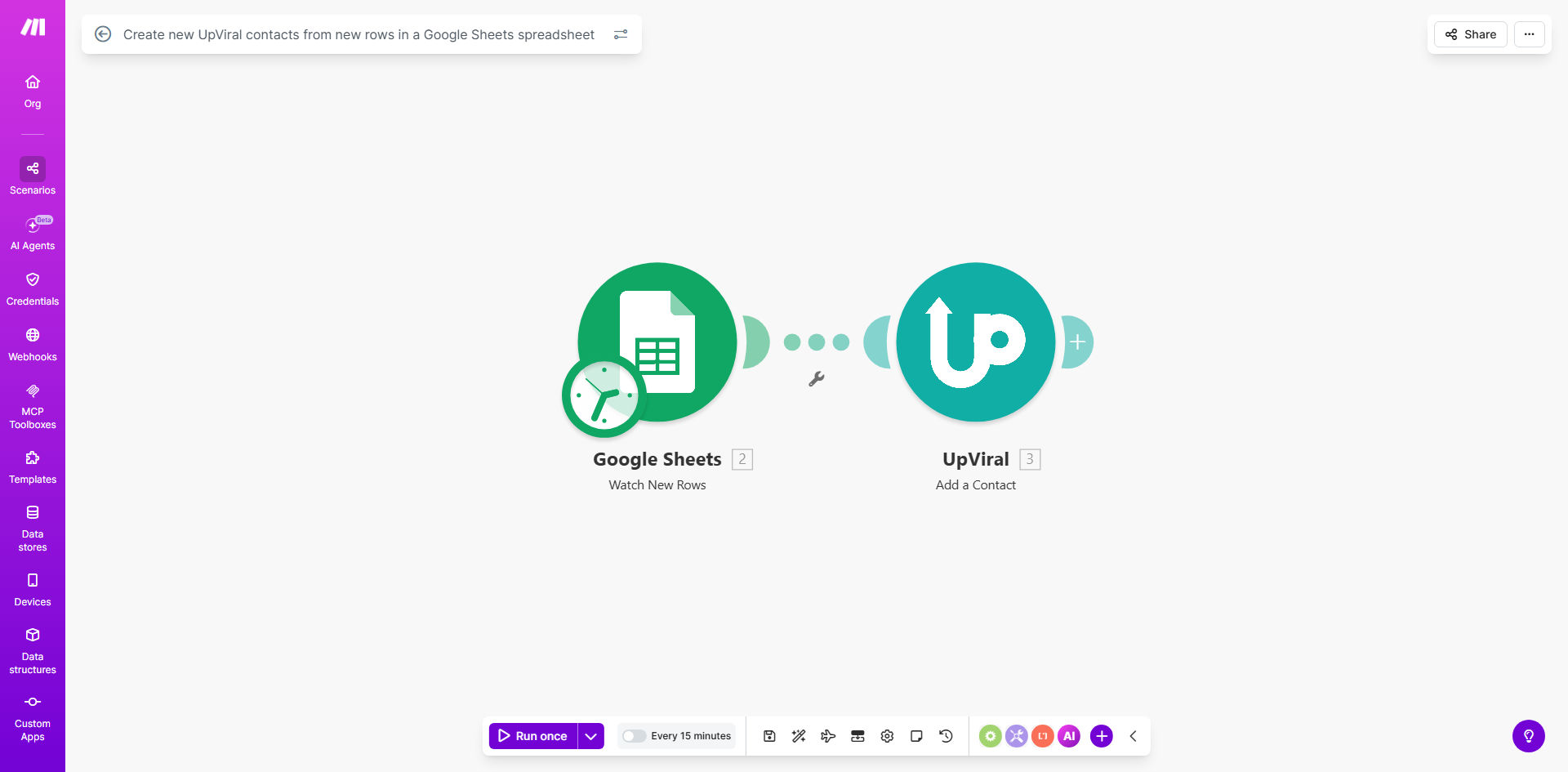
What This Workflow Does
For marketers and business owners running referral or affiliate programs with UpViral, manually transferring leads from sign-up sheets, partner lists, or webinar registrations is a tedious and error-prone bottleneck. This process often delays participant onboarding, dampening the initial excitement and reducing program effectiveness.
This automation solves that problem by creating a seamless bridge between Google Sheets and UpViral. It acts as a dedicated assistant that periodically checks your designated spreadsheet for new rows. Whenever a new lead is added—whether from a form submission, a team member, or an integrated app—the workflow instantly captures their details (like name and email) and creates a corresponding new contact within your UpViral campaign. This ensures your referral program is always populated with fresh, engaged participants without any manual intervention.
The result is a faster, more reliable, and scalable lead onboarding process. You can collect leads through any method that feeds into Google Sheets, confident that they will automatically join your UpViral ecosystem, ready to start sharing and driving growth.
How It Works
The workflow operates on a simple yet powerful trigger-action principle, ensuring no lead slips through the cracks.
Step 1: Scheduled Check on Google Sheets
The automation is initiated by a schedule module, set by default to run every 15 minutes. At each interval, it connects to your specified Google Sheets spreadsheet and scans for rows that have been added since the last check. It intelligently tracks its progress so it only processes genuinely new entries.
Step 2: Data Retrieval and Parsing
For each new row found, the workflow retrieves the cell values from predefined columns. These typically include essential contact information such as email address, first name, last name, and any custom fields you've set up in your sheet that correspond to UpViral contact properties.
Pro tip: Structure your Google Sheet with clear column headers (e.g., "Email", "FirstName", "LastName"). This makes mapping the data to UpViral fields straightforward and prevents errors during the sync.
Step 3: Contact Creation in UpViral
The core action takes place here. The workflow uses the UpViral module, authenticating with your API key. It takes the parsed data from the sheet and sends a "Create a Contact" API request to your specific UpViral campaign. The contact is created instantly with all the provided details, making them an active participant in your program.
Step 4: Error Handling & Logging (Optional Enhancement)
While the base template focuses on the core sync, you can enhance it with error handling. For instance, you can add a router to check if the email field is empty before attempting the API call, preventing failed operations. You can also log successful creations or errors to a separate sheet for auditing.
Who This Is For
This automation is a game-changer for specific roles and business models:
- Digital Marketers & Growth Hackers: Those running viral referral, affiliate, or loyalty campaigns who collect leads through various funnels and need them instantly active in UpViral.
- Course Creators & Coaches: Individuals who use webinars or landing pages to build an audience and want to automatically enroll sign-ups into a referral program for their flagship product.
- Agency Owners: Marketing or SaaS agencies managing UpViral campaigns for multiple clients. This automation standardizes and simplifies lead ingestion from client-provided sheets or forms.
- Community Managers: Professionals who build communities and use referral programs to incentivize sharing. They often gather member details in Sheets from events or applications.
- Small Business Owners: Entrepreneurs wearing multiple hats who cannot afford to waste time on manual data entry between their lead list and their marketing tools.
What You'll Need
To set up this workflow successfully, ensure you have the following prerequisites ready:
- A Make.com account (free or paid tier).
- A Google Sheets spreadsheet containing your lead data, with edit access granted to Make.com.
- An active UpViral account with a campaign already created.
- Your UpViral API Key, which can be found in your UpViral account settings under the API section.
- The Campaign ID for the specific UpViral campaign where you want contacts to be added.
- Basic understanding of your Google Sheet's structure (column names for email, name, etc.).
Quick Setup Guide
Follow these steps to configure the template in your Make.com account:
- Clone the Template: Click the "Get This Workflow" button above. This will open the template in Make.com. Press the "Copy" button to create a copy in your own Make workspace.
- Connect Google Sheets: In the first module, click to add a connection. Authenticate with your Google account and select the specific spreadsheet and worksheet that contains your lead list.
- Connect UpViral: In the UpViral module, click to add a connection. Enter your UpViral API Key when prompted. This securely links your workflow to your UpViral account.
- Map Your Data Fields: In the UpViral "Create a Contact" module, you will see fields like "Email", "First Name", etc. Map each of these to the corresponding column from your Google Sheets row. For example, map "Email" to the column in your sheet that holds email addresses.
- Set the Schedule (Optional): The template is set to run every 15 minutes. You can adjust this schedule by clicking on the clock module. Change it to hourly, daily, or a custom interval that matches your lead flow.
- Test and Turn On: Run the scenario once manually to test with a single row. Check your UpViral campaign to confirm the contact was created successfully. Once verified, toggle the scenario to "ON" to let it run automatically.
Key Benefits
Eliminate 5–10 hours of manual work per month. Free your team from the mind-numbing task of copying and pasting data between tabs and platforms, allowing them to focus on high-value marketing strategy and community engagement.
Achieve 100% data accuracy and zero missed leads. Automated systems don't get tired or distracted. Every new row in your sheet is processed consistently, ensuring your UpViral campaign reflects your complete and accurate lead list in real-time.
Accelerate participant onboarding by 90%. Instead of leads waiting hours or days to be added to your referral program, they are enrolled within minutes. This immediacy capitalizes on their peak interest, leading to higher initial sharing activity.
Create a scalable foundation for growth. As your lead volume increases from dozens to thousands, this automation scales effortlessly without requiring additional staff. It handles the increased load with the same reliability.
Centralize lead management from multiple sources. Use Google Sheets as a simple, universal hub for leads from Typeform, Facebook Lead Ads, partner CSVs, or manual entries. This single automation becomes the unifying pipeline to UpViral, simplifying your tech stack.