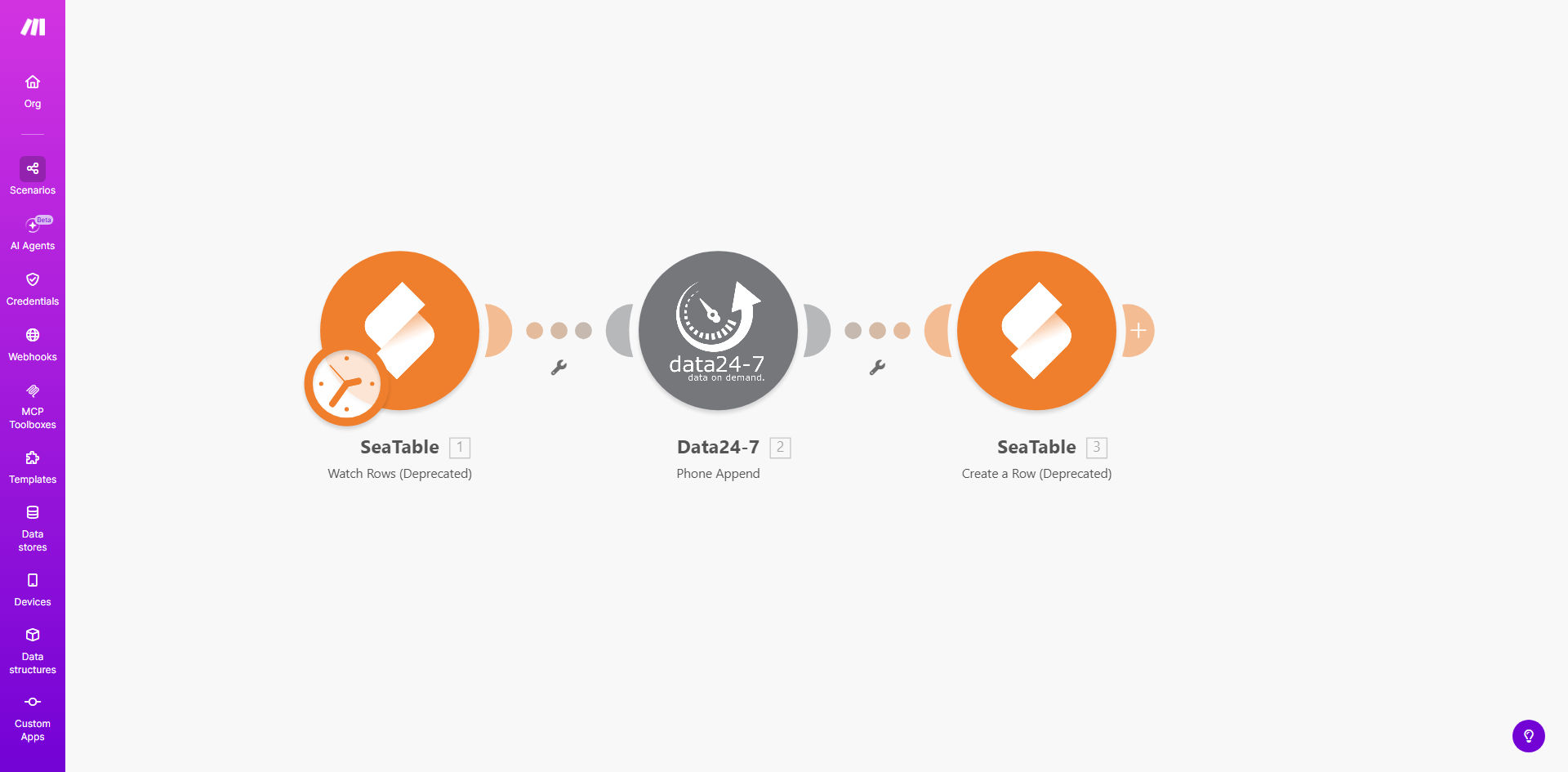
What This Workflow Does
Incomplete contact data is a major bottleneck for sales and outreach teams. When a new lead or contact is added to your SeaTable database, you often have a name and address but lack a direct phone number. Manually searching for this information is tedious, time-consuming, and prone to errors, delaying follow-up and potentially losing business opportunities.
This automated workflow solves that problem by connecting SeaTable to Data24-7, a professional data enrichment service. Every time a new record with the required fields (First Name, Last Name, Address, City, State, Zip Code) appears in your designated SeaTable base, Make.com automatically triggers a search. It sends this information to Data24's API, retrieves the associated phone number, and updates the original SeaTable record—all within seconds, without any human intervention.
The result is a continuously enriched database where your team has actionable phone numbers ready for calls, SMS campaigns, or support outreach immediately after a contact is added. It turns a passive data storage system into an active, intelligence-gathering tool.
How It Works
The automation follows a clear, reliable sequence to ensure data flows seamlessly from detection to enrichment.
Step 1: SeaTable Trigger
The workflow is initiated by the "Watch Records" module in Make.com, which monitors your specified SeaTable base for new entries. The moment a row is added that contains data in the critical columns, the automation captures the entire record and passes it to the next step.
Pro tip: Ensure your SeaTable column names exactly match what the workflow expects (First Name, Last Name, etc.). Use SeaTable's "Single Line Text" column type for best compatibility.
Step 2: Data Preparation & API Call
Make.com formats the captured data—concatenating the address fields into a standard format—and prepares the API request for Data24-7. It sends the person's full name and complete address to Data24's "Find Person" or similar endpoint, requesting a phone number in return.
Step 3: Phone Number Retrieval & Processing
Data24's service searches its extensive databases and returns a response. The workflow includes a router to handle different outcomes: a successful phone number find, a "no result" response, or an API error. This ensures robust error handling so the workflow doesn't fail unexpectedly.
Step 4: Update SeaTable Record
If a phone number is successfully retrieved, Make.com uses the "Update a Record" module to write that number back into a new column (e.g., "Phone Number" or "Data24 Phone") in the original SeaTable row. The record is now complete and ready for use.
Who This Is For
This automation delivers immense value to any business or team that relies on accurate contact information for outbound communication.
Sales Teams: Accelerate prospecting by instantly getting phone numbers for new leads from web forms, trade shows, or purchased lists stored in SeaTable.
Marketing Agencies: Enrich client contact databases for SMS marketing campaigns, ensuring higher deliverability and engagement rates.
Recruiters and HR Departments: Quickly find contact details for potential candidates whose resumes might only list an address.
Small Business Owners: Automate contact data hygiene for customer lists, saving valuable time that can be spent on serving clients instead of admin work.
Real Estate and Insurance Agents: Keep lead databases updated with the most current contact information for timely follow-ups.
What You'll Need
To implement this template successfully, you'll need to have the following accounts and configurations ready:
- A Make.com account (free or paid plan).
- A SeaTable account with a base containing your contact data.
- An active Data24-7 API subscription or account with available credits for lookups.
- Your SeaTable base must have columns named: First Name, Last Name, Address, City, State, Zip Code. You can add an empty column like "Phone Number" for the results.
- Your API keys for both SeaTable (for Make.com to connect) and Data24-7 securely stored and ready for input during setup.
Quick Setup Guide
Follow these steps to get your automation live in under 15 minutes.
- Clone the Template: Click "Get This Workflow" and duplicate the template into your own Make.com scenario.
- Connect Your Apps: In the scenario, update the connections for the SeaTable and Data24 modules with your respective API keys or login credentials.
- Configure the Trigger: Point the "Watch Records" module to your specific SeaTable base and table. Test it by adding a dummy record to ensure it triggers.
- Map Data Fields: Verify that the data mapping between SeaTable columns and the Data24 API request is correct. The address should be formatted as a single string.
- Set Up the Update: Specify which column in your SeaTable should receive the found phone number. You may want to create a new column for this purpose.
- Test with a Single Record: Run the scenario once manually with a known contact to verify the phone number is fetched and written back correctly.
- Activate and Monitor: Turn on the scenario's scheduler and monitor the operations for the first few hours to ensure it runs smoothly.
Key Benefits
Eliminate hours of manual data entry each week. What used to take an employee 5-10 minutes per record now happens automatically in the background, freeing your team for higher-value tasks like customer conversations and strategy.
Improve data accuracy and campaign success rates. Automated lookups via a professional service like Data24 reduce typos and outdated numbers, leading to more successful call connections and higher ROI on SMS marketing efforts.
Enable real-time lead engagement. Sales teams can call a new lead within minutes of them submitting a form, dramatically increasing conversion chances compared to contacting them days later when the lead has gone cold.
Scale your outreach without scaling headcount. This automation allows you to process hundreds or thousands of records with zero additional labor, making it cost-effective to manage large lead lists or database cleanup projects.
Maintain a single source of truth. All enriched data lives directly in your central SeaTable base, ensuring everyone in your organization works from the same updated, reliable information without checking multiple systems.