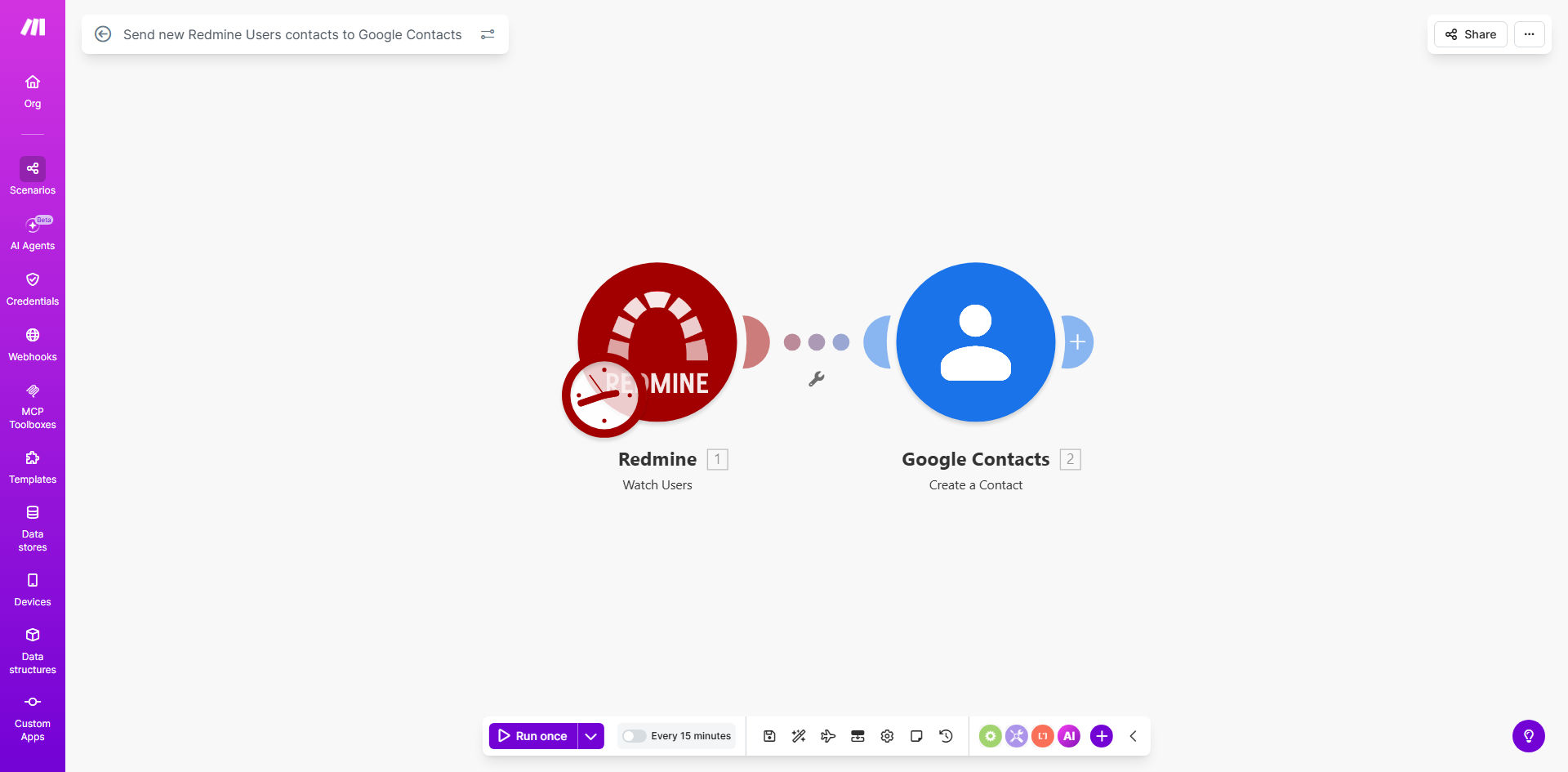
What This Workflow Does
For teams using Redmine for project management and issue tracking, managing a separate, updated contact list for clients, developers, and stakeholders is a constant, manual chore. New users are added to Redmine, but their details remain siloed, forcing team members to copy-paste information into email clients or Google Contacts, leading to errors, duplicates, and communication delays.
This automation solves that by creating a live bridge between Redmine and Google Contacts. Whenever a new user is created in your Redmine instance, this Make.com workflow triggers instantly. It captures the user's details—like name, email address, and company—and automatically creates a corresponding, fully formatted contact in your specified Google Contacts list. This ensures your entire team has immediate access to accurate contact information directly from their Gmail or Google Calendar, streamlining communication from the very first interaction.
Pro tip: Use Google Contact Groups to automatically categorize new Redmine contacts (e.g., "Clients," "Developers," "Project Stakeholders") based on their Redmine role or project, making segmented communication effortless.
How It Works
The workflow is a straightforward, reliable automation that runs in the background, requiring zero ongoing effort after the initial one-time setup.
Step 1: Monitor Redmine for New Users
The scenario starts with a Watch Hook or a scheduled module in Make.com that monitors your Redmine application's API for the creation of new users. The moment a user record is added, the workflow is triggered, and the user's data is captured.
Step 2: Map and Format Contact Data
Make.com then processes the incoming data. It maps the relevant fields from Redmine (such as first name, last name, login/email, and custom fields) to the corresponding fields required by Google Contacts (Given Name, Family Name, Email, Organization Title). You can easily customize this mapping to include phone numbers or notes.
Step 3: Create Contact in Google Contacts
Finally, the workflow uses the Google Contacts module to create a new contact in your chosen Google account. The contact is saved instantly, becoming immediately searchable and available across Google's ecosystem—Gmail, Calendar, and Chat—for your entire team.
Who This Is For
This automation is a game-changer for any business or team that relies on Redmine for client projects, internal development, or support ticketing. It's perfect for development agencies that onboard new client contacts regularly, IT departments managing internal and external stakeholders, and open-source project maintainers who collaborate with a growing community of contributors. If your team wastes time looking up contact details or manually updating address books, this workflow is for you.
What You'll Need
- A Make.com account (free tier available).
- Administrator or API access to your Redmine instance to generate an API key.
- A Google account with Google Contacts, where you have permission to add contacts.
- (Recommended) A basic understanding of the user fields in your Redmine setup you wish to sync.
Quick Setup Guide
You can have this automation running in under 15 minutes.
- Get the Template: Click "Get This Workflow" to copy the ready-made scenario into your Make.com account.
- Connect Redmine: In the first module, create a connection to your Redmine using an API key. Make.com will guide you through this simple process.
- Connect Google Contacts: Authorize Make.com to access your Google Contacts—this is a standard, secure OAuth process.
- Map Your Fields: Review the data mapping between Redmine and Google Contacts. Adjust the field pairs if your Redmine uses custom attribute names.
- Turn it On: Activate the scenario. It will now run automatically, syncing every new Redmine user going forward.
Pro tip: Test the workflow by creating a test user in Redmine first. Verify the contact appears correctly in Google Contacts before letting it run on live data.
Key Benefits
Save 2-3 hours per month on manual data entry. Eliminate the repetitive task of copying contact information between systems, freeing up your team for higher-value work.
Ensure 100% data accuracy and eliminate duplicates. Automated sync removes human error from manual entry, guaranteeing that contact details in Google are always an exact match of your Redmine source of truth.
Accelerate team onboarding and client communication. New contacts are instantly available to your entire team in Gmail and Calendar, speeding up initial outreach and collaboration from the moment a project starts.
Create a unified contact hub. Bridge the gap between your project management tool and your communication suite, giving everyone a single, reliable place to find contact details.
Scale your operations effortlessly. As your user base in Redmine grows—whether clients or team members—your Google Contacts list grows automatically with zero additional administrative overhead.