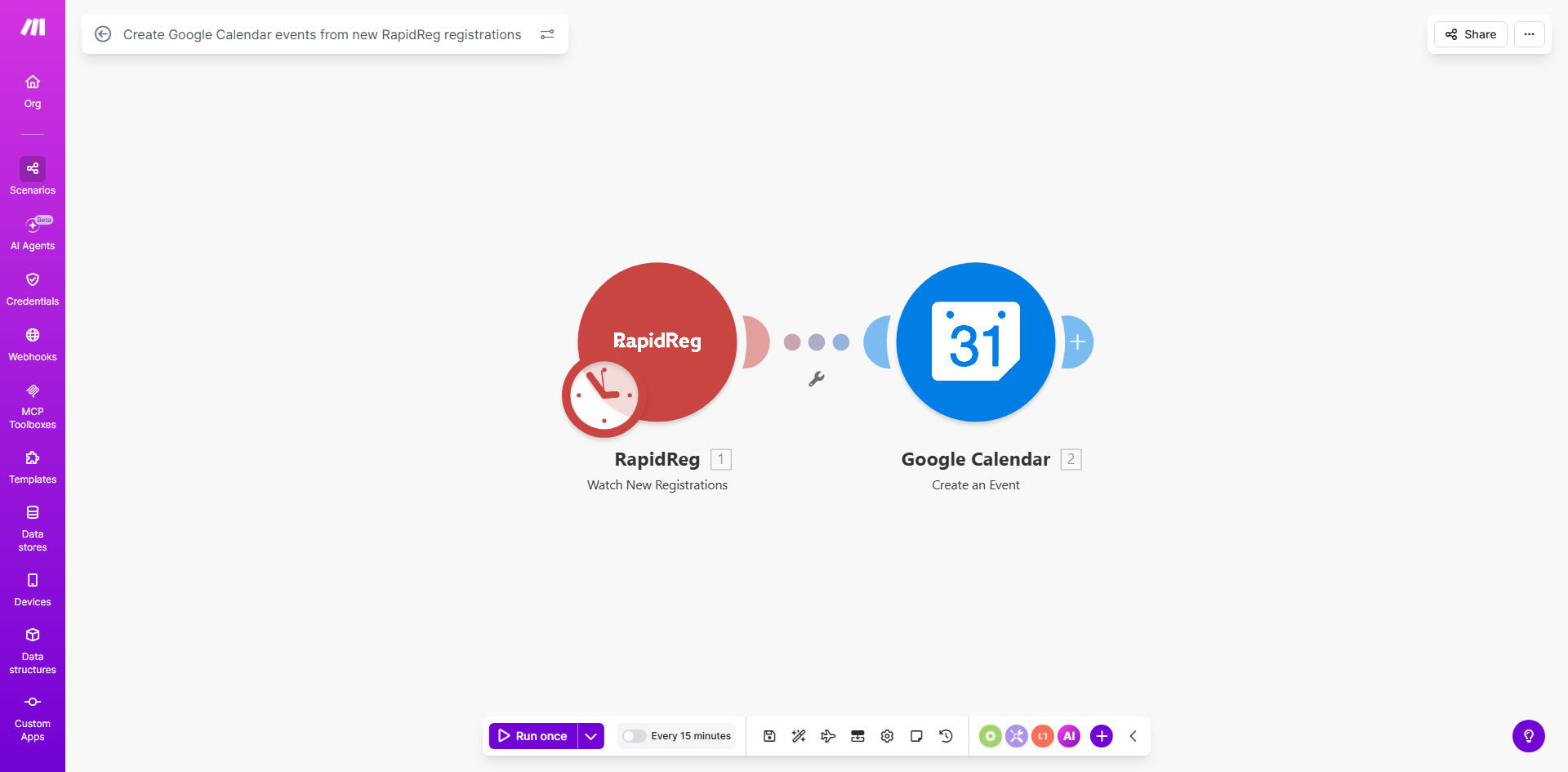
What This Workflow Does
Managing events, classes, or appointments manually is a time-consuming and error-prone process. Every new registration in RapidReg requires someone to manually open Google Calendar, create an event, fill in details, and set reminders. This not only eats up administrative hours but also leads to mistakes—double bookings, incorrect times, or missed entries that result in poor customer experience.
This automation solves that by creating a seamless bridge between RapidReg and Google Calendar. Whenever a new registration is submitted, the workflow instantly triggers and creates a corresponding Google Calendar event. It pulls data like the registrant's name, event date, time, and session details to populate the calendar entry automatically. This ensures your schedule is always up-to-date, your team is aligned, and every customer receives immediate confirmation of their booked slot.
The business value is clear: you save hours per week on manual scheduling, eliminate administrative errors, and provide a professional, automated experience that increases customer satisfaction and reduces no-shows.
How It Works
Step 1: Trigger on New RapidReg Registration
The workflow starts by monitoring your RapidReg account for new registrations. Make.com watches for new entries in your registration form or database. Once a new record appears, it captures all the relevant data—customer information, selected event, date, time, and any custom fields.
Step 2: Map Registration Data to Calendar Fields
The automation then processes the captured data. It maps the RapidReg fields to the corresponding Google Calendar event properties. For example, the registrant's name becomes part of the event title or description, the selected date and time become the event start and end, and any notes become the event description.
Pro tip: You can add logic to format dates correctly, handle different time zones, or even categorize events by type (e.g., "Workshop," "Consultation") based on registration data.
Step 3: Create the Google Calendar Event
Using the mapped data, the workflow calls Google Calendar's API to create a new event on your specified calendar. It sets all details, including title, description, start/end times, and can even add the registrant's email as an attendee. The event is created instantly, often before the customer even closes the registration form.
Step 4: Confirm and Log
After the event is successfully created, the automation can log the action in a spreadsheet or send a confirmation notification to your team. This provides an audit trail and ensures you can verify that every registration resulted in a scheduled calendar entry.
Who This Is For
This automation is ideal for businesses, educators, coaches, and organizations that manage scheduled events through registration platforms.
- Training Companies & Coaches: Automatically schedule coaching sessions, workshops, or courses when a client signs up.
- Event Organizers: Instantly create calendar entries for conference attendees, webinar participants, or meetup guests.
- Health & Service Professionals: Schedule appointments for consultations, treatments, or follow-ups directly from client bookings.
- Educational Institutions: Create class calendar events for students who register for courses or special sessions.
- Any Team Using RapidReg: Reduce manual work for admins who currently copy-paste registration details into calendars.
What You'll Need
- A Make.com account (free or paid) to build and run the automation.
- A RapidReg account with an active registration form or database that you want to monitor.
- A Google Calendar account (Google Workspace or personal) where events will be created.
- API connections set up between Make.com and both RapidReg and Google Calendar (Make provides modules for both).
- Clear understanding of which RapidReg fields correspond to which Google Calendar event properties (e.g., date field, time field, customer name field).
Quick Setup Guide
- Get the Template: Use the "Get This Workflow" button above to import the template into your Make.com account.
- Connect Your Apps: In Make.com, establish connections to your RapidReg and Google Calendar accounts. Authorize the necessary API access.
- Configure the Trigger: Set the RapidReg module to watch for new registrations. Specify the exact form or table you want to monitor.
- Map the Data: Adjust the data mapping between RapidReg fields and Google Calendar event fields. Ensure date/time formats are compatible.
- Select the Calendar: Choose which Google Calendar (e.g., "Primary," "Business Events") the new events should be added to.
- Test the Flow: Create a test registration in RapidReg and verify that a correct event appears in your Google Calendar.
- Activate: Turn on the scenario. Your automation is now live, creating calendar events for every new registration automatically.
Key Benefits
Save 2–5 hours per week on manual scheduling. Administrative staff no longer need to manually enter each registration into the calendar. The automation handles it instantly, freeing up time for higher-value tasks.
Eliminate scheduling errors and double bookings. Automated mapping ensures data consistency. Every registration gets a calendar slot with correct details, reducing the risk of human error that leads to overbooking or missed appointments.
Improve customer experience with instant confirmation. When a calendar event is created immediately after registration, customers feel assured their slot is secured. This can be paired with automated confirmation emails for a seamless experience.
Centralize event management across teams. All scheduled events live in Google Calendar, giving your entire team real-time visibility into upcoming sessions, improving coordination and resource planning.
Scale your event operations effortlessly. As registration volume grows, the automation scales with it. You can handle hundreds of registrations per day without adding manual work, enabling business growth.