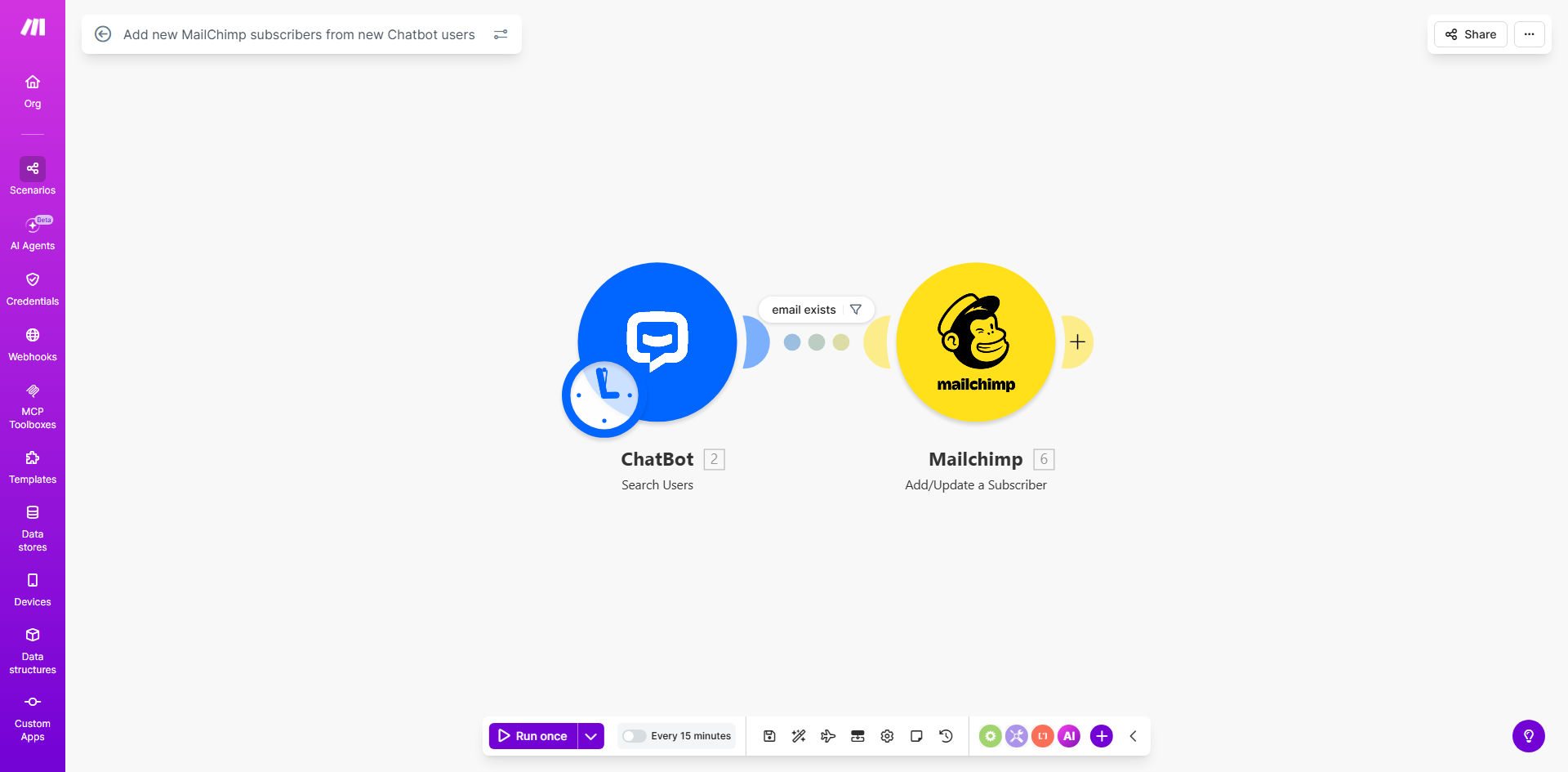
What This Workflow Does
Every business with a website faces the same challenge: capturing the interest of visitors before they leave. Chatbots are excellent at engaging visitors and collecting lead information, but that data often gets stuck in a separate platform, requiring manual export and import to your email marketing system. This creates delays, introduces errors, and causes missed opportunities for immediate follow-up.
This automation solves that by creating a seamless bridge between your chatbot and Mailchimp. It works silently in the background, checking for new users who have interacted with your lead generation chatbot. When a new lead is captured—providing their name, email, company details, and purpose—the workflow instantly creates a new, tagged subscriber in your designated Mailchimp audience. This turns your chatbot from a simple engagement tool into a powerful, automated list-building engine that works around the clock.
How It Works
The workflow operates on a simple but powerful trigger-action principle, ensuring no lead is forgotten.
Step 1: Monitor for New Chatbot Users
The automation is set on a schedule (e.g., every 15 minutes) to poll your Chatbot platform for new user entries. It specifically looks for users who have completed a conversation with a "Lead Generation" bot template, which collects structured data.
Step 2: Extract and Structure Lead Data
For each new user found, the workflow extracts the valuable information provided during the chat. This typically includes the lead's first name, last name, email address, company name, company size, and the reason for their inquiry. The data is cleaned and formatted for the next step.
Step 3: Create a Subscriber in Mailchimp
The formatted data is then sent to Mailchimp via its API. The workflow creates a new subscriber in your chosen audience list. It can also map the collected data to Mailchimp merge fields (like FNAME, LNAME, COMPANY) and apply tags based on the lead's details (e.g., "Inquiry: Pricing", "Company Size: Small Business"). This enables powerful segmentation from the moment the lead is captured.
Pro tip: Use the "purpose of inquiry" field from the chatbot to apply specific tags in Mailchimp. This allows you to automatically enroll new subscribers into highly targeted email sequences based on their expressed interest, boosting conversion rates.
Who This Is For
This automation is ideal for marketing teams, solopreneurs, and small to medium-sized businesses that use a website chatbot for lead generation and Mailchimp for email marketing. It's perfect for:
- Digital Agencies managing client lead generation who need to prove ROI with seamless list growth.
- SaaS Companies offering free trials or demos through a chatbot, wanting to nurture sign-ups instantly.
- E-commerce Stores using chatbots for pre-sale questions, aiming to build a newsletter list from engaged visitors.
- Consultants & Coaches who capture leads via a "book a call" bot and want to add them to a nurture sequence automatically.
What You'll Need
- A Make.com account (free tier available) to host and run the automation.
- A Chatbot platform account (like ChatBot.com, ManyChat, Drift) with API access enabled. The template is designed for ChatBot.com's "Lead Generation Bot" template.
- A Mailchimp account with a Standard plan or higher (API access is required).
- An existing Mailchimp Audience (list) where you want to add new subscribers.
- The chatbot already deployed on your website and collecting lead information.
Quick Setup Guide
- Clone the Template: Click "Get This Workflow" to open the template in your Make.com account and create a copy.
- Connect Your Apps: In the Make.com scenario, establish connections to your Chatbot account and your Mailchimp account by authorizing each module with your API keys or OAuth.
- Configure the Trigger: Set the Chatbot module to watch for "New Users" from the specific bot you use for lead generation. Adjust the polling interval as needed.
- Map the Data: In the Mailchimp "Add Subscriber to Audience" module, map the fields from your chatbot (name, email) to the corresponding Mailchimp merge fields. Define any tags you want to apply automatically.
- Test & Activate: Turn on the scenario and test it by submitting a fake lead through your website chatbot. Verify that the contact appears correctly in your Mailchimp audience with all the mapped data and tags.
Key Benefits
Eliminate manual data entry and save 2-5 hours per week. No more downloading spreadsheets from your chatbot and uploading them to Mailchimp. The entire process happens instantly and without error.
Improve lead response time from hours to seconds. The moment a visitor shares their email, they are added to your list and can be hit with an immediate welcome or nurture email, dramatically increasing engagement.
Build a richer, more segmented email list automatically. By passing chatbot data like "company size" and "inquiry purpose" into Mailchimp tags and custom fields, you enable hyper-targeted campaigns from day one.
Capture leads 24/7 without any team member being online. Your website works for you around the clock, converting visitors into marketable contacts even outside business hours.
Ensure data consistency and hygiene. Automated syncing prevents typos, duplicate entries, and missed leads that are common in manual processes, giving you a cleaner, more reliable database.