What This Workflow Does
Product teams often struggle with a critical bottleneck: user feedback arrives through various channels like in-app widgets, surveys, or support tickets, but it takes manual effort to copy, categorize, and input that feedback into product roadmap tools like Productboard. This delay means valuable insights sit idle, feature prioritization is based on incomplete data, and the team loses touch with real user needs.
This automation workflow solves that by creating a direct, real-time bridge between Userback, a popular user feedback collection platform, and Productboard, a leading product management system. Every time a user submits feedback—whether it's a bug report, feature request, or general comment—via Userback, this Make.com scenario instantly transforms that raw feedback into a structured note within your Productboard project. The note includes the user's message, attached screenshots, feedback type, and any custom metadata, ready for your product managers to review, prioritize, and act upon.
The result is a continuous flow of user insights directly into your product planning hub. It eliminates the manual copy-paste task, ensures no feedback is ever lost or forgotten, and empowers your team to make data-driven decisions faster. Your product roadmap becomes a living document informed by immediate user input, accelerating development cycles and improving product-market fit.
How It Works
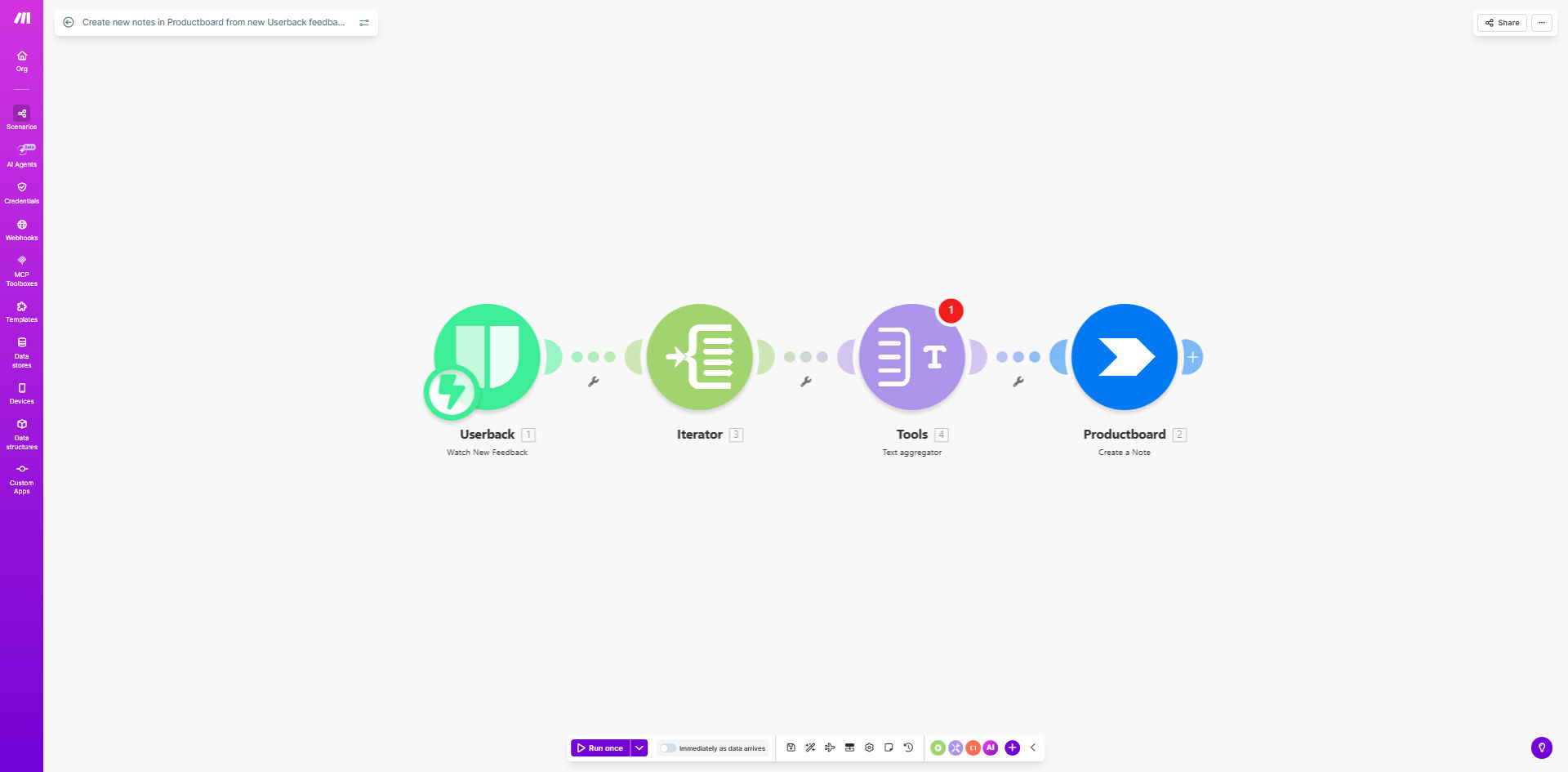
The workflow is a straightforward automation built on Make.com, acting as a intelligent connector between two specialized platforms.
Step 1: Userback Triggers the Workflow
The scenario starts when a new feedback item is created in your Userback account. Make.com watches for this event using a webhook or scheduled poll. The trigger captures the full feedback payload: the user's comment, any screenshots or video recordings, the project it belongs to, the feedback type (bug, idea, praise), and the user's identifier or email.
Step 2: Data Mapping and Transformation
Make.com then processes the incoming data. It can filter feedback based on your rules—for example, only processing high-priority bugs or feedback from specific user segments. It maps the Userback fields to the corresponding fields required to create a note in Productboard, such as title, description, tags, and custom fields.
Pro tip: You can enrich the data in this step. Add internal labels, calculate a priority score based on user segment and feedback type, or append links to related features already in Productboard.
Step 3: Creating the Productboard Note
Finally, Make.com uses the Productboard module to create a new note within your designated Productboard project. The note is populated with the mapped data. The screenshot URL from Userback is included as a link or embedded image, providing visual context. The note is automatically tagged with the feedback type, making it easy to filter and search later.
The entire process runs in seconds, ensuring the Productboard note exists almost as soon as the user hits 'submit' in your app.
Who This Is For
This automation is ideal for product teams, development teams, and customer-centric companies that rely on user input to guide their work.
Product Managers & Product Owners: You need a systematic way to capture user feedback directly into your roadmap tool without manual overhead. This workflow gives you a real-time feed of user needs to prioritize features and plan sprints.
Software Development Teams: If your team uses Userback for bug reporting and Productboard for tracking development items, this automation ensures every reported bug instantly becomes a tracked item, reducing triage time and improving response rates.
Startups & Scale-ups: Fast-moving companies that must iterate quickly based on user feedback. Automating this flow allows small teams to focus on building rather than administrative data transfer.
Companies with High User Feedback Volume: If you receive hundreds of feedback items weekly, manually processing them is impossible. This workflow scales effortlessly, handling each submission automatically and keeping your product backlog organized.
What You'll Need
To set up this workflow, you'll need the following accounts and access:
- A Make.com account (free or paid plan). This is the automation platform that will execute the scenario.
- A Userback account with active projects collecting user feedback. You'll need API access or webhook permissions to trigger the automation.
- A Productboard account with at least one project set up. You'll need API credentials (API key) to allow Make.com to create notes.
- Basic understanding of the data fields in both systems (e.g., knowing how feedback types are categorized in Userback and how notes are structured in Productboard).
Pro tip: Ensure your Userback and Productboard accounts are on plans that support API access. Most paid plans include this, but check their documentation.
Quick Setup Guide
Follow these steps to deploy the template and connect your tools.
- Clone the Template: Use the "Get This Workflow" button above to open the template on Make.com. Click "Copy" to create your own version of the scenario.
- Connect Userback: In the first module of your scenario, add your Userback connection. You may need to create a webhook in Userback pointing to Make.com, or use Make's built-in Userback module to watch for new feedback.
- Connect Productboard: In the final module, add your Productboard connection using your API key. Specify the target Productboard project ID where notes should be created.
- Map the Data: Review the data mapping between modules. Ensure fields like feedback title, description, type, and screenshot URL from Userback are correctly mapped to the note title, content, tags, and links in Productboard. Adjust if needed.
- Test and Activate: Run a test execution by simulating a feedback submission in Userback (or use a past item). Verify a note appears in your Productboard project. Once confirmed, activate the scenario to run automatically.
Key Benefits
Save 2–5 hours per week on manual feedback processing. Eliminate the tedious task of copying user comments, screenshots, and metadata from one platform to another. Your team reclaims time for analysis and action instead of data entry.
Ensure 100% of user feedback reaches your product team. Manual processes often miss or delay feedback. Automation guarantees every submission is captured and logged in your central roadmap tool, creating a complete picture of user needs.
Accelerate feature prioritization and decision-making by 30–50%. With feedback instantly available in Productboard, product managers can review, tag, and prioritize items in real-time. This speeds up sprint planning and reduces the lag between user input and development action.
Improve product quality and user satisfaction through faster response loops. When bugs are logged instantly as Productboard notes, developers can address them quicker. When feature requests are immediately visible, they can be evaluated for upcoming releases. This leads to a product that better serves its users.
Create a scalable system that grows with your user base. Whether you receive ten or ten thousand feedback items a month, this automation handles the volume effortlessly. It scales without additional manual labor, supporting your growth seamlessly.