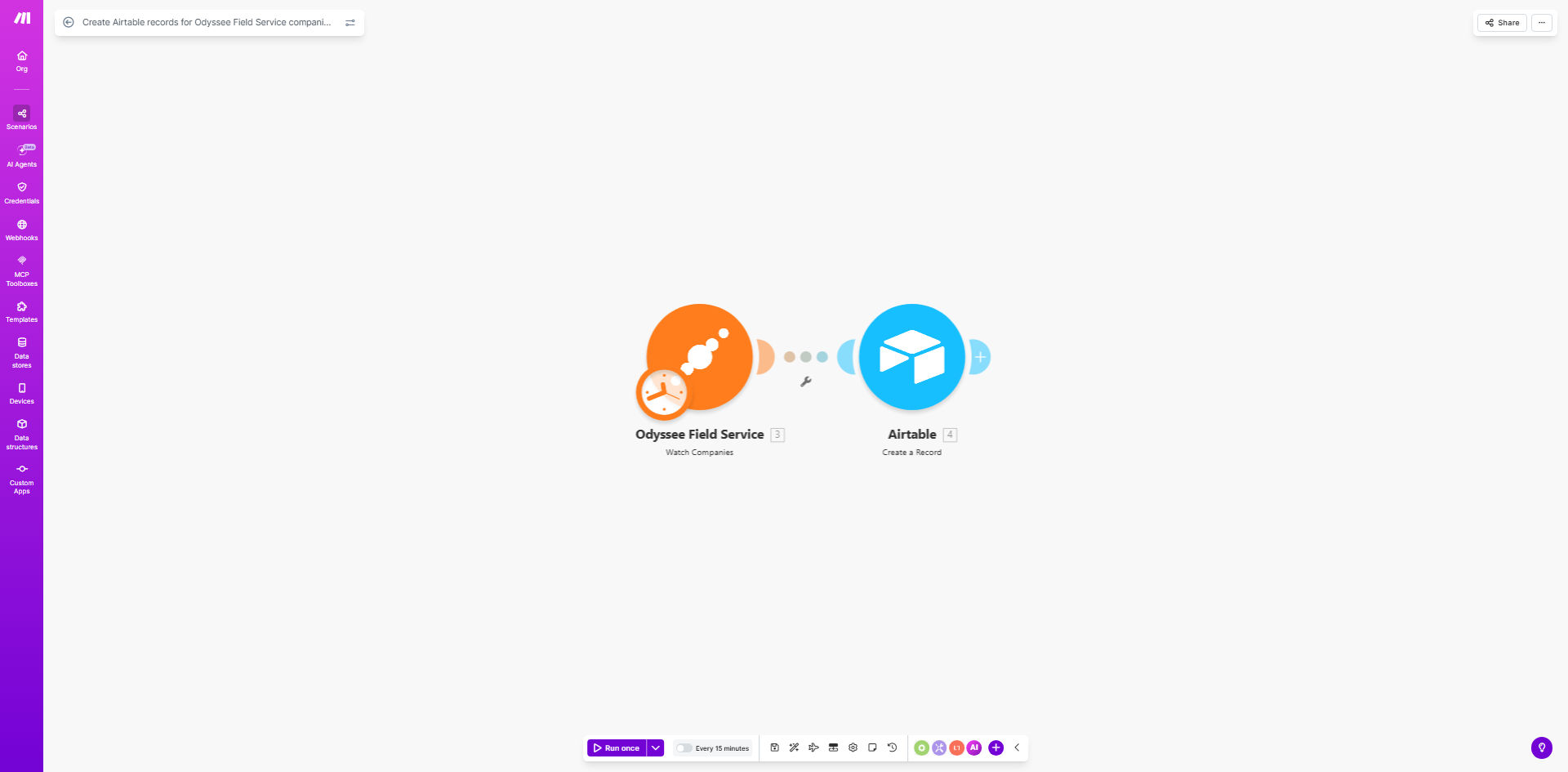
What This Workflow Does
For field service businesses, capturing new client information efficiently is crucial. Technicians using Odyssee Field Service in the field create company records on-site, but that data often gets stuck in the field service software. Sales, marketing, and management teams then waste time manually transferring this information to shared systems like Airtable for follow-up, reporting, and planning.
This automation solves that disconnect. It acts as a real-time bridge between Odyssee Field Service and Airtable. Whenever a field technician creates a new company profile in Odyssee, this workflow automatically triggers and creates a corresponding, detailed record in your designated Airtable base. The process is instantaneous, accurate, and requires zero human intervention.
The result is a unified operational view. Your office team has immediate visibility into new business opportunities captured in the field. Marketing can launch targeted campaigns, sales can begin outreach, and management can track growth metrics—all using the freshly synced data in Airtable, without asking technicians for spreadsheets or waiting for end-of-day updates.
How It Works
The workflow is built on Make.com and follows a simple "watch-create" logic that runs reliably in the background.
Step 1: Monitor Odyssee for New Companies
The scenario starts with a Make.com module that watches your Odyssee Field Service account. It is configured to check for new "Company" records at regular intervals (e.g., every 15 minutes, hourly, or in real-time depending on the plan). When it detects a newly created company, it captures all relevant data fields like company name, address, primary contact, service location, and any custom notes added by the technician.
Step 2: Format and Prepare the Data
Before sending data to Airtable, the workflow can include a data transformation step. This ensures the information from Odyssee matches the expected format in your Airtable base. For example, it might split a full address into separate "Street," "City," and "ZIP Code" columns, or format phone numbers consistently. This step guarantees clean, usable data arrives in Airtable.
Step 3: Create the Airtable Record
The core action is the "Create Record" module in Airtable. Make.com sends the prepared company data to your specified Airtable base and table. It maps each piece of Odyssee data to the correct field in Airtable. Upon successful creation, Airtable returns the new record ID, confirming the sync is complete. The new company is now fully integrated into your central business database.
Pro tip: Extend this workflow by adding a step to notify your sales team in Slack or via email immediately after the Airtable record is created. This turns automation into actionable intelligence, prompting instant follow-up on hot leads from the field.
Who This Is For
This template is ideal for any business using Odyssee Field Service for operations while relying on Airtable for CRM, project management, or central data management. It's perfect for HVAC companies, plumbing services, electrical contractors, landscaping businesses, and other field service operators who want to break down data silos between field crews and the office.
Business owners and operations managers drowning in manual data entry will find immediate relief. Marketing teams needing fresh leads for nurturing campaigns will get automated lists. Sales directors wanting real-time insight into new service areas or client types will gain valuable visibility. If your growth is hampered by slow information flow from the field to decision-makers, this automation is for you.
What You'll Need
- A Make.com account (free or paid plan).
- An active Odyssee Field Service account with API access or webhook capabilities.
- An Airtable account with a base and table ready to receive company data. You can use the provided example table or your own.
- The API keys or OAuth credentials to connect Make.com to both Odyssee and Airtable (Make.com guides you through this simple process).
- A clear idea of which Odyssee company fields you want to sync to which columns in your Airtable table.
Quick Setup Guide
You can have this automation running in under 30 minutes.
- Get the Template: Click "Get This Workflow" to copy the ready-made scenario to your Make.com account.
- Connect Your Apps: In the Make.com scenario editor, click on the Odyssee module and Airtable module to authenticate and connect your respective accounts. This is a secure, one-time process.
- Configure the Trigger: Set the Odyssee module to watch the "Companies" object. Define how often it should check for new records (polling interval).
- Map Your Fields: In the Airtable "Create Record" module, select your base and table. Then, map the data from Odyssee (like "Company Name," "Address") to the corresponding field names in your Airtable table.
- Test and Activate: Use the "Run once" feature to test the workflow. Create a test company in Odyssee and verify it appears correctly in Airtable. Once confirmed, turn the scenario "ON." It will now run automatically based on your schedule.
Key Benefits
Save 5–10 hours per week on manual data entry. Eliminate the tedious task of transferring information from Odyssee to spreadsheets or Airtable. This time can be reinvested in customer service, business development, or strategic work.
< strong>Achieve 100% data accuracy and eliminate human error. Manual entry leads to typos, missed fields, and outdated information. Automation ensures every field from Odyssee is transferred perfectly every time, creating a reliable single source of truth.
Enable real-time business intelligence and faster response times. Sales and marketing teams get access to new leads the moment they're captured in the field, allowing for same-day follow-up that significantly increases conversion rates.
Improve operational visibility and scalability. With all company data automatically centralized in Airtable, managers can run accurate reports, track growth trends, and make data-driven decisions without manual data compilation.
Create a foundation for advanced automation. Once companies are in Airtable, you can easily trigger additional workflows for welcome emails, task assignments for account managers, or invoice creation, building a powerful, integrated business system.