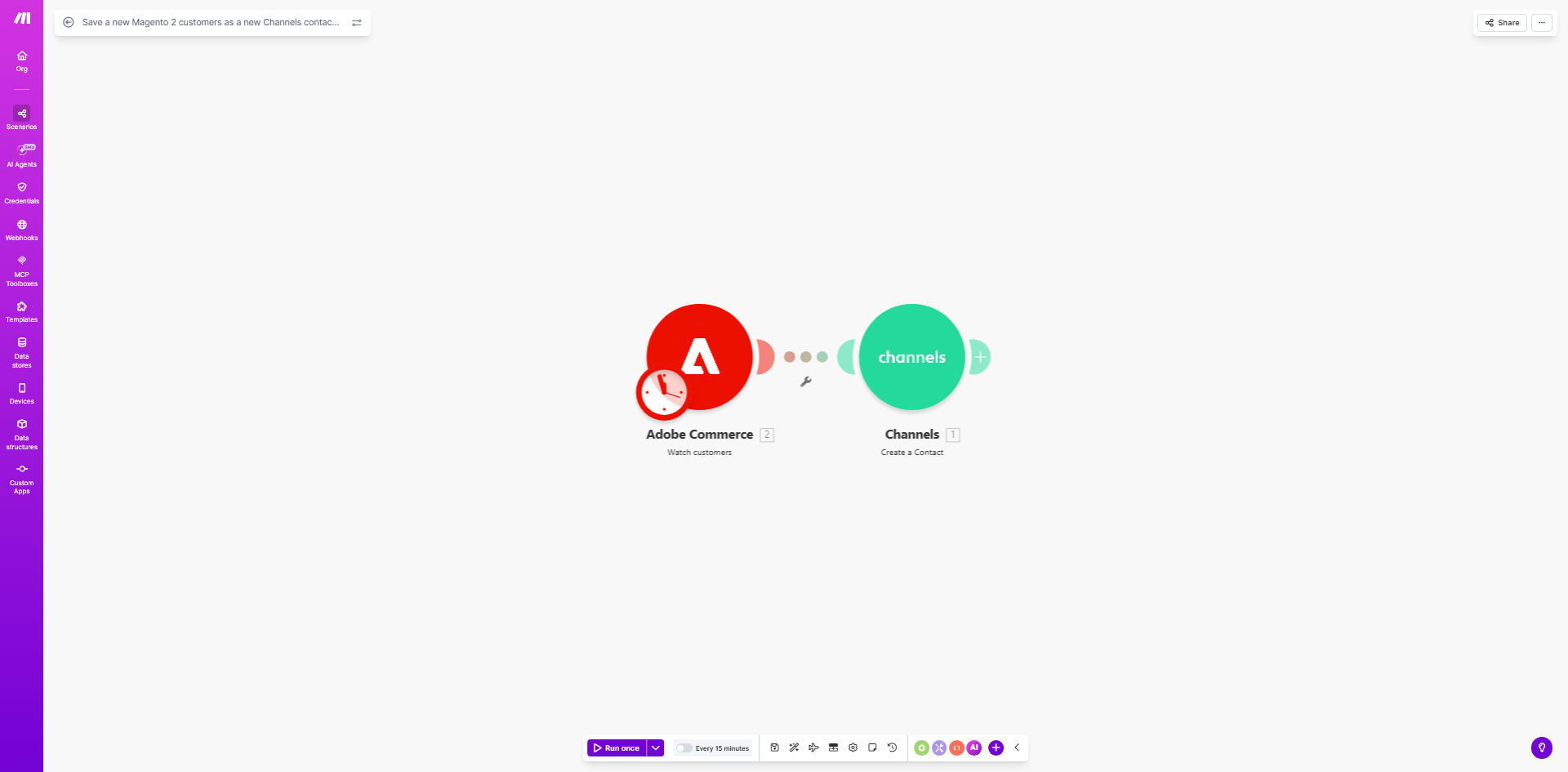
What This Workflow Does
For e-commerce businesses, a new customer registration is just the beginning of the relationship. The real challenge begins when that customer's data sits isolated in your online store, invisible to your sales and customer service teams in your CRM. This disconnect leads to missed follow-up opportunities, impersonal communication, and a fragmented view of your customer base.
This automation solves that problem by creating a seamless, real-time bridge between your Magento 2 store and your Channels CRM. The moment a customer completes registration or places their first order, their contact details are automatically and accurately transferred into Channels. This eliminates the need for manual exports, imports, or copy-pasting, ensuring your entire team operates from a single, up-to-date customer database.
The workflow is designed for reliability and accuracy. It captures key customer information—name, email, phone, and address—and formats it correctly for Channels. This instant sync means marketing can trigger a personalized welcome sequence, sales can identify high-value leads, and support has immediate context, all without anyone lifting a finger.
How It Works
The automation is triggered by a specific event in your Magento 2 store and follows a logical sequence to ensure data integrity.
Step 1: Detecting a New Customer
The workflow is initiated the instant a new customer account is successfully created in your Magento 2 store. Make.com monitors your Magento 2 instance via a secure API connection, waiting for this specific event.
Step 2: Gathering Customer Data
Once triggered, the automation retrieves the complete set of data for the new customer. This includes their first and last name, email address, billing and shipping addresses, telephone number, and any other default or custom attributes you've configured to capture during signup.
Step 3: Formatting for Channels
The raw data from Magento is then processed and mapped to the correct field structure required by the Channels CRM API. This step ensures names are split correctly, addresses are formatted properly, and all data meets Channels' validation rules before an attempt is made to create a contact.
Step 4: Creating the CRM Contact
The formatted data is sent to Channels via its API, creating a new contact record. The workflow can be configured to add tags, assign the contact to a specific team member, or categorize them based on their source (e.g., "Magento Sign-up").
Pro tip: Extend this workflow by adding a step to subscribe the new contact to a specific email list or trigger an internal Slack notification for your sales team, turning a simple data sync into a powerful engagement tool.
Who This Is For
This automation is essential for any business using Magento 2 for e-commerce and Channels for customer relationship management. It's particularly valuable for:
- Growing E-commerce Brands: Teams that are scaling and can no longer afford manual, error-prone data entry between systems.
- Sales-Driven Organizations: Companies where the sales team needs immediate visibility into new potential leads from the website.
- Marketing Teams: Marketers who want to trigger automated, personalized email sequences the moment someone creates an account, not days later.
- Businesses Prioritizing Customer Service: Support teams benefit from having instant access to a customer's basic details and order history when they reach out for help.
What You'll Need
To implement this workflow successfully, you will need the following prerequisites set up and ready:
- A live Magento 2 store with administrative access to generate API credentials.
- An active Channels CRM account with permissions to create and manage contacts via its API.
- A Make.com account (formerly Integromat) with an active subscription plan that allows for creating scenarios.
- API keys or OAuth credentials for both Magento 2 and Channels, with the necessary permissions (typically read access for Magento, write access for Channels).
- A clear understanding of which specific customer fields from Magento (e.g., customer group, custom attributes) you want to sync to Channels.
Quick Setup Guide
Follow these steps to configure the template in your Make.com account:
- Clone the Template: Click the "Get This Workflow" button above to open the template on Make.com and create a copy in your own account.
- Connect Your Apps: In the first module, authorize the connection to your Magento 2 store using your API credentials. Then, authorize the connection to your Channels CRM in the module that creates the contact.
- Test the Trigger: Run the scenario once manually to ensure it can successfully fetch a sample customer from your Magento 2 store. This verifies your connection is working.
- Map Your Data: Review the data mapping between Magento and Channels. Ensure fields like name, email, and phone are correctly aligned. Add mappings for any custom fields you wish to transfer.
- Activate & Monitor: Turn on the scheduler (e.g., set it to run every 5 minutes) and let it run. Monitor the scenario's history for the first few cycles to ensure contacts are being created successfully in Channels without errors.
Key Benefits
Eliminate 100% of manual customer data entry between your store and CRM. This reclaims hours per week for your team that can be redirected towards sales, strategy, or customer engagement instead of administrative tasks.
Achieve a 360-degree customer view instantly. Your sales, support, and marketing teams all have access to the same, freshly-synced customer data the moment an account is created, enabling personalized and timely interactions.
Drastically reduce human error. Automated data transfer removes the risk of typos, missed entries, or incorrect field mapping that are common with manual processes, ensuring your CRM data is clean and reliable.
Accelerate your sales and marketing cycles. With new leads appearing in Channels in real-time, your team can begin outreach or trigger automated nurture sequences within minutes, significantly improving conversion rates.
Build a scalable data infrastructure. As your customer base grows, this automated bridge scales effortlessly, handling 10 or 10,000 new sign-ups with the same reliability, without requiring additional staff.