Make.com HubSpot CRM Stripe Customer Sync Automation

Automatically Create Stripe Customers from New HubSpot Contacts

Sync your sales pipeline with your billing system instantly. Eliminate manual data entry and ensure every new customer is ready for invoicing.

Get This Workflow Make.com · HubSpot & Stripe · Free Template
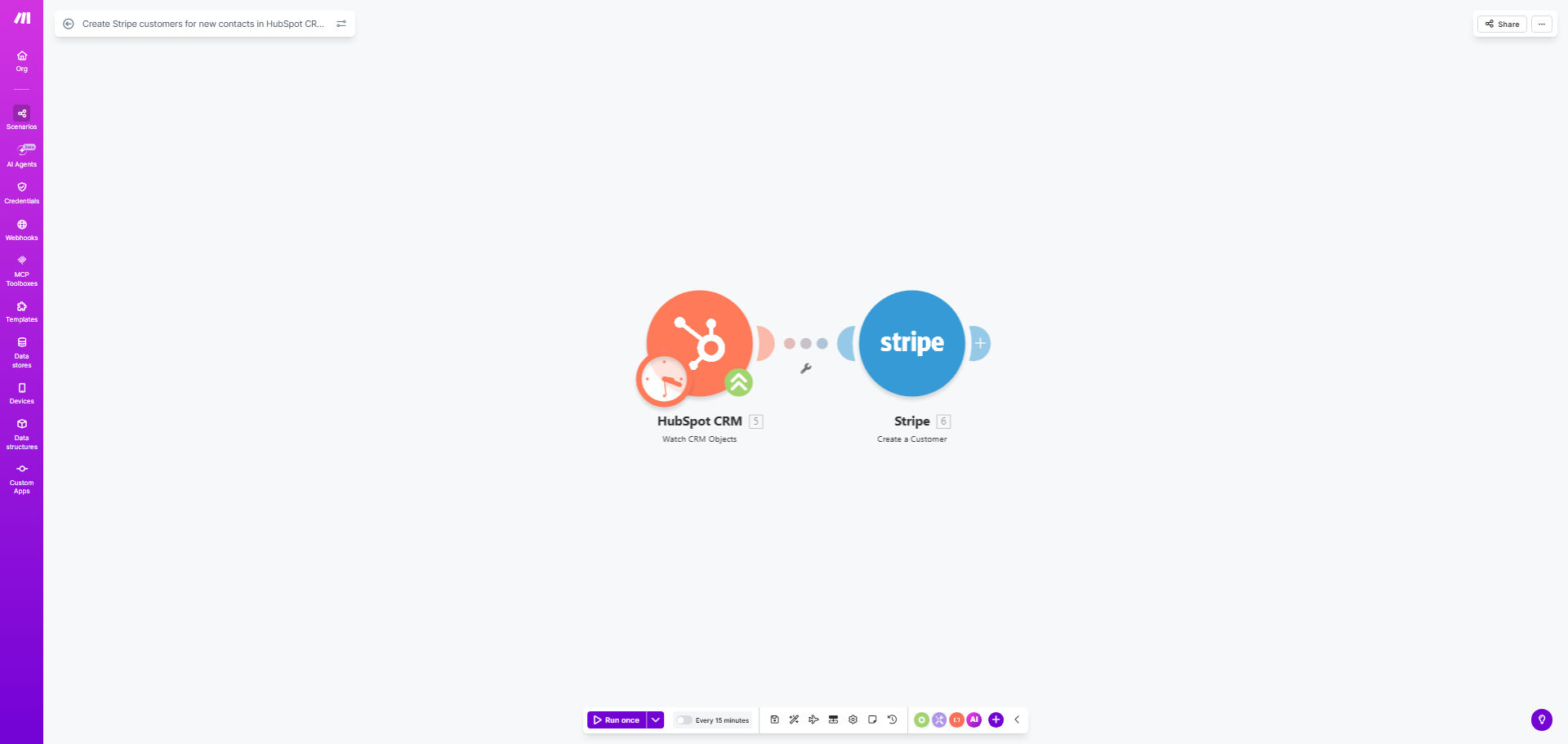
Diagram showing automation flow from HubSpot CRM to Stripe creating a customer record

What This Workflow Does

For businesses using HubSpot for sales and Stripe for payments, a critical gap often exists between the two systems. When a new contact becomes a customer in HubSpot, someone on your team must manually log into Stripe, create a new customer profile, and copy over details. This process is not only time-consuming but prone to errors, delays in invoicing, and creates data silos that hurt your financial reporting.

This free Make.com template solves that problem by building an automated bridge. Every time a new contact is created in your HubSpot CRM, this workflow triggers instantly. It takes the contact's information—name, email, company—and uses it to create a corresponding customer record in your Stripe account. This ensures your billing system is always in sync with your sales pipeline, enabling faster invoicing, accurate subscription management, and a unified view of your customer.

How It Works

The automation follows a simple, reliable sequence to transfer data securely between platforms.

Step 1: Monitor HubSpot for New Contacts

The workflow starts with a HubSpot module set to watch for new contact creations. It can be configured to trigger on any new contact or filtered to only act on contacts in a specific lifecycle stage (like 'Customer') or list, ensuring you only create Stripe records for actual customers.

Step 2: Map and Prepare Contact Data

The data from the new HubSpot contact is extracted. Key fields like the contact's email, first name, last name, and company are mapped to the corresponding fields required by Stripe's API. You can also include custom HubSpot properties, such as phone number or billing address, to create a richer customer profile.

Step 3: Create the Customer in Stripe

The prepared data bundle is sent securely to Stripe via its API. The workflow instructs Stripe to create a new customer with the provided information. A successful creation returns a unique Stripe Customer ID, which can optionally be sent back and stored in HubSpot as a custom property, creating a two-way link between the records.

Pro tip: Add a filter step after the HubSpot trigger to only process contacts where the "Lifecycle Stage" equals "Customer." This prevents creating Stripe records for leads or subscribers who aren't yet paying clients, keeping your billing system clean.

Who This Is For

This automation is a game-changer for SaaS companies, agencies, consultants, and any subscription-based or service business that uses HubSpot to manage leads and Stripe to process payments. It's ideal for operations managers, finance teams, and founders who are tired of manual back-and-forth between their CRM and billing software. If you onboard more than a handful of new customers per month, the time savings and error reduction from this sync become immediately valuable.

What You'll Need

  1. A Make.com account (free tier available).
  2. A HubSpot CRM account with contacts and API access.
  3. A Stripe account with live or test API keys.
  4. Basic understanding of where to find API keys in both HubSpot and Stripe (the template guides you through this).

Quick Setup Guide

You can have this automation running in under 15 minutes.

  1. Clone the Template: Click "Get This Workflow" and duplicate the scenario into your Make.com account.
  2. Connect HubSpot: In the first module, authorize Make.com to access your HubSpot account. Select the specific HubSpot account if you have multiple.
  3. Connect Stripe: In the Stripe module, authorize Make.com with your Stripe API keys (you can use test keys first).
  4. Test the Flow: Create a test contact in HubSpot and watch the scenario run. Check your Stripe dashboard to confirm the customer was created.
  5. Activate: Once testing is successful, schedule the scenario to run in real-time or at frequent intervals.

Key Benefits

Eliminate 5–15 minutes of manual work per new customer. What was a repetitive, error-prone task for your team is now handled instantly and accurately in the background.

Accelerate time-to-invoice and improve cash flow. With the customer profile ready in Stripe immediately, you can send the first invoice or set up their subscription without any delay, getting paid faster.

Ensure 100% data consistency between sales and finance. Automated mapping guarantees the name, email, and company in Stripe exactly match what's in HubSpot, eliminating typos and mismatches that cause billing issues.

Create a scalable foundation for revenue operations. This sync is the first step in building a connected tech stack. Once the customer is in Stripe, you can trigger further automations for welcome emails, contract generation, or internal notifications.

Free your team for higher-value work. Your operations and finance staff can focus on analysis, customer support, and strategic tasks instead of data entry, boosting overall productivity and morale.

Frequently Asked Questions

Common questions about CRM and billing automation

Syncing HubSpot contacts with Stripe ensures your billing system has the most up-to-date customer information, which is crucial for accurate invoicing, subscription management, and revenue operations. It eliminates the need for manual data entry between your sales CRM and payment platform, reducing errors and saving your team significant time.

This automation creates a single source of truth for customer data, improving financial reporting and customer experience. For example, your support team can instantly see a customer's billing status without switching apps, and your finance team can trust that the customer list is complete and current.

Typically, key contact details like name, email address, and company name are mapped to create a new customer profile in Stripe. You can also configure the automation to pass through custom properties from HubSpot, such as phone number, billing address, or lead source, to enrich the Stripe customer record.

This ensures all relevant sales and marketing context is available for billing and support teams. The flexibility of Make.com allows you to transform or format the data during the transfer, like combining first and last name fields or adding a specific description based on the contact's source.

Yes, you can set up filters within the automation to only create Stripe customers for contacts that meet specific criteria. For example, you might only sync contacts marked as 'Customer' in a lifecycle stage, those associated with a closed-won deal, or contacts from a specific list.

This prevents cluttering Stripe with leads or prospects who aren't yet paying customers, keeping your billing system clean. It's a best practice to define clear business rules for the sync to maintain data hygiene and ensure the automation aligns with your sales process.

Automating the HubSpot-to-Stripe sync accelerates customer onboarding by instantly creating their billing profile the moment they become a customer in your CRM. This means invoices or subscription setups can begin immediately without waiting for manual data transfer.

It provides a seamless, professional experience where the customer's sales journey flows directly into a smooth billing setup, reducing friction and improving time-to-revenue. The customer receives their first invoice promptly, and your team avoids the awkward delay that can sometimes follow a signed contract.

Common mistakes include syncing all contacts instead of just customers, which pollutes the billing system; not mapping custom fields, which loses valuable context; and failing to handle updates, so changes in HubSpot aren't reflected in Stripe.

Another error is not having error-handling for duplicates or missing required fields, which can break the automation and require manual cleanup. To avoid these, plan your data mapping carefully, implement filters, and build in simple error notifications to alert you if a sync fails.

Using an automation platform like Make.com offers far more flexibility than a basic native connector. You can build complex logic, add conditional filters, transform data formats, and connect to other apps in your stack. Native connectors are often limited to simple, one-way syncs.

For a tailored solution that fits your specific business rules and scales with your processes, a custom-built automation is superior. It allows you to handle edge cases, log activities for auditing, and easily extend the workflow to include steps like sending a welcome email or notifying your account manager.

Absolutely. GrowwStacks specializes in building custom automation bridges between your CRM (like HubSpot, Salesforce, or Pipedrive) and your billing platform (Stripe, Chargebee, or QuickBooks). We design workflows that match your unique sales process, data models, and business rules.

Our team handles the entire build, testing, and deployment, ensuring a reliable, secure, and scalable integration that saves you time and prevents revenue leakage. We can also incorporate advanced features like deduplication logic, multi-step data enrichment, and real-time dashboards to monitor the sync's health.

  • Tailored to your specific data fields and business rules.
  • Includes error handling and monitoring for reliability.
  • Can be expanded to include other apps in your workflow.

Need a Custom CRM-to-Billing Automation?

This free template is a starting point. Our team builds fully tailored automation systems for your specific business needs.