What This Workflow Does
For B2B marketers and sales teams, LinkedIn Lead Gen Forms are a goldmine for high-quality prospects. But the value is lost if those leads sit in a spreadsheet or require manual transfer into your CRM. This delay costs you response time and potential sales.
This automation solves that by creating a direct, real-time bridge between LinkedIn and SharpSpring. Every time a professional fills out your LinkedIn ad form, their details—like name, email, company, and job title—are instantly and accurately created as a new lead record in your SharpSpring account. It turns a manual, error-prone process into a seamless, automated pipeline accelerator.
The result? Your sales team gets notified immediately, lead scoring can begin, and automated nurture emails can be triggered—all while the prospect is still engaged with your brand. You move from collecting data to activating leads in seconds.
How It Works
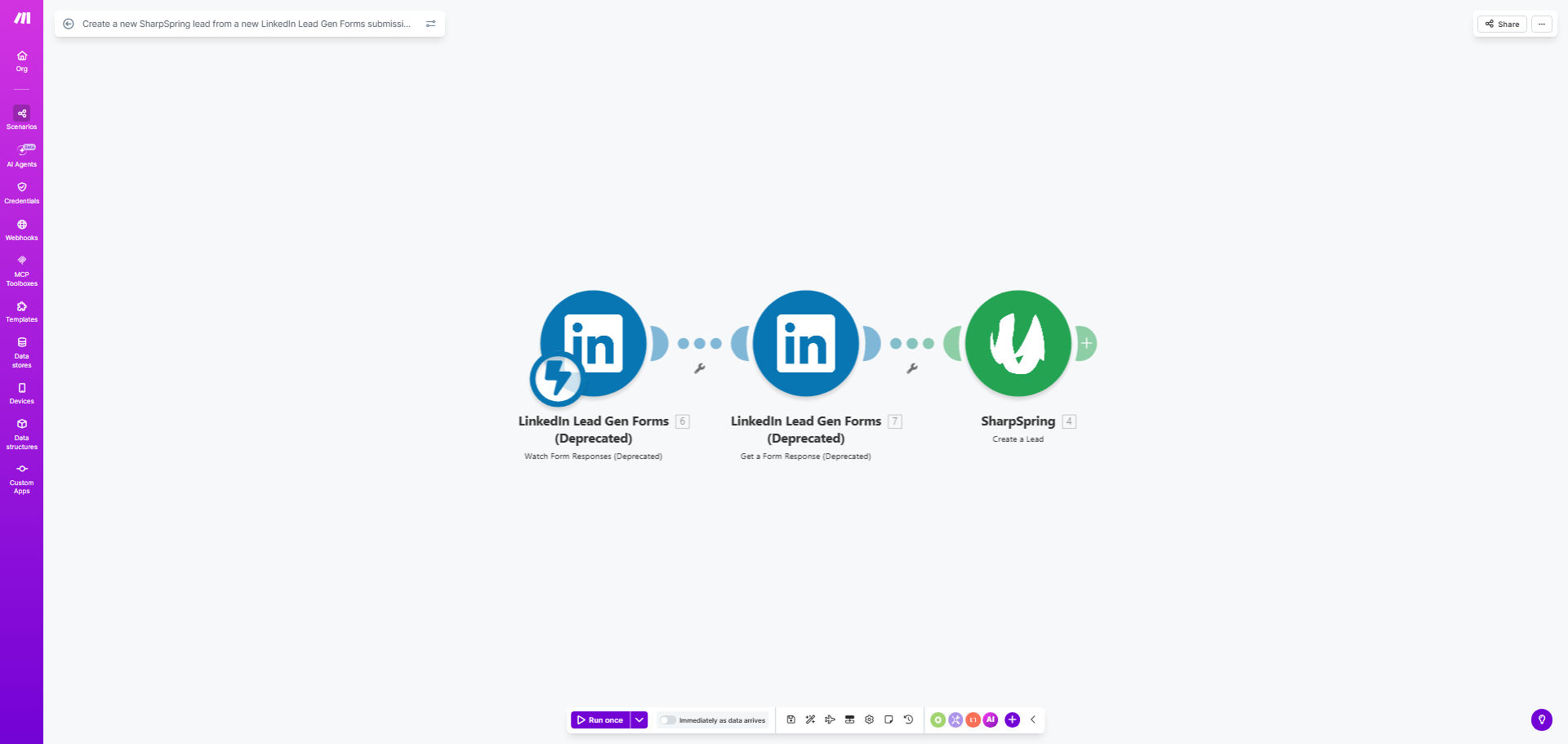
The workflow is triggered by a new submission and moves the data through a simple, reliable process.
Step 1: Capture the LinkedIn Submission
The automation watches for new responses on your designated LinkedIn Lead Gen Form. When a user submits their information, the workflow is instantly triggered, capturing all the form field data.
Step 2: Map and Format the Lead Data
The data from LinkedIn (First Name, Last Name, Email, Company Name, etc.) is mapped to the corresponding fields in SharpSpring. This step ensures the information is structured correctly for the CRM, preventing import errors.
Pro tip: You can add a module here to enrich the lead data with firmographics or trigger an internal Slack alert for your sales reps the moment a high-value title (like "Director" or "VP") submits the form.
Step 3: Create the Lead in SharpSpring
The formatted data is sent via the SharpSpring API to create a new lead. The workflow confirms the creation was successful, logging the new lead ID for future tracking and automation.
Step 4: Trigger Next Actions (Optional)
Once the lead is created, the automation can trigger powerful follow-up actions. This could include adding the lead to a specific campaign, assigning them to a sales rep, or sending a personalized welcome email—all fully automated.
Who This Is For
This template is designed for businesses that invest in LinkedIn advertising and use SharpSpring for marketing automation and CRM. It's perfect for:
- B2B Marketing Teams: Who run LinkedIn ad campaigns and need to prove ROI by swiftly moving leads into the sales funnel.
- Sales Operations Managers: Looking to eliminate data entry bottlenecks and ensure their team gets hot leads instantly.
- Marketing Agencies: Managing LinkedIn ads for clients and needing to demonstrate seamless integration and lead delivery.
- Startups & Scale-ups: Where speed is critical, and manual processes hinder growth and lead conversion rates.
What You'll Need
- A Make.com account (free or paid plan) to host and run the automation.
- An active LinkedIn Campaign Manager account with a Live Lead Gen Form.
- A SharpSpring account with admin access to generate API keys.
- Your LinkedIn form should collect, at a minimum: First Name, Last Name, Email, and Company Name.
Quick Setup Guide
You can have this automation running in under 30 minutes.
- Clone the Template: Click "Get This Workflow" and duplicate the scenario into your Make.com account.
- Connect LinkedIn: In the first module, authenticate your LinkedIn account and select the specific Lead Gen Form you want to monitor.
- Connect SharpSpring: In the SharpSpring module, add your API credentials (found in your SharpSpring settings under "API & Webhooks").
- Map the Fields: Ensure the data from LinkedIn maps correctly to the right SharpSpring lead fields. The template provides a standard mapping you can adjust.
- Test & Activate: Use the "Run Once" feature in Make to test with a recent form submission. Confirm the lead appears in SharpSpring, then turn the scenario on.
Key Benefits
Reduce lead response time from hours to seconds. The fastest company to contact a lead wins. This automation ensures your team is notified and can act while the prospect's interest is highest, dramatically increasing conversion chances.
Eliminate 100% of manual data entry errors. No more typos in email addresses or misplaced company names. Data flows perfectly from the form to the CRM, ensuring your database is clean and reliable for segmentation and outreach.
Scale your lead capture efforts without adding staff. Whether you get 10 leads or 1,000 leads per month, the process is handled automatically. This allows your marketing team to scale campaigns without creating an administrative burden for sales or operations.
Enable immediate, personalized follow-up. With the lead instantly in SharpSpring, you can trigger automated welcome emails, add them to a nurture track, or assign them to a rep based on territory rules—creating a professional, responsive prospect experience.
Gain clear ROI on LinkedIn Ad spend. By directly tying form submissions to CRM leads, you can accurately track how many leads and customers are generated from each campaign, making your advertising budget more accountable and effective.