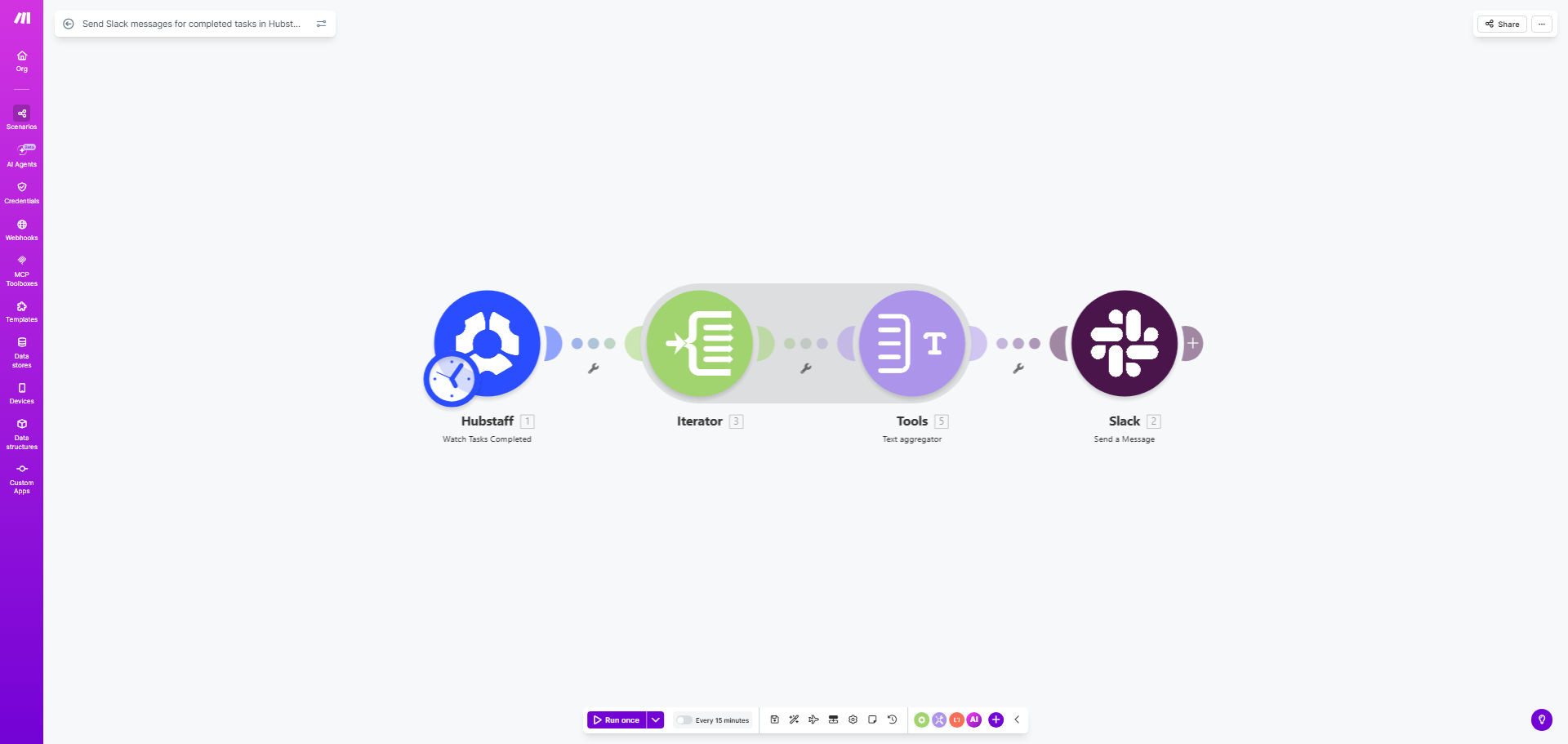
What This Workflow Does
For teams using Hubstaff for task and time tracking, a critical gap often exists between work completion and team awareness. Project managers and team members waste valuable time constantly checking Hubstaff for updates or sending manual "is this done?" messages in Slack. This disconnect slows down projects, creates communication overhead, and can lead to billing delays or missed deadlines.
This automation template solves that by creating a seamless bridge between Hubstaff and Slack. Every time a task is marked as complete in Hubstaff, this workflow automatically triggers and sends a formatted notification to a designated Slack channel. It turns silent task completion into a visible team celebration, providing real-time progress updates that keep everyone aligned without any manual effort.
How It Works
The workflow is built on Make.com and acts as an intelligent messenger between your two essential tools.
Step 1: Monitor Hubstaff for New Completions
The scenario starts by watching your Hubstaff organization for new "completed task" events. It uses Hubstaff's API to check at regular intervals, ensuring it catches every update as soon as it happens.
Step 2: Gather Task Details
Once a completion is detected, the workflow collects all relevant information: the task name, the team member who completed it, the associated project, time spent, and any completion notes. This data is structured for the next step.
Step 3: Format & Send the Slack Message
Make.com then takes this data package and uses it to craft a clear, actionable Slack message. It posts this message to the Slack channel of your choice, which could be a general project channel, a team announcements channel, or even a direct message to a manager.
Pro tip: Customize your Slack message to include a direct link back to the task in Hubstaff. This allows anyone seeing the notification to click through for more details or verification instantly, closing the loop between communication and action.
Who This Is For
This automation is invaluable for any business that relies on Hubstaff for project tracking and Slack for team communication. It's perfect for remote or hybrid teams, digital agencies, software development squads, consulting firms, and marketing departments. Essentially, if your team needs to know "what got done" without having to ask, this workflow is for you.
What You'll Need
- A Make.com account (free tier available).
- Admin or member access to a Hubstaff organization with tasks being tracked.
- Access to a Slack workspace where you have permission to create incoming webhooks or use a Slack app.
- Basic understanding of how to connect apps in Make.com (a simple click-through authentication process).
Quick Setup Guide
You can have this automation running in under 10 minutes.
- Clone the Template: Click the "Get This Workflow" button to open the template on Make.com and create a copy in your own account.
- Connect Hubstaff: In the first module, click to add your Hubstaff account. Follow the prompts to authorize Make.com to access your Hubstaff data.
- Connect Slack: In the Slack module, authenticate your Slack workspace. You'll need to allow Make.com to post messages to your chosen channels.
- Map Your Data: Review the data flow. Ensure the task name, user, and project details from Hubstaff are correctly mapped to the fields in the Slack message builder.
- Choose Your Channel: Select the specific Slack channel where notifications should be sent (e.g., #project-updates, #team-completions).
- Test & Activate: Turn on the scenario. Complete a test task in Hubstaff and watch the notification appear in your Slack channel. Once confirmed, the automation is live.
Key Benefits
Eliminate manual status updates and save 5–10 hours per month per project manager. By automating the communication of task completion, managers no longer need to chase progress, freeing them for strategic work.
Improve project transparency and reduce miscommunication by 90%. With instant notifications, every team member has the same real-time information, eliminating assumptions and confusion about what's finished.
Accelerate project handoffs and dependent tasks. When someone sees a task is complete, they can immediately start their next piece of work, reducing idle time and speeding up overall project velocity.
Create a record of accomplishments for client reporting and performance reviews. The Slack channel becomes a searchable log of completed work, making it easy to compile reports or demonstrate team productivity.
Boost team morale with visible recognition. Publicly acknowledging completed work in a team channel fosters a culture of achievement and provides positive reinforcement for a job well done.