Make.com Shopify Mixmax CRM Sync

Automatically Save New Shopify Customers as Mixmax Contacts

Eliminate manual data entry by instantly syncing customer details from Shopify to your Mixmax CRM

Get This Workflow → Make.com · Shopify · Free Template
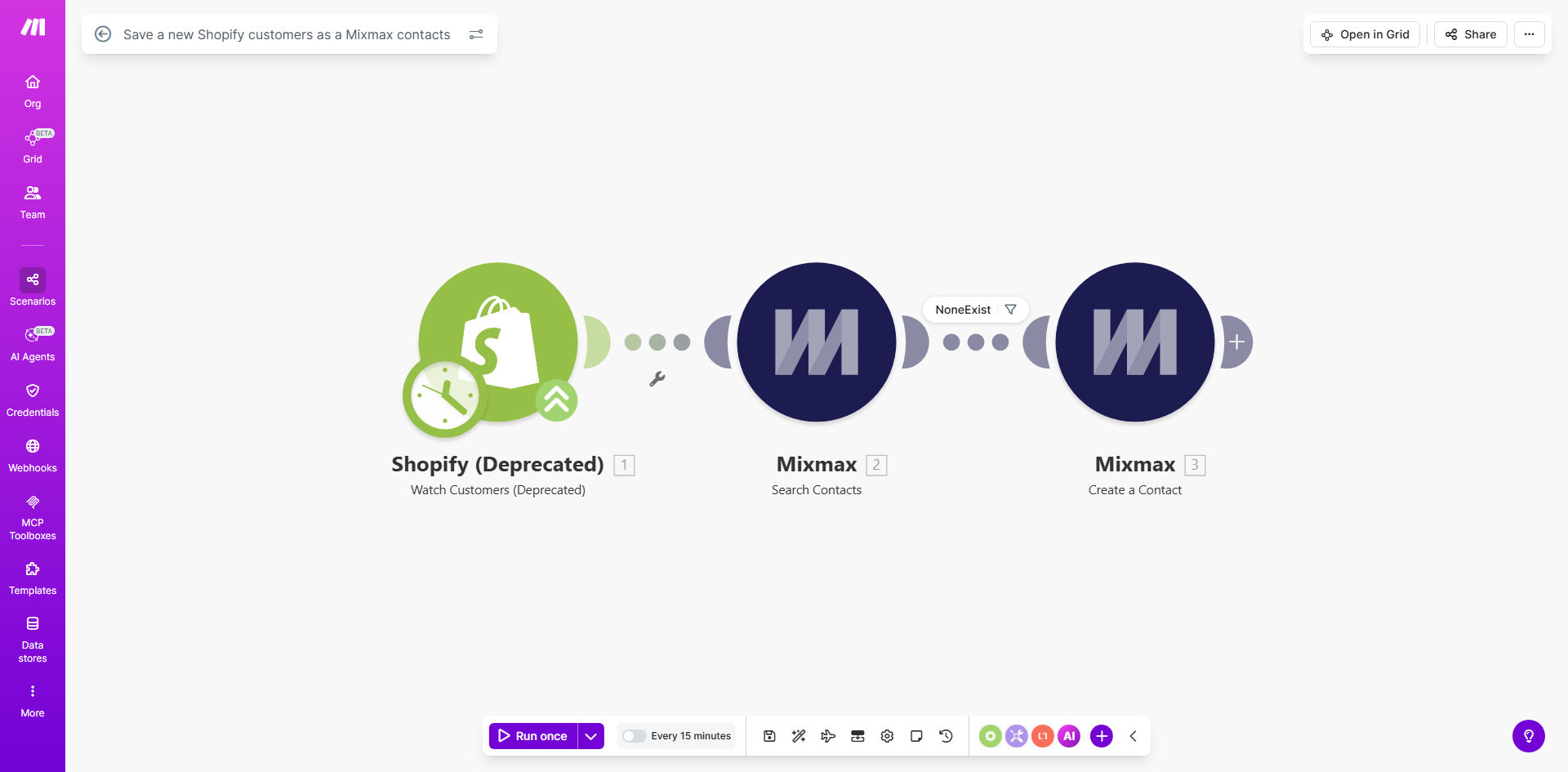
Make.com workflow diagram showing Shopify to Mixmax integration

What This Workflow Does

This automation solves a common pain point for ecommerce businesses using Shopify with Mixmax for sales outreach. When new customers complete purchases, their information often gets stuck in Shopify while sales teams waste time manually transferring data to Mixmax for follow-up sequences.

The workflow automatically creates Mixmax contacts whenever new customer records appear in Shopify. It captures all essential details including name, email, phone number, and order information - ensuring your sales team has complete customer profiles immediately available for personalized outreach.

How It Works

1. Shopify Triggers the Workflow

Make.com monitors your Shopify store for new customer creation events. The moment someone completes a purchase and their customer record is saved, the workflow activates.

2. Customer Data Gets Processed

The system extracts all relevant customer information from Shopify including contact details, order history, and any custom fields you've configured. This data gets formatted for Mixmax's contact structure.

3. Mixmax Contact Creation

Using Mixmax's API, the workflow creates a new contact with all the Shopify customer data. You can customize which fields get mapped and how information gets organized in Mixmax.

Pro tip: Add conditional logic to only sync customers who meet specific criteria (like purchase amount or product type) to focus your sales team's outreach efforts.

Who This Is For

This workflow benefits ecommerce businesses that:

  • Use Shopify for online sales
  • Rely on Mixmax for sales outreach and CRM
  • Want to automate post-purchase follow-up sequences
  • Need to eliminate manual data entry between systems
  • Require real-time customer data for sales teams

What You'll Need

  1. A Shopify store with admin access
  2. A Mixmax account with API access
  3. A Make.com account (free plan available)
  4. Basic understanding of Shopify customer fields
  5. Knowledge of your desired Mixmax contact structure

Quick Setup Guide

  1. Connect your Shopify store to Make.com using API credentials
  2. Authorize Make.com to access your Mixmax account
  3. Map Shopify customer fields to Mixmax contact properties
  4. Set up any filters or conditions for which customers to sync
  5. Test with a new Shopify customer to verify the contact appears in Mixmax

Key Benefits

Eliminate 2+ hours per week of manual data entry that sales teams typically spend transferring customer information between systems.

Improve response times by 80% with instant access to new customer data for immediate follow-up.

Reduce human error in contact creation by automating the transfer of accurate Shopify data directly to Mixmax.

Enable personalized outreach at scale with complete customer profiles automatically available in your CRM.

Frequently Asked Questions

Common questions about Shopify-Mixmax automation and integration

Connecting Shopify with Mixmax ensures your sales team immediately has access to new customer data for personalized outreach. This eliminates manual data transfers between systems and keeps your CRM contacts always up-to-date with the latest Shopify purchases.

The integration creates a seamless flow from purchase to follow-up, allowing your team to capitalize on the critical post-purchase window when customers are most engaged.

The workflow triggers instantly whenever a new customer is created in Shopify, providing real-time synchronization. There's no delay - contacts appear in Mixmax within seconds of the Shopify customer record being created.

For high-volume stores, Make.com can process hundreds of syncs per minute without performance issues or data bottlenecks.

By default, the workflow transfers all standard Shopify customer fields including name, email, phone number, and shipping/billing addresses. You can customize which specific fields get mapped to Mixmax contact properties.

The integration can also include order details like purchase amount, products bought, and any custom Shopify customer tags that help segment your outreach strategy.

Yes, you can add conditional logic to only sync customers who meet specific criteria like purchase amount, location, or tags. This prevents cluttering your Mixmax contacts with leads that don't require follow-up.

Common filters include minimum order value, specific product purchases, or geographic regions where you offer personalized sales support.

The workflow can be configured to either skip existing contacts or update their information in Mixmax. This prevents duplicates while ensuring contact details stay current with Shopify's data.

Most businesses choose to update existing contacts to maintain accurate purchase history and customer profiles over time.

Make.com workflows have 99.9% uptime and process thousands of Shopify integrations daily. The system includes automatic retries for any temporary connection issues, ensuring no customer data gets lost during transfers.

For mission-critical applications, you can add backup processes that log all sync attempts and alert you to any failures requiring manual intervention.

Absolutely! GrowwStacks specializes in building tailored Shopify-Mixmax integrations that match your specific sales processes. We can add custom field mappings, segmentation rules, and even trigger follow-up sequences based on purchase behavior.

Our automation experts will design a solution that fits your exact workflow needs, whether you require simple contact syncing or complex multi-step sales enablement processes.

  • Custom field mappings for your unique data structure
  • Advanced segmentation logic for targeted outreach
  • Automated follow-up sequences triggered by purchases

Need a Custom Shopify-Mixmax Automation?

This free template is a starting point. Our team builds fully tailored automation systems for your specific business needs.