Make.com CRM Sync Google Contacts Mixmax Automation

Automatically Sync Google Contacts to Mixmax

Eliminate manual data entry by automatically creating Mixmax contacts whenever new contacts are added to Google Contacts

Get This Workflow Make.com · CRM Sync · Free Template
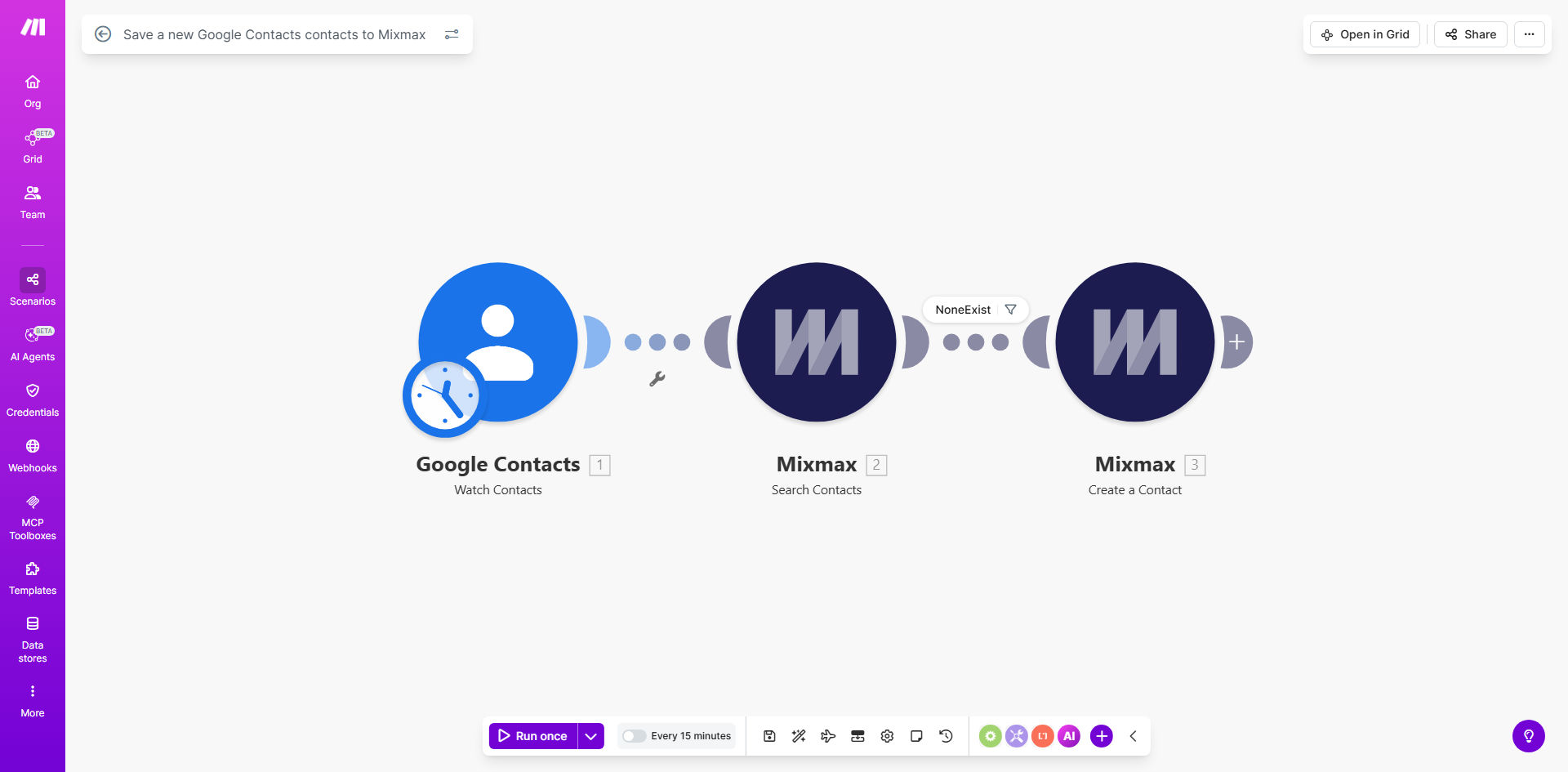
Make.com workflow diagram showing Google Contacts to Mixmax integration

What This Workflow Does

This automation solves a common pain point for sales and marketing teams who use Google Contacts alongside Mixmax for outreach. When contacts are added to Google Contacts (whether manually or through other integrations), they don't automatically appear in Mixmax. This creates manual work for teams who need to maintain contacts in both systems.

The workflow eliminates this friction by instantly creating a corresponding Mixmax contact whenever a new entry appears in Google Contacts. It captures all standard contact fields including name, email, phone numbers, and company information, ensuring your Mixmax campaigns always target the most complete and up-to-date contact list.

How It Works

1. New Contact Detection

The workflow monitors your Google Contacts for new additions using Make.com's Google Contacts trigger. Whenever a new contact is created, the workflow immediately captures all available contact details.

2. Data Formatting

The contact information is formatted to match Mixmax's expected data structure. This includes mapping Google Contact fields to their Mixmax equivalents and ensuring proper formatting of names, email addresses, and other details.

3. Mixmax Contact Creation

Using Mixmax's API through Make.com, the workflow creates a new contact entry with all the captured information. The process happens in seconds, ensuring your sales team has immediate access to new contacts in Mixmax.

Pro tip: Add a filter step to only sync contacts with email addresses if you want to avoid creating Mixmax entries for contacts without email information.

Who This Is For

This automation is ideal for:

  • Sales teams using Mixmax for email outreach who maintain their primary contact list in Google Contacts
  • Marketing teams running campaigns through Mixmax who need to ensure new leads are automatically available
  • Businesses that receive contacts through various channels (forms, business cards, events) into Google Contacts
  • Teams tired of manually copying contacts between systems or dealing with outdated Mixmax contact lists

What You'll Need

  1. A Make.com account (free plan sufficient)
  2. Google Contacts with contacts you want to sync
  3. A Mixmax account with API access
  4. Approximately 10 minutes for setup

Quick Setup Guide

  1. Click "Get This Workflow" to open the template in Make.com
  2. Connect your Google Contacts account when prompted
  3. Connect your Mixmax account using your API credentials
  4. Review the field mappings between Google Contacts and Mixmax
  5. Turn on the scenario - it will now monitor for new Google Contacts

Key Benefits

Eliminate manual data entry: Save 5-15 minutes per contact by removing the need to copy information between systems.

Ensure data consistency: Prevent errors from manual transcription by automatically syncing accurate contact details.

Speed up outreach: New contacts become immediately available in Mixmax for campaigns and sequences.

Maintain a single source of truth: Keep managing contacts in Google Contacts while ensuring Mixmax always has the latest information.

Frequently Asked Questions

Common questions about CRM sync automation and integration

Syncing Google Contacts with Mixmax ensures your sales and outreach teams always have access to the latest contact information. This eliminates manual data entry between systems, reduces errors, and ensures your Mixmax campaigns target the most current contact list automatically.

For example, when a sales rep collects business cards at an event and adds them to Google Contacts, those contacts will immediately appear in Mixmax ready for follow-up sequences without any additional work.

The workflow triggers instantly whenever a new contact is added to Google Contacts. There's no delay - contacts appear in Mixmax within seconds of being created in Google Contacts.

This real-time sync is far more efficient than batch processing or scheduled syncs that might run hourly or daily, ensuring your team always has immediate access to new contacts.

The automation transfers all standard contact fields including name, email, phone numbers, company information, and any custom fields you've set up in Google Contacts. You can customize which fields get mapped to Mixmax during setup.

Common additional fields that sync well include job titles, notes, and contact categories/groups that you might use for segmentation in Mixmax campaigns.

No, this workflow only creates new Mixmax contacts when new Google Contacts are added. Editing existing contacts won't trigger duplicate creation. For two-way sync capabilities, you'd need a more advanced custom automation.

If you need to update existing Mixmax contacts when Google Contacts change, we recommend exploring our custom CRM sync solutions that can handle bidirectional updates.

Yes, you can add filters in the Make.com scenario to only sync contacts meeting specific criteria. Common filters include only syncing contacts with email addresses or from certain Google Contact groups.

For businesses with large contact databases, filtering helps keep Mixmax focused on your most valuable contacts. We can help implement advanced filtering logic if needed.

The workflow will still create a new Mixmax contact entry. For deduplication capabilities, you would need to enhance the automation with custom logic to check for existing contacts first.

In a custom solution, we typically implement deduplication by matching on email addresses or other unique identifiers before creating new entries, preventing duplicates in your Mixmax account.

Absolutely. Our team specializes in building custom CRM integration solutions tailored to your specific business processes. We can create two-way syncs, add advanced deduplication, and connect additional systems beyond Google Contacts and Mixmax.

Custom solutions might include syncing with your CRM, adding validation rules, or incorporating data from other sources like lead forms or event registration systems.

  • Bidirectional sync capabilities
  • Advanced field mapping and transformations
  • Integration with additional business systems

Need a Custom CRM Sync Automation?

This free template is a starting point. Our team builds fully tailored automation systems for your specific business needs.