Make.com Email Automation Gmail Mixmax Sales Automation

Automate Mixmax Messages from Gmail Emails

Trigger personalized Mixmax sequences automatically when receiving qualifying emails in Gmail

Get This Workflow → Make.com · Email Automation · Free Template
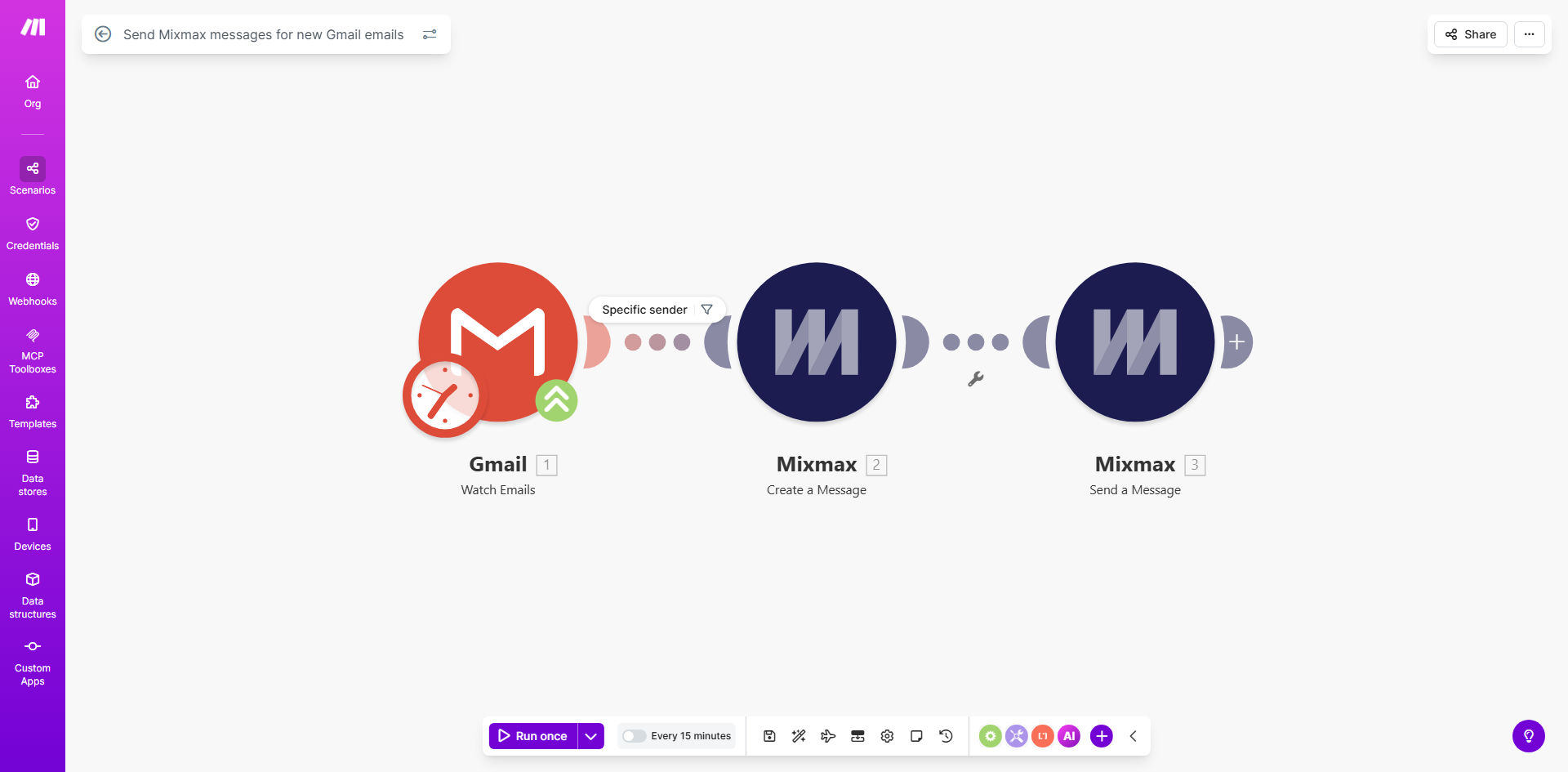
Make.com workflow diagram showing Gmail to Mixmax integration

What This Workflow Does

This automation bridges Gmail and Mixmax to create responsive email sequences without manual intervention. When specific emails arrive in your Gmail inbox—whether customer inquiries, support tickets, or sales leads—the system automatically triggers pre-configured Mixmax messages tailored to each scenario.

Unlike basic email forwarding, this workflow intelligently processes incoming messages. It can filter emails by sender domain, subject keywords, or other criteria before initiating Mixmax sequences. This ensures only relevant communications trigger automated responses while maintaining personalization through dynamic message templates.

How It Works

1. Gmail email monitoring

The workflow continuously checks your Gmail account for new messages matching your specified criteria (like containing specific keywords or coming from certain domains).

2. Email processing and filtering

Each qualifying email gets parsed to extract key details—sender address, subject line, body content—which then determine which Mixmax sequence to trigger.

3. Mixmax message triggering

Based on the email content, the system selects and sends the appropriate Mixmax message template, automatically populating it with details from the original email.

Pro tip: Combine this with Mixmax's scheduling features to automatically send follow-up messages at optimal times after the initial response.

Who This Is For

This workflow delivers the most value for sales teams, customer support agents, and operations managers who handle standardized email communications. It's particularly useful for:

  • Sales reps receiving inbound lead inquiries
  • Support teams handling common customer questions
  • Operations staff processing standardized requests
  • Any team using Mixmax sequences for email outreach

What You'll Need

  1. A Make.com account (free plan sufficient)
  2. Gmail account with access to the inbox being monitored
  3. Mixmax account with message templates prepared
  4. Clear criteria for which emails should trigger automation

Quick Setup Guide

  1. Install the template from Make.com
  2. Connect your Gmail and Mixmax accounts
  3. Define your email filtering criteria (keywords, senders, etc.)
  4. Map your Mixmax templates to different email types
  5. Test with sample emails to verify triggering logic
  6. Activate the workflow for production use

Key Benefits

Save 5-10 hours weekly by eliminating manual email forwarding and response initiation for common message types.

Improve response times with instant Mixmax message triggering the moment qualifying emails arrive.

Ensure consistency by using standardized Mixmax templates instead of ad-hoc responses.

Scale personalized communication by automatically incorporating details from each incoming email into your responses.

Frequently Asked Questions

Common questions about Gmail-Mixmax automation and integration

Automating Mixmax messages from Gmail saves sales and support teams significant time by eliminating manual message forwarding. When specific emails arrive (like customer inquiries), relevant Mixmax sequences can trigger automatically, ensuring timely responses while reducing repetitive tasks.

This automation also improves response consistency by ensuring every qualifying email receives the appropriate standardized sequence rather than varying manual replies.

This automation works best for standardized email types like customer support tickets, sales inquiries, or appointment requests. You can filter emails by subject line, sender domain, or keywords to ensure only relevant messages trigger Mixmax sequences.

Common high-value use cases include automatically responding to pricing inquiries with sales sequences, acknowledging support tickets with status updates, or confirming appointment requests with calendar links.

Mixmax integration transforms static email responses into dynamic sequences with tracking, scheduling, and templates. Automated triggers from Gmail ensure timely follow-ups while maintaining personalization through customizable message templates.

The combination provides visibility into email engagement while removing the manual work of initiating sequences. Teams gain the benefits of structured outreach without the administrative overhead.

Yes, the template allows full customization of Mixmax messages. You can personalize content based on the incoming Gmail's details, use different templates for different email types, and include dynamic fields from the original message.

For example, you might create separate templates for pricing inquiries versus support tickets, each automatically populated with relevant details from the triggering email.

The workflow includes duplicate detection to prevent sending multiple Mixmax messages for the same email thread. You can configure time windows (like 24 hours) where duplicate emails won't trigger new messages.

Advanced implementations can track message threads to ensure follow-ups align with the conversation history rather than treating each reply as a new trigger.

Modern email parsing reliably extracts key details like sender, subject, and body text. For critical workflows, we recommend adding validation steps to handle edge cases like poorly formatted emails or missing information.

Best practices include testing with various email formats during setup and implementing fallback logic when expected data isn't present in the parsed email.

Absolutely. Our team specializes in building tailored email automation systems that match your specific sales, support, or operational workflows. We can create custom filtering rules, message templates, and integration logic beyond this template.

Custom implementations might include integrating with your CRM to enrich lead data, adding conditional branching based on email content analysis, or creating multi-step sequences with intelligent timing between messages.

  • Free consultation to assess your needs
  • Custom workflow design and testing
  • Ongoing optimization support

Need a Custom Email Automation?

This free template is a starting point. Our team builds fully tailored automation systems for your specific business needs.