Make.com WooCommerce Bullet CRM CRM Integration Ecommerce

Create Bullet clients for new WooCommerce customers

Automatically sync your WooCommerce store customers to Bullet CRM as new client records

Get This Workflow → Make.com · WooCommerce · Free Template
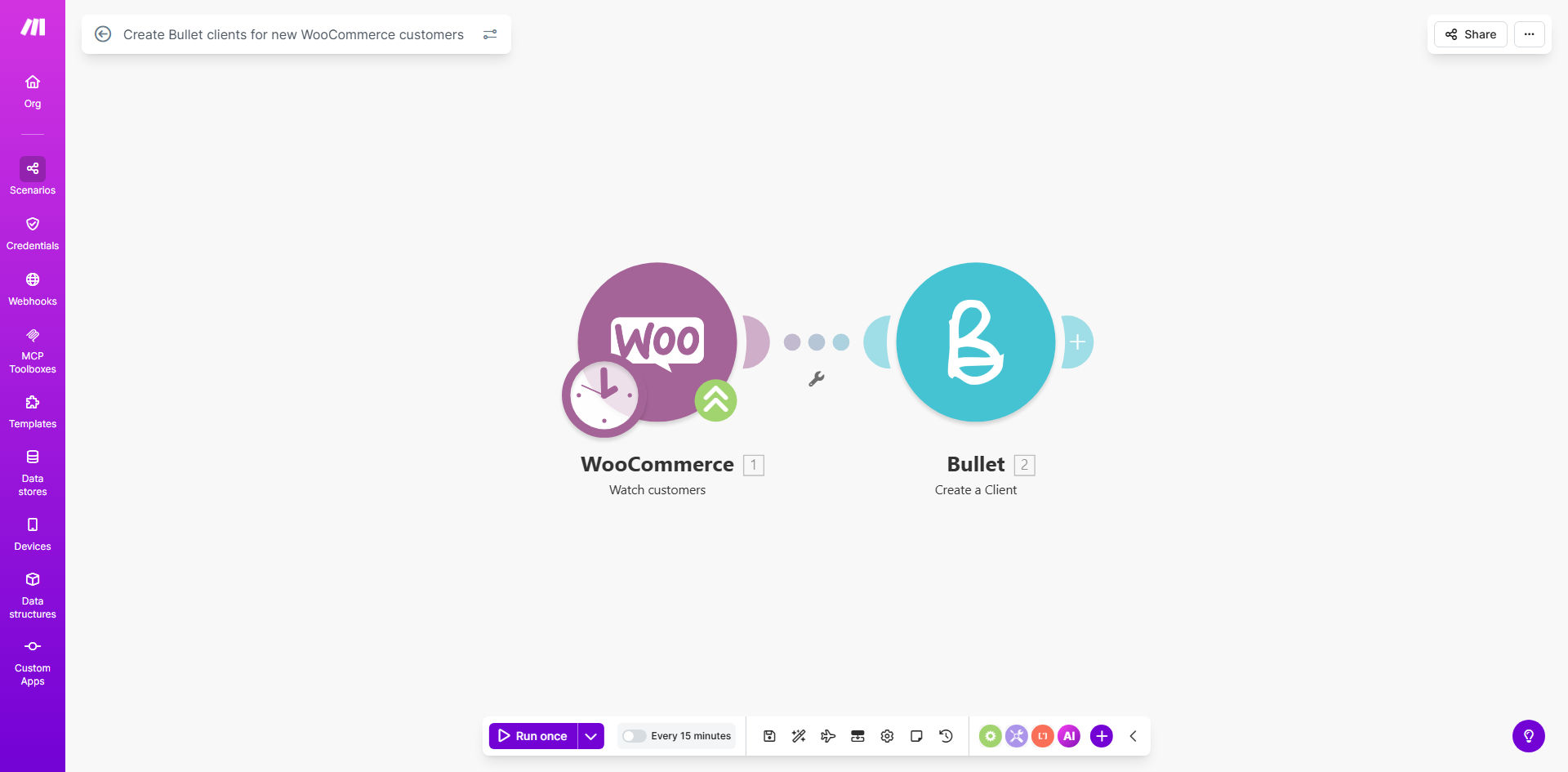
Make.com workflow diagram syncing WooCommerce customers to Bullet CRM

What This Workflow Does

This automation solves the tedious manual process of transferring new WooCommerce customers into your Bullet CRM system. Every time someone makes a purchase on your WooCommerce store, their customer profile gets automatically created as a client record in Bullet CRM with all their details.

The workflow eliminates duplicate data entry, reduces human errors in client onboarding, and ensures your sales team has immediate access to new customers in your CRM system. Instead of wasting hours copying information between platforms, your team can focus on building relationships and driving repeat purchases.

How It Works

1. Monitoring new WooCommerce customers

The Make.com scenario regularly checks your WooCommerce store for new customer registrations using WooCommerce's REST API. You can configure the polling interval based on your store's order volume.

2. Extracting customer data

When new customers are detected, the workflow retrieves all available information including name, email, billing/shipping addresses, phone number, and initial order details.

3. Formatting for Bullet CRM

The customer data gets transformed into the proper structure required by Bullet CRM's API, mapping WooCommerce fields to corresponding Bullet client profile fields.

4. Creating Bullet client records

The workflow sends the formatted data to Bullet CRM via its API, automatically creating a new client record with all the customer's information from WooCommerce.

Pro tip: Add a custom field in Bullet to track the original WooCommerce customer ID. This helps maintain the connection between systems for future updates.

Who This Is For

This automation is ideal for:

  • Ecommerce businesses using WooCommerce with Bullet CRM
  • Teams spending more than 5 hours/week manually transferring customer data
  • Companies wanting faster follow-up with new customers
  • Businesses needing accurate CRM data without duplicate entry errors

What You'll Need

  1. A WooCommerce store with customer accounts enabled
  2. Bullet CRM account with API access
  3. Make.com account (free tier works for basic setup)
  4. WooCommerce REST API keys (Consumer Key/Secret)
  5. Bullet CRM API credentials

Quick Setup Guide

  1. Clone the template in your Make.com account
  2. Connect your WooCommerce store using API credentials
  3. Connect your Bullet CRM account
  4. Map WooCommerce fields to Bullet client fields
  5. Set your preferred polling schedule
  6. Test with a new WooCommerce test customer
  7. Activate the scenario

Key Benefits

Save 5-10 hours per month by eliminating manual customer data transfer between WooCommerce and Bullet CRM.

Reduce onboarding errors with automated, consistent data mapping that prevents typos and missing information.

Improve sales follow-up speed by having new customers in your CRM immediately after purchase.

Maintain data consistency across platforms with synchronized customer profiles.

Scale your operations without adding administrative staff to handle growing customer volumes.

Frequently Asked Questions

Common questions about WooCommerce-Bullet CRM automation and integration

Syncing WooCommerce customers to Bullet CRM eliminates manual data entry, ensures customer data consistency across platforms, and enables better client management in your CRM. This automation saves 5-10 hours per month for most ecommerce businesses while reducing human errors in client onboarding.

Without automation, valuable customer data often gets stuck in WooCommerce, making it difficult for sales teams to build relationships. Automated sync ensures every customer becomes a managed client in your CRM system immediately after purchase.

The workflow checks for new customers at intervals you configure - typically every hour or daily. Make.com polls your WooCommerce store efficiently without impacting site performance, then creates matching Bullet client records immediately when new customers are detected.

For high-volume stores, we recommend hourly checks to ensure prompt follow-up. Lower volume businesses may prefer daily syncs to batch process new customers.

The workflow transfers all standard WooCommerce customer fields including name, email, billing address, phone number, and order history. You can customize which fields map to Bullet's client profile structure during setup to match your preferred CRM organization.

Advanced implementations can include custom fields, lifetime spend calculations, product preferences, and segmentation tags to enhance your Bullet client profiles with valuable ecommerce insights.

Yes, you can add filters to only create Bullet clients for customers meeting specific criteria like minimum order value, product categories purchased, or customer tags. This prevents CRM clutter from one-time buyers while focusing on valuable clients.

Common filters include excluding guest checkouts, setting minimum order thresholds, or only syncing customers who opt-in to marketing communications. These rules help maintain a quality CRM database.

The workflow can be configured to either skip existing clients or update their Bullet profile with new WooCommerce data. This prevents duplicates while keeping client information current across both systems.

For best results, we recommend updating existing records to capture new purchases and changing contact details. This maintains complete customer histories in your CRM.

By automatically adding customers to your CRM, your sales team can immediately begin relationship-building with personalized follow-ups, tailored offers, and proactive support based on purchase history - all without manual data transfer delays.

Studies show contacting new customers within 1 hour of purchase increases repeat business by 35%. This automation ensures your team has the information they need to deliver timely, relevant engagement.

Absolutely! GrowwStacks specializes in custom ecommerce-CRM integrations. We can build tailored workflows with advanced features like segmentation rules, purchase behavior triggers, and automated nurture sequences based on your specific WooCommerce-Bullet setup.

Our automation experts will analyze your current processes, identify optimization opportunities, and implement a solution that saves your team time while improving customer experiences. Custom integrations typically pay for themselves within 2-3 months through efficiency gains.

  • Custom field mapping for your unique CRM structure
  • Advanced segmentation based on purchase behavior
  • Automated follow-up sequences triggered by purchases

Need a Custom WooCommerce-Bullet CRM Automation?

This free template is a starting point. Our team builds fully tailored automation systems for your specific business needs.