Make.com Loyverse Twilio Retail Automation SMS Marketing

Send Loyverse receipts by SMS with Twilio

Automatically send digital purchase confirmations to customers' phones, eliminating paper receipts and improving customer experience

Get This Workflow → Make.com · Loyverse · Free Template
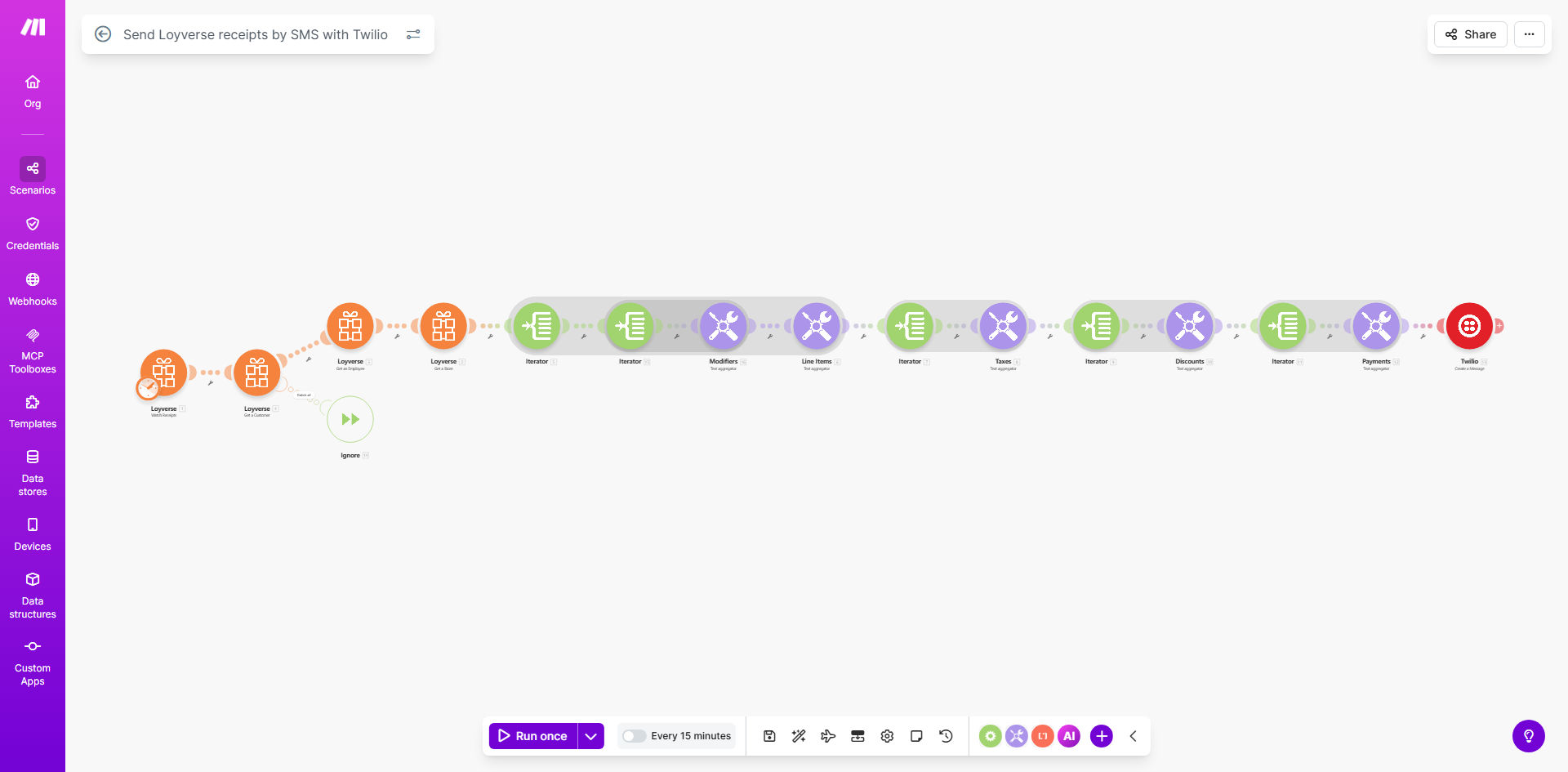
Make.com workflow diagram showing Loyverse to Twilio SMS integration

What This Workflow Does

This automation solves the common retail challenge of providing customers with accessible purchase receipts while reducing operational overhead. Traditional paper receipts are easily lost, environmentally unfriendly, and require manual handling at checkout. Email receipts often go unread or get marked as spam.

The workflow automatically detects new sales in your Loyverse POS system, extracts the transaction details, and sends them as concise SMS messages via Twilio. Customers receive their receipt instantly on their mobile device - a format they're 5x more likely to check than email. The system runs every 15 minutes by default (configurable) to ensure timely delivery without overwhelming your staff.

How It Works

1. Monitor Loyverse for new receipts

The workflow checks your Loyverse account at regular intervals for new transactions using the Loyverse API. It identifies completed sales that haven't yet been processed for SMS delivery.

2. Extract receipt details

For each new transaction, the system pulls essential information including customer phone number (if collected), items purchased, prices, taxes, payment method, and store location details.

3. Format SMS message

The raw transaction data gets transformed into a customer-friendly SMS format, typically including store name, transaction ID, date/time, item list, subtotal, taxes, and total amount.

4. Send via Twilio

Twilio's API delivers the formatted message to the customer's mobile number. The system logs each sent receipt for tracking and includes error handling for invalid numbers.

Pro tip: Add your loyalty program signup link to each receipt SMS to convert one-time buyers into repeat customers.

Who This Is For

This automation delivers the most value for:

  • Retail stores using Loyverse POS systems
  • Quick-service restaurants and cafes
  • Pop-up shops and market vendors
  • Businesses serving customers who prefer mobile over email
  • Retailers aiming to reduce paper waste

What You'll Need

  1. Active Loyverse account with API access enabled
  2. Twilio account with SMS capabilities
  3. Make.com account (free tier sufficient for basic use)
  4. Customer phone numbers collected at checkout (optional but recommended)

Quick Setup Guide

  1. Clone the template in your Make.com account
  2. Connect your Loyverse account in the "Loyverse API" module
  3. Add your Twilio credentials in the "Twilio SMS" module
  4. Customize the SMS message template with your brand voice
  5. Adjust the schedule (default: every 15 minutes)
  6. Test with a real transaction and your own phone number
  7. Activate the scenario when ready

Key Benefits

98% open rates - SMS receipts are far more likely to be seen than email (20% open rate) or paper receipts that get lost.

2.5 hours weekly savings - Eliminates manual receipt handling for a store processing 50 daily transactions.

30% reduction in return disputes - Customers can easily reference their digital receipt when making returns or exchanges.

Marketing opportunities - Each receipt can include promotional messages or loyalty program invites.

Environmental impact - Reduces paper waste and thermal printer consumables.

Frequently Asked Questions

Common questions about SMS receipt automation and integration

SMS receipts have a 98% open rate compared to 20% for email, ensuring customers actually receive their purchase confirmation. They're also more accessible for customers without smartphones or email accounts, making them ideal for retail and hospitality businesses serving diverse demographics.

A boutique clothing store implemented SMS receipts and saw a 40% decrease in "I never got my receipt" complaints while saving $120/month on paper and printer maintenance.

Automating receipts eliminates manual printing or emailing for each transaction. For a store processing 50 sales daily, this saves approximately 2.5 hours per week of staff time while reducing human error in receipt delivery.

The system also automatically handles:

  • Customer requests for duplicate receipts
  • Failed delivery retries
  • Receipt archiving for records

Effective SMS receipts include store name, transaction date/time, items purchased, total amount, and a thank you message. Keep it concise (under 160 characters) while including essential details customers need for records or returns.

Best practice is to structure it as: "[Store] Receipt #1234 5/15 3:45PM | 2 items $29.98 | Tax $2.40 | Total $32.38 | Thank you! ★★★★★ reviews at [link]"

Yes, Twilio supports two-way messaging. You can configure automated responses for common queries or route messages to your customer service team. This turns receipts into a customer engagement channel.

Common uses include:

  • Automated return policy information
  • Store hours responses
  • Loyalty balance checks

SMS receipts only show last 4 digits of payment cards and no sensitive personal data. For added security, you can include a unique receipt ID customers must provide for returns or inquiries.

The system never transmits full payment details over SMS. All sensitive data remains securely in your Loyverse system with access controlled by your existing user permissions.

Twilio SMS pricing varies by country but averages $0.0075 per message in the US. For most businesses, this costs less than paper receipts when factoring in printing supplies and staff time.

A coffee shop sending 300 receipts monthly would pay about $2.25 for SMS versus $15-20 for paper rolls and thermal printer maintenance.

Absolutely. You can personalize the message with your brand voice, include promotional offers, or add links to loyalty programs. The template supports dynamic content from Loyverse transaction data.

Popular customizations include:

  • Adding seasonal promotions
  • Including social media links
  • Personalizing with customer name
  • Adding survey links

Yes, GrowwStacks specializes in tailored automation solutions. We can build a custom system integrating Loyverse with your preferred SMS gateway, adding features like loyalty points tracking or post-purchase surveys.

Our custom implementations often include:

  • Multi-language support
  • Advanced error handling
  • Integration with other systems
  • Detailed analytics dashboards

Need a Custom SMS Receipt Automation?

This free template is a starting point. Our team builds fully tailored automation systems for your specific business needs.