Make.com Retail Automation SMS Integration Loyverse SMS Alert

Automatically Send Loyverse Receipts via SMS

Deliver digital purchase confirmations instantly to customers' phones using SMS Alert integration

Get This Workflow Make.com · Loyverse · Free Template
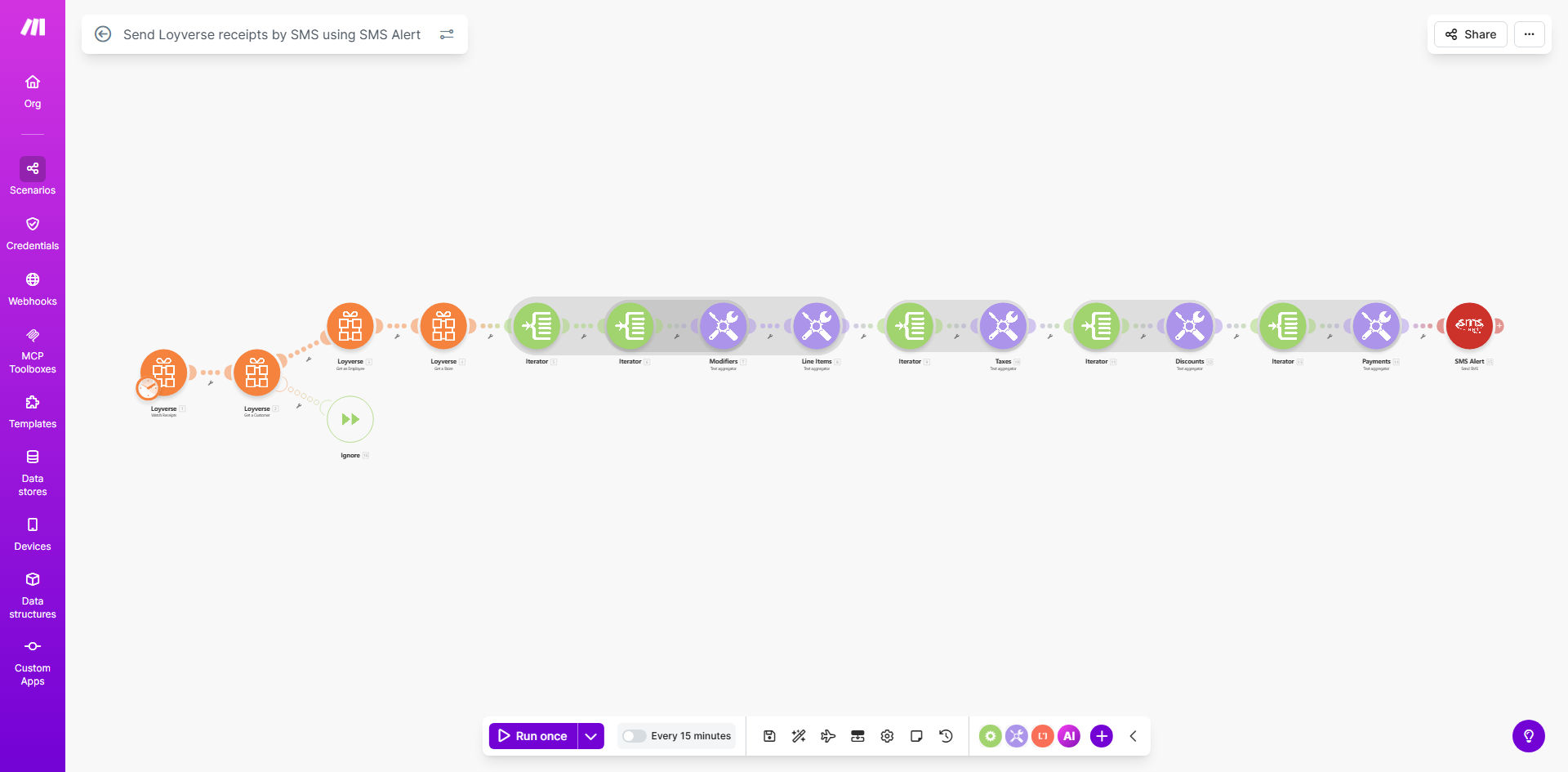
Make.com workflow diagram for Loyverse to SMS Alert integration

What This Workflow Does

This automation solves the challenge of providing customers with immediate purchase confirmations from Loyverse POS systems. Instead of printing paper receipts or relying on customers to check email, it automatically sends transaction details via SMS within minutes of each sale.

The workflow periodically checks Loyverse for new receipts, formats the purchase information into a customer-friendly SMS message, and delivers it through SMS Alert's reliable messaging platform. This creates a seamless digital receipt experience that improves customer satisfaction while reducing paper waste.

How It Works

1. Scheduled Receipt Checking

The template runs every 15 minutes (configurable) to check Loyverse for new receipts since the last run. This ensures timely delivery without overloading either system.

2. Receipt Data Processing

For each new receipt found, the workflow extracts key details like transaction ID, items purchased, totals, payment method, and customer phone number from Loyverse's API.

3. SMS Message Formatting

The system formats the receipt data into a concise SMS message that includes store name, purchase summary, total amount, and optional thank-you message or promotional content.

4. SMS Delivery via SMS Alert

The formatted message is sent through SMS Alert's API to the customer's mobile number. Delivery status is logged for reference.

Pro tip: Customize your SMS template to include your store's branding, loyalty program details, or special offers to turn receipts into marketing opportunities.

Who This Is For

This automation is ideal for:

  • Retail stores using Loyverse POS systems
  • Businesses wanting to reduce paper receipt waste
  • Operations needing instant purchase confirmations
  • Merchants who want to include marketing messages with receipts
  • Businesses serving customers who prefer mobile communication

What You'll Need

  1. An active Loyverse account with API access
  2. SMS Alert API credentials
  3. A Make.com account (free plan available)
  4. Customer phone numbers collected at checkout
  5. Approved SMS template compliant with carrier regulations

Quick Setup Guide

  1. Copy this template to your Make.com account
  2. Connect your Loyverse account in the first module
  3. Add your SMS Alert API credentials
  4. Customize the SMS message template
  5. Set your preferred schedule frequency
  6. Test with a few manual receipts
  7. Activate the automation

Key Benefits

Instant customer confirmation: Customers receive purchase details on their phone within minutes, reducing questions at checkout and building trust.

Paperless operations: Eliminate thermal paper receipts while maintaining compliance with customer receipt requirements.

Marketing opportunities: Include promotional messages, loyalty program signups, or review requests with each receipt.

Reduced disputes: Digital records help resolve questions about purchases days or weeks later.

Scalable solution: Handles any volume of receipts without additional staff effort.

Frequently Asked Questions

Common questions about retail SMS receipt automation

SMS receipts provide instant confirmation to customers, reduce paper waste, and create digital records of purchases. Unlike email receipts that often go unread, SMS messages have 98% open rates within minutes of receipt.

For businesses, this means fewer customer service inquiries about purchases and the ability to include promotional content. A clothing retailer using SMS receipts saw a 23% increase in return visits from receipt-based offers.

SMS Alert offers competitive pricing, high deliverability rates, and simple API integration. Their platform is optimized for transactional messaging with features like delivery receipts and two-way messaging capabilities.

Unlike bulk SMS providers, SMS Alert specializes in reliable receipt delivery with minimal latency. Their infrastructure ensures messages reach customers even during network congestion periods common in retail environments.

Essential details include store name, purchase date/time, items purchased, total amount, and payment method. Keep the message concise while including all legally required receipt information.

Best practice is to structure the message with the most important details first. For example: "[StoreName] Purchase: 3 items $45.50 Card ****1234 5/15 2:30PM". Additional details can follow in subsequent messages if needed.

  • Always include transaction ID for reference
  • Consider local receipt requirements
  • Keep message under 160 characters when possible

Yes, digital receipts provide customers with immediate purchase confirmation and details they can reference later. This reduces disputes and questions about transaction amounts or items purchased.

A convenience store chain implementing SMS receipts saw customer service calls about purchases drop by 62%. Customers could simply refer to their text message history rather than calling the store.

For most retail businesses, checking every 15-30 minutes provides timely receipts without overloading systems. This balances immediacy with system performance considerations.

High-volume stores may need more frequent checks during peak hours. The schedule can be adjusted in Make.com based on your sales patterns - more frequent during busy periods, less often overnight.

Yes, SMS Alert supports two-way messaging. You can configure automated responses for common inquiries when customers reply to receipts.

For example, replies containing "HOURS" could return store hours, "RETURN" could send return policy details, and "LOYALTY" could provide loyalty program information. This creates an interactive customer service channel.

Absolutely! Our team specializes in building tailored SMS automation systems for retail businesses. We can customize receipt formats, integrate with your POS system, and add features like loyalty program enrollment.

Beyond basic receipts, we've built systems that send appointment reminders, inventory alerts, and personalized promotions based on purchase history. Every solution is designed around your specific business needs and customer communication strategy.

  • Custom SMS templates matching your brand
  • Integration with your existing POS system
  • Advanced features like two-way messaging

Need a Custom Retail SMS Automation?

This free template is a starting point. Our team builds fully tailored automation systems for your specific business needs.