Stripe Zoho Sheets Payment Tracking Accounting

Automate Stripe Charges to Zoho Sheets

Sync payment data automatically between platforms without manual work

Get This Workflow → Make.com · Free Template
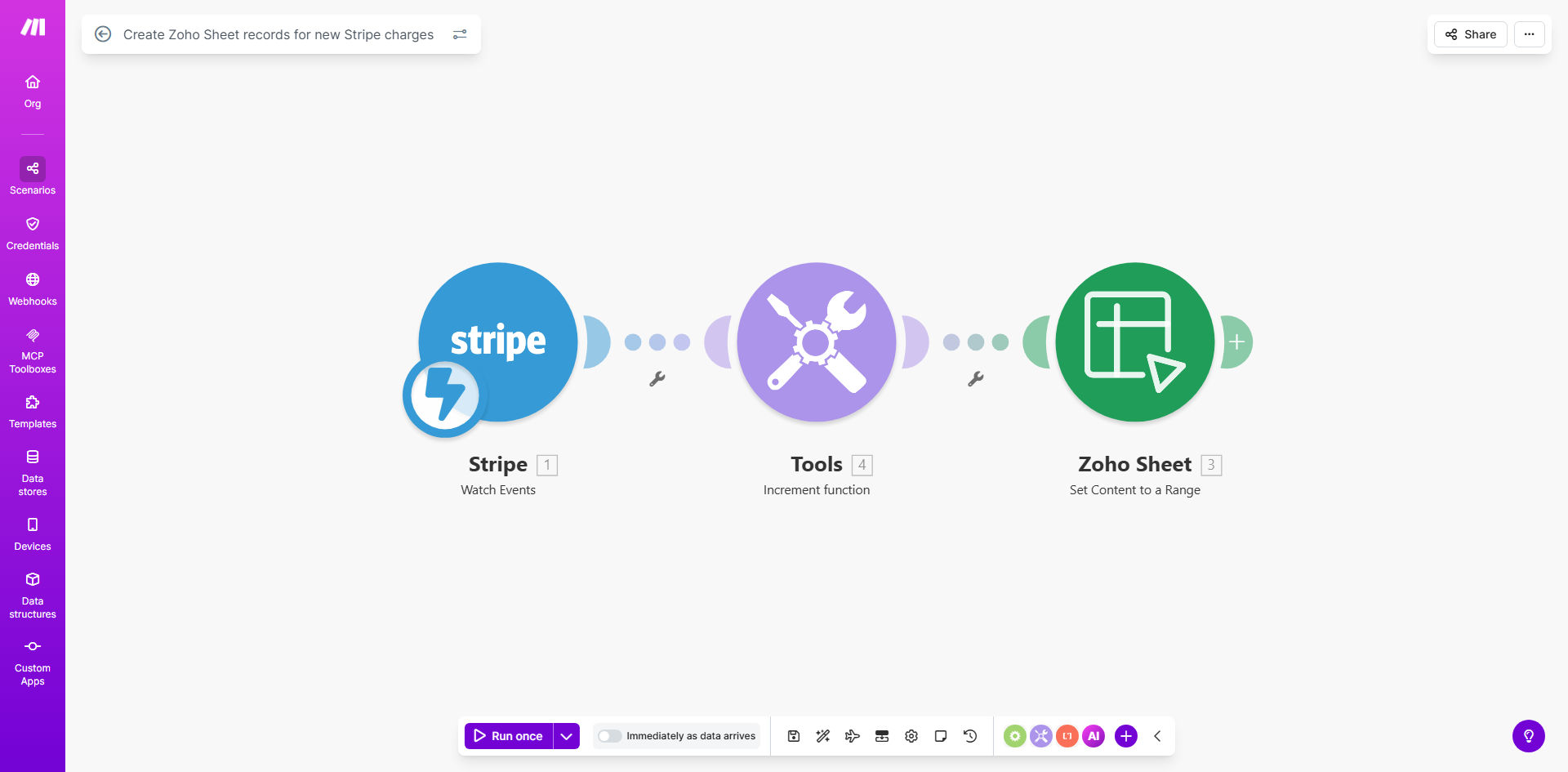
Make.com workflow diagram showing Stripe to Zoho Sheets automation

What This Workflow Does

This automation solves the tedious manual process of copying payment data from Stripe to accounting spreadsheets. Every time a customer makes a payment through Stripe, the workflow automatically creates a corresponding record in your Zoho Sheets with all relevant transaction details.

Businesses using both Stripe and Zoho Sheets typically waste 5-10 hours per month manually transferring payment data. This workflow eliminates that repetitive work while ensuring perfect data accuracy. The automated sync happens in real-time, so your financial records are always up-to-date.

How It Works

1. New Stripe Charge Trigger

The workflow monitors your Stripe account for new charges using Stripe's API. Whenever a customer payment is processed, the automation immediately captures the event.

2. Data Extraction

Key payment details are extracted including amount, currency, customer email, payment date, invoice ID, and payment status. The workflow can be customized to include additional metadata as needed.

3. Zoho Sheets Record Creation

The payment data gets formatted and added as a new row in your specified Zoho Sheet. You can configure which columns receive which data points for seamless integration with your existing accounting system.

Who This Is For

This automation delivers the most value for:

  • Ecommerce businesses using Stripe for payments
  • SaaS companies with subscription billing
  • Freelancers tracking client payments
  • Accounting teams reconciling Stripe data
  • Businesses using Zoho Sheets for financial tracking

What You'll Need

  1. A Stripe account with payment processing enabled
  2. A Zoho Sheets spreadsheet with appropriate column headers
  3. Make.com account (free tier available)
  4. API access permissions for both platforms

Quick Setup Guide

  1. Get the template from Make.com
  2. Connect your Stripe account in Make
  3. Connect your Zoho Sheets account
  4. Specify the target spreadsheet and worksheet
  5. Map Stripe fields to Zoho Sheet columns
  6. Test with sample transactions
  7. Activate the automation

Pro tip: Create a dedicated "Stripe Payments" worksheet with columns matching Stripe's API fields for easiest setup. Include a timestamp column to track when records were added.

Key Benefits

Eliminates manual data entry - No more copying payment details between platforms, reducing errors and saving hours each month.

Real-time financial visibility - Your Zoho Sheets always reflect current payment status without waiting for manual updates.

Customizable data mapping - Include only the fields you need in the format that works with your accounting system.

Scalable solution - Handles any volume of transactions automatically, whether 10 or 10,000 payments monthly.

Frequently Asked Questions

Common questions about Stripe and Zoho Sheets integration

Automating Stripe-Zoho Sheets sync eliminates manual data entry errors and saves 5-10 hours monthly. Payment records automatically appear in your accounting system with correct timestamps and metadata.

Manual processes often lead to missed payments or incorrect amounts being recorded. Automation ensures 100% accuracy while freeing your team for higher-value work.

The workflow captures charge amount, customer email, payment date, invoice ID, and payment status. You can customize which fields to include based on your accounting needs.

Common additional fields businesses include are product SKUs, tax amounts, payment method, and custom metadata from Stripe that's relevant to their accounting processes.

The automation runs in real-time whenever a new charge occurs in Stripe. You can also configure daily batch updates if preferred.

Real-time sync is ideal for businesses needing immediate payment visibility, while batch processing works well for those who reconcile finances on a daily schedule.

Yes, you can set conditions to only sync charges above certain amounts, from specific products, or with particular metadata tags.

This helps avoid cluttering your accounting sheets with test payments, refunds, or internal transactions that don't need tracking.

The workflow can be extended to mark refunded charges in Zoho Sheets or create separate refund records to maintain accurate accounting.

Advanced configurations can even trigger approval workflows when refunds exceed certain thresholds or come from specific customers.

Make.com uses OAuth and API keys with read-only access to Stripe data. Your payment information never gets stored on Make's servers.

The connection uses bank-grade encryption, and you can restrict API permissions to only the minimum required for the integration to function.

Our team designs tailored Stripe integrations that match your specific accounting workflows, including custom field mapping, multi-sheet organization, and reconciliation features.

We can build solutions that handle complex scenarios like:

  • Multi-currency accounting
  • Departmental cost allocation
  • Automated reconciliation with bank feeds

Need a Custom Stripe-Zoho Integration?

This free template is a starting point. Our team builds fully tailored automation systems for your specific business needs.