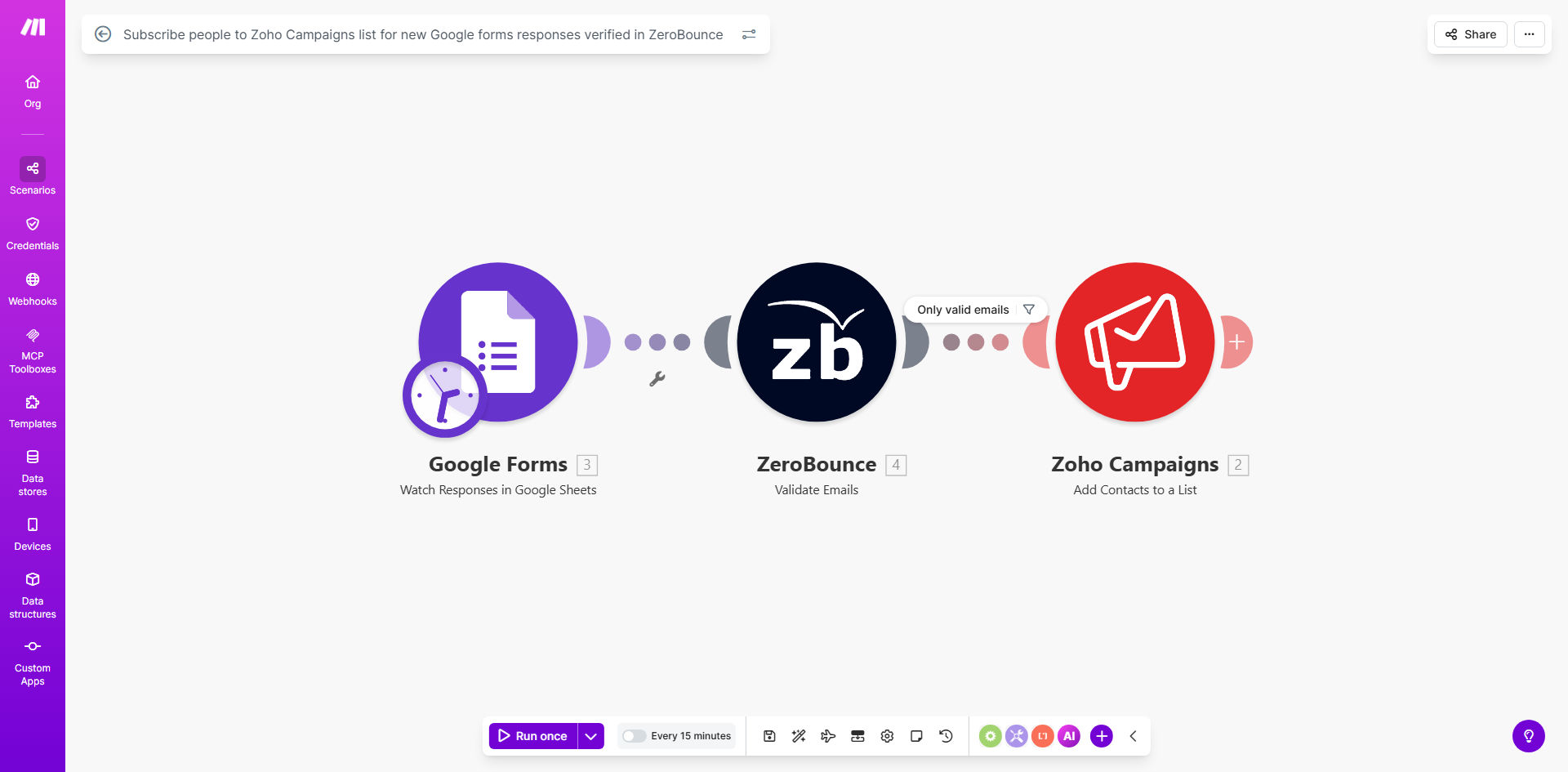
What This Workflow Does
This automation solves a critical challenge for marketers and businesses collecting leads through Google Forms: ensuring only valid, deliverable email addresses enter your Zoho Campaigns mailing lists. Without validation, forms often collect typos, fake emails, or disposable addresses that hurt your sender reputation and campaign performance.
The workflow automatically monitors new Google Forms responses, validates each email address through ZeroBounce's industry-leading verification service, and only subscribes confirmed valid addresses to your specified Zoho Campaigns list. This maintains list hygiene while eliminating hours of manual verification work.
How It Works
Step 1: Trigger on New Form Responses
The workflow checks your Google Form at regular intervals (typically every 15-60 minutes) for new submissions containing email addresses.
Step 2: Email Validation with ZeroBounce
Each collected email address is sent to ZeroBounce for real-time verification. The service checks for syntax errors, disposable domains, spam traps, and other red flags.
Step 3: Filter Valid Addresses
Only emails that pass ZeroBounce's validation (with statuses like "valid" or "catch-all") proceed to the next step. Invalid addresses are logged separately for review.
Step 4: Add to Zoho Campaigns
Verified emails are automatically added to your designated Zoho Campaigns mailing list along with any additional form data (name, phone, etc.) you want to include.
Pro tip: Configure Zoho Campaigns to send a welcome email immediately after subscription to confirm opt-in and improve engagement rates.
Who This Is For
This workflow is ideal for:
- Marketing teams running lead capture forms
- Event organizers managing attendee communications
- E-commerce businesses building newsletter lists
- Educational institutions handling student inquiries
- Any business using Google Forms with email marketing
What You'll Need
- A Google Forms with email collection field
- ZeroBounce API account (free tier available)
- Zoho Campaigns account with API access enabled
- Make.com account (free plan sufficient)
Quick Setup Guide
- Connect your Google Forms to the workflow trigger
- Add your ZeroBounce API credentials
- Configure your Zoho Campaigns list ID and connection
- Set your preferred validation strictness level
- Test with sample submissions before going live
Key Benefits
98% cleaner email lists by eliminating invalid addresses before they enter your marketing system, protecting your sender reputation.
Saves 5-8 hours weekly by automating what would otherwise require manual verification and data entry for every new lead.
15-25% higher deliverability rates compared to unvalidated lists, ensuring your campaigns reach real inboxes.
Real-time lead processing that's faster than manual methods, accelerating your marketing funnel velocity.
Compliance-ready tracking with validation timestamps and logs for GDPR and other regulations.