Make.com Email Marketing Typeform Zoho Campaigns Email Validation

Automatically Build Clean Zoho Campaigns Lists from Typeform Responses

Validate emails with Clearout and auto-subscribe verified contacts to your Zoho Campaigns lists - no manual work required

Get This Workflow → Make.com · Email Marketing · Free Template
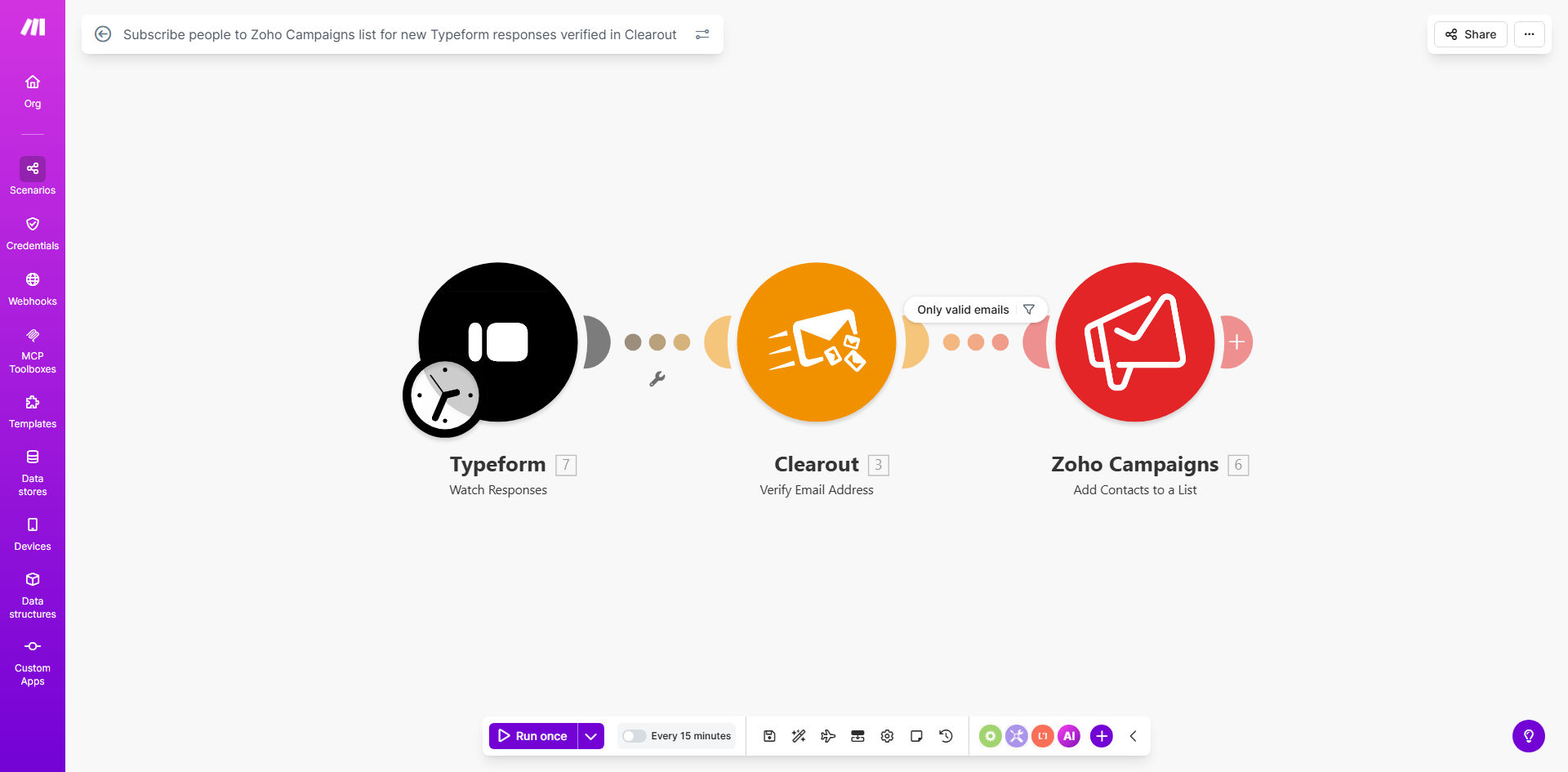
Make.com workflow diagram showing Typeform to Clearout to Zoho Campaigns integration

What This Workflow Does

This automation solves a critical problem for marketers and business owners who collect leads through Typeform - ensuring only valid, deliverable email addresses make it into your Zoho Campaigns mailing lists. Without automation, you'd need to manually export Typeform responses, validate each email, then import the clean list - a time-consuming process prone to human error.

The workflow automatically monitors your Typeform for new responses, sends each email address through Clearout's validation service, and only subscribes verified contacts to your specified Zoho Campaigns list. This maintains list hygiene, improves email deliverability, and saves hours of manual data processing each week.

How It Works

1. New Typeform Response Trigger

The workflow checks your Typeform at regular intervals (configurable from 15 minutes to 24 hours) for new submissions containing email addresses.

2. Email Validation with Clearout

Each collected email address is sent to Clearout's API for real-time verification. Clearout checks domain validity, mailbox existence, and filters out disposable/temporary email addresses.

3. Conditional Routing

Based on Clearout's validation results, the workflow routes emails to different paths - valid addresses proceed to Zoho Campaigns, while invalid or risky addresses can be flagged for review.

4. Zoho Campaigns Subscription

Verified email addresses are automatically added to your specified Zoho Campaigns mailing list, with optional custom fields mapped from the Typeform response data.

Pro tip: Configure the workflow to add tags in Zoho Campaigns based on Typeform responses (like "Webinar Attendee" or "Product Interest") for powerful segmentation in your email campaigns.

Who This Is For

This automation delivers the most value for:

  • Marketing teams running lead generation campaigns through Typeform
  • Event organizers collecting registrations with email verification
  • Ecommerce businesses building newsletter subscriber lists
  • SAAS companies onboarding new trial users
  • Any business using Typeform + Zoho Campaigns that wants cleaner lists

What You'll Need

  1. An active Make.com account (formerly Integromat)
  2. Typeform with responses containing email addresses
  3. Zoho Campaigns account with API access
  4. Clearout.io account for email validation (free tier available)
  5. Basic understanding of Make.com scenarios

Quick Setup Guide

  1. Clone the template to your Make.com account
  2. Connect your Typeform account and select the form to monitor
  3. Add your Clearout API key for email validation
  4. Connect your Zoho Campaigns account and specify the target list
  5. Map Typeform fields to Zoho Campaigns contact fields
  6. Set your preferred polling interval (15-60 minutes recommended)
  7. Test with sample responses and activate the scenario

Key Benefits

98%+ deliverability: By filtering out invalid emails before they reach Zoho Campaigns, you maintain high sender reputation and inbox placement rates.

5-10 hours saved weekly: Eliminate manual exports, validation spreadsheets, and list imports - the workflow handles everything automatically.

Real-time list growth: New Typeform respondents are added to your campaigns within minutes, not days, keeping your marketing agile.

Segmentation opportunities: Leverage Typeform response data to create dynamic segments in Zoho Campaigns for targeted messaging.

Fraud prevention: Clearout blocks disposable emails and spam traps that could distort your campaign metrics.

Frequently Asked Questions

Common questions about email list automation and integration

Email validation prevents fake or mistyped emails from entering your Zoho Campaigns lists, which improves deliverability rates and protects your sender reputation. Invalid emails can cause bounces that negatively impact your ability to reach real subscribers.

Marketing platforms like Zoho Campaigns track bounce rates as a key metric of list quality. High bounce rates may trigger sending limits or even account suspension. Automated validation ensures only legitimate contacts enter your system.

  • Reduces hard bounces by 80-90%
  • Maintains sender score with ISPs
  • Saves money by not sending to invalid addresses

Clearout checks email addresses against multiple databases to verify domain validity, mailbox existence, and whether the address follows proper formatting. It can identify disposable emails, catch-all domains, and potential spam traps that could harm your campaigns.

The service performs over 20 different checks including syntax validation, DNS lookup, SMTP verification, and mailbox ping. For example, it can detect if an address like "[email protected]" actually exists or if the domain has proper MX records configured.

  • Syntax check: Valid email format
  • Domain check: Active DNS records
  • Mailbox check: Actual existence

This workflow works with any Typeform that collects email addresses, including lead gen forms, newsletter signups, event registrations, or customer feedback surveys. The email field must be properly mapped in the Make.com scenario.

Common use cases include webinar registration forms, product waitlist signups, customer satisfaction surveys, and contact request forms. The automation can handle multiple response fields - you might capture name, company, and preferences along with the email for richer subscriber profiles.

  • Works with all Typeform question types
  • Supports hidden fields and variables
  • Handles conditional logic responses

Yes, you can configure the workflow to add tags or place subscribers in different Zoho Campaigns lists based on their Typeform answers. For example, segment by product interest or event attendance preference.

A real estate agency might route "Home Buyer" respondents to one list and "Home Seller" to another. Or a software company could tag users by their stated role (Developer, Marketer, Executive) for persona-based email sequences.

  • Create unlimited segments
  • Apply multiple tags per contact
  • Trigger different welcome sequences

The polling interval is configurable in Make.com, typically checking every 15-60 minutes. More frequent checks ensure faster list updates but consume more operations from your Make.com plan.

For most marketing use cases, checking every 30 minutes provides a good balance between responsiveness and operation consumption. High-volume forms might use 15-minute intervals, while low-traffic forms could check hourly to conserve operations.

  • Minimum interval: 5 minutes
  • Default recommendation: 30 minutes
  • Consider your Make.com operation limits

The workflow can be configured to either skip invalid emails entirely or route them to a separate list for manual review. You'll maintain a clean main list while still capturing potential valid addresses that may need follow-up.

For example, you might create a "Needs Verification" list in Zoho Campaigns for borderline cases (like catch-all domains). This lets you attempt manual validation through secondary channels like phone calls before adding to your primary marketing list.

  • Option to receive validation failure alerts
  • Can trigger follow-up actions for invalid emails
  • Maintains audit trail of validation attempts

Absolutely. GrowwStacks specializes in building tailored email automation systems that connect your specific forms, validation tools, and marketing platforms. We can create workflows with custom validation rules, segmentation logic, and integration with your unique tech stack.

Our team has implemented custom solutions for businesses needing advanced features like lead scoring based on form responses, multi-step validation processes, or integration with CRMs beyond Zoho. We'll design a system that fits your exact marketing operations and data flow requirements.

  • Custom validation rulesets
  • Advanced segmentation logic
  • Integration with your full tech stack

Need a Custom Email List Automation?

This free template is a starting point. Our team builds fully tailored automation systems for your specific business needs.