Email Marketing Form Automation Data Validation Make.com

Automate Amazon SES Contacts from Verified Tally Responses

Create validated email contacts automatically when new Tally form submissions pass Clearout verification

Get This Workflow → Make.com · Free Template
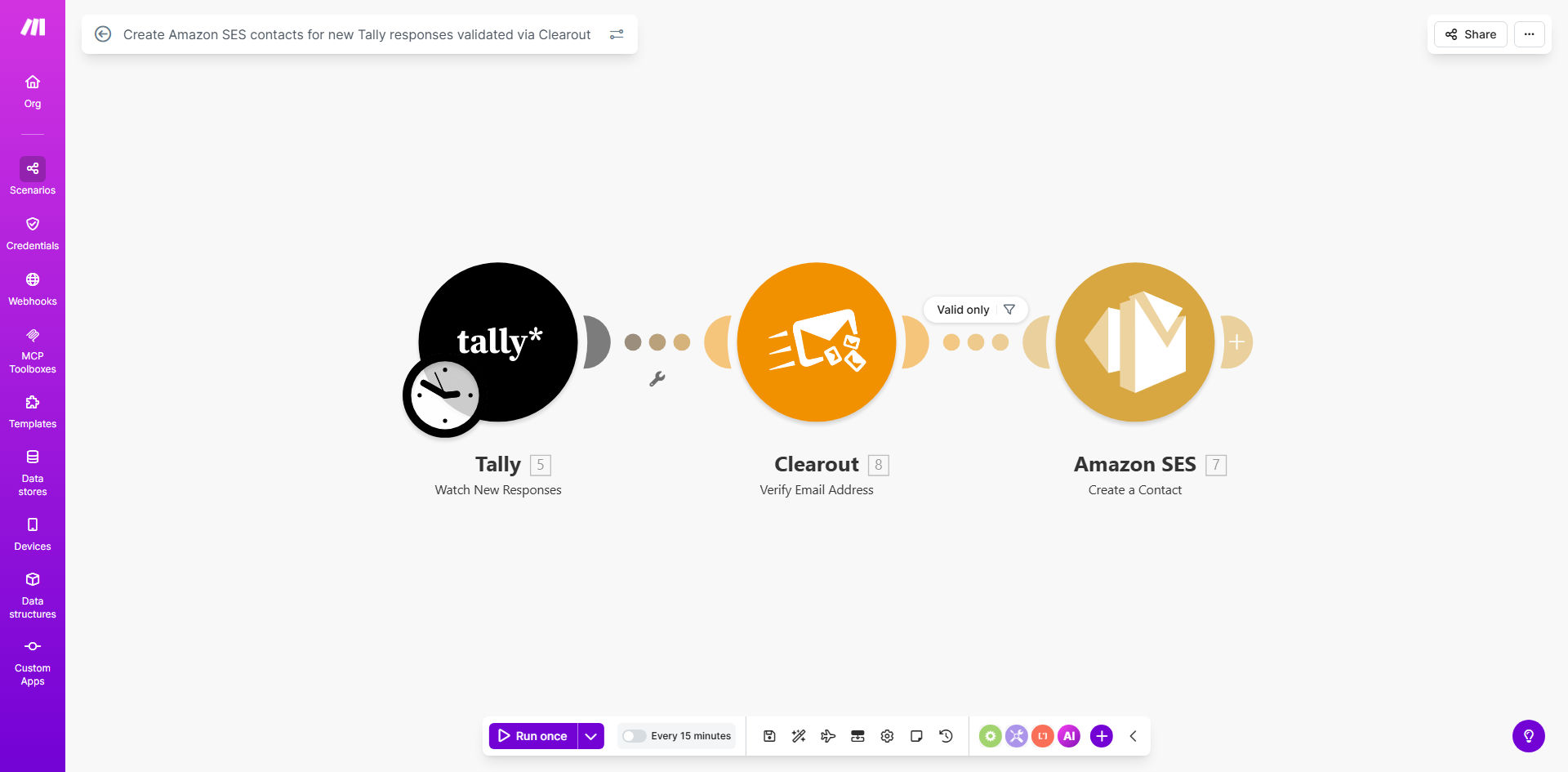
Workflow diagram showing Tally form responses being validated by Clearout before creating Amazon SES contacts

What This Workflow Does

This automation solves the challenge of maintaining clean, verified email contact lists in Amazon Simple Email Service (SES) when collecting leads through Tally forms. Many businesses struggle with invalid email submissions that waste resources and hurt deliverability metrics.

The workflow automatically validates each new Tally form response through Clearout's email verification service before creating the contact in Amazon SES. This ensures your email marketing campaigns only target valid, deliverable addresses while eliminating manual verification steps.

How It Works

1. New Tally Form Submission

The workflow triggers whenever someone submits your Tally form, capturing all provided contact information including email address.

2. Clearout Email Validation

Each submitted email address is automatically checked against Clearout's verification service to confirm its validity and deliverability.

3. Conditional Routing

Only emails that pass verification proceed to the next step. Invalid addresses can be routed to a separate list for follow-up.

4. Amazon SES Contact Creation

Verified contacts are automatically added to your specified Amazon SES contact lists with all relevant form data mapped to appropriate fields.

Pro tip: Configure the workflow to add tags in Amazon SES based on which Tally form was submitted, allowing for targeted email campaigns.

Who This Is For

This workflow benefits any business using Tally forms for lead generation that wants to:

  • Ensure only valid emails enter their Amazon SES contact lists
  • Automate the transfer of form responses to their email marketing system
  • Reduce manual data entry and verification work
  • Maintain high deliverability rates for email campaigns

What You'll Need

  1. An active Tally account with forms collecting email addresses
  2. Amazon SES configured with appropriate contact lists
  3. Clearout API access for email verification
  4. A Make.com account to host the workflow

Quick Setup Guide

  1. Copy the template to your Make.com account
  2. Connect your Tally, Clearout, and Amazon SES accounts
  3. Map your Tally form fields to Amazon SES contact attributes
  4. Set your preferred verification thresholds in Clearout
  5. Activate the workflow and test with sample submissions

Key Benefits

Improved Email Deliverability: By ensuring only verified addresses enter your Amazon SES lists, you maintain higher sender reputation and inbox placement rates.

Time Savings: Eliminates hours of manual email verification and contact list management each week.

Real-Time Processing: New leads are added to your email system within minutes of form submission when they meet your quality standards.

Consistent Data: Automated field mapping ensures all contacts are formatted correctly in Amazon SES for segmentation and targeting.

Frequently Asked Questions

Common questions about email validation and contact management automation

Email verification ensures your Amazon SES contacts are valid before adding them to your lists. This improves deliverability rates and prevents bounces that could harm your sender reputation. Clearout provides real-time verification to maintain list hygiene.

Without verification, you risk sending emails to invalid addresses that bounce, which can eventually lead to your emails being flagged as spam or your sending limits being reduced by Amazon SES.

Tally forms capture contact information that can be automatically sent to Amazon SES through this workflow. The integration eliminates manual data transfer between systems, saving hours of administrative work while ensuring no leads fall through the cracks.

The workflow maps Tally form fields to corresponding Amazon SES contact attributes, maintaining all collected information in your email marketing system where it can be used for segmentation and personalization.

Automation reduces human error in contact data entry and ensures timely processing of new leads. It also enforces consistent data formatting and allows for immediate follow-up with new contacts through your email campaigns.

Additional benefits include the ability to scale your lead generation without proportional increases in administrative work, and maintaining compliance with email marketing best practices through standardized processes.

Yes, the workflow allows field mapping configuration so you can control which Tally form fields populate specific Amazon SES contact attributes. This ensures your email campaigns have all relevant segmentation data.

For example, you might map a "Company Size" dropdown from Tally to a custom attribute in Amazon SES, allowing you to send targeted content based on this information later.

The workflow runs at intervals you configure, from every 15 minutes to daily. More frequent checks ensure real-time processing, while less frequent runs may be better for high-volume forms to batch process submissions.

Consider your business needs - time-sensitive offers may require near-instant processing, while newsletter signups could be processed in daily batches without issue.

The workflow can be configured to either discard invalid emails or route them to a separate list for review. This prevents invalid addresses from entering your main contact lists while allowing potential corrections.

Some businesses choose to notify their sales team about potentially invalid emails so they can follow up through other channels, as sometimes typos rather than fake addresses are to blame.

Absolutely. Our team specializes in building tailored email validation and contact management systems. We can customize this workflow for your specific Tally forms, Amazon SES configuration, and business rules around contact verification.

Customizations might include additional validation steps, integration with your CRM, special handling for certain types of submissions, or reporting on verification outcomes. We'll design a solution that fits your exact email marketing workflow needs.

Need a Custom Email Validation Automation?

This free template is a starting point. Our team builds fully tailored automation systems for your specific business needs.