Make.com HubSpot Loqate Email Validation CRM Automation

Validate HubSpot CRM Contacts Using Loqate

Automatically verify new contact emails and maintain a clean CRM database

Get This Workflow → Make.com · HubSpot · Free Template
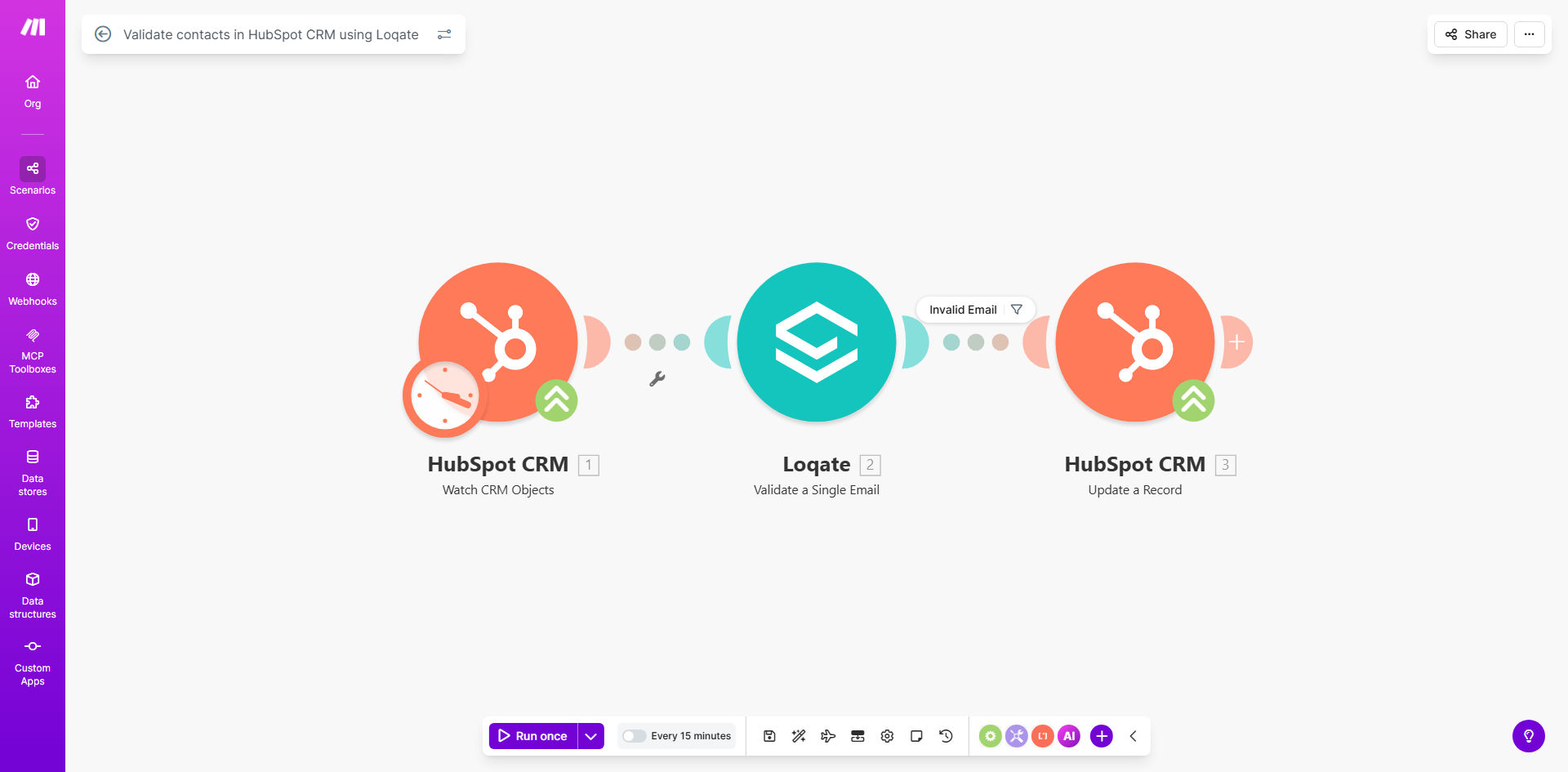
HubSpot CRM and Loqate integration workflow diagram

What This Workflow Does

This automation solves a critical problem for businesses using HubSpot CRM - maintaining accurate contact information. When new contacts enter your CRM, invalid email addresses can lead to wasted marketing efforts, bounced messages, and inaccurate reporting.

The workflow automatically validates each new HubSpot contact using Loqate's email verification service. If an email fails validation, the contact is immediately flagged or deactivated in HubSpot, preventing it from entering your marketing sequences or sales pipelines with incorrect data.

How It Works

1. New Contact Detection

The workflow monitors HubSpot for newly created contacts, triggering whenever a contact record is added to your CRM.

2. Email Validation

Each contact's email address is sent to Loqate's verification API, which checks for proper syntax, valid domain, and active mailbox.

3. Validation Results Processing

Loqate returns a validation score indicating whether the email is deliverable. The workflow interprets this score to determine if the email is valid.

4. HubSpot Contact Update

For invalid emails, the workflow automatically updates the HubSpot contact record - either deactivating it or adding a custom property flagging it as unverified.

Pro tip: Configure the workflow to notify your sales team when invalid contacts are detected, allowing them to follow up for corrected information.

Who This Is For

This automation is ideal for:

  • Marketing teams running email campaigns from HubSpot
  • Sales organizations relying on accurate CRM data
  • Companies with high-volume contact acquisition
  • Businesses experiencing email bounce rate issues
  • Teams wanting to improve marketing ROI through better data

What You'll Need

  1. An active HubSpot CRM account
  2. Loqate API credentials (free tier available)
  3. A Make.com account
  4. Admin access to configure HubSpot workflows

Quick Setup Guide

  1. Import the template into your Make.com account
  2. Connect your HubSpot and Loqate accounts
  3. Configure the validation threshold (we recommend "deliverable" or higher)
  4. Set your preferred action for invalid emails (deactivate or flag)
  5. Test with sample contacts before going live

Key Benefits

Reduce wasted marketing spend by preventing emails to invalid addresses, which account for 10-20% of typical CRM contacts.

Improve campaign metrics with 20-30% higher open rates when only valid emails are included in your sends.

Maintain sender reputation by avoiding bounces that can trigger spam filters and delivery problems.

Save manual cleanup time with automatic validation instead of periodic database scrubbing.

Enhance sales productivity by ensuring your team only works with properly contactable leads.

Frequently Asked Questions

Common questions about CRM email validation automation

Email validation ensures your CRM contains accurate contact information, improving deliverability rates and preventing wasted marketing efforts. Invalid emails lead to bounced messages and inaccurate reporting.

For example, a marketing team sending 10,000 emails per month could waste $500-$1,000 monthly sending to invalid addresses. Validation prevents this while improving key metrics like open rates.

Loqate checks email syntax, domain validity, and mailbox existence using real-time verification protocols. It identifies disposable emails, typos, and inactive accounts that could harm your marketing performance.

The service uses SMTP verification to confirm mailbox existence without actually sending messages. This provides accurate validation while maintaining privacy compliance.

Industry studies show 10-20% of new CRM contacts contain invalid email addresses. Automated validation prevents these from polluting your database and wasting marketing resources.

The rate varies by industry and acquisition method. Web forms typically have lower invalidity rates (8-12%) than purchased lists (25-40%).

Yes, validated email lists see 20-30% higher open rates and 15-25% better conversion rates. Clean data also reduces spam complaints and improves sender reputation with ISPs.

Marketing automation platforms like HubSpot actually score sender reputation based on bounce rates. Maintaining clean lists ensures your emails reach the inbox.

This workflow automatically flags or deactivates invalid contacts in HubSpot, preventing them from entering marketing sequences. You can configure alerts to follow up with these contacts manually.

Common approaches include adding a "validation_status" property or moving invalid contacts to a separate list for review. The template supports all these options.

Best practice is validating new contacts immediately and rechecking inactive contacts quarterly. Email validity changes over time as people change jobs or abandon accounts.

You can extend this workflow to periodically revalidate inactive contacts or those with low engagement. This maintains data quality as your CRM grows.

Absolutely. Our team designs tailored validation workflows matching your specific CRM, industry requirements, and data quality standards. We can integrate multiple validation services and create custom rules.

Custom solutions might include validating phone numbers alongside emails, creating tiered validation rules based on lead source, or building approval workflows for questionable contacts.

  • Multi-service validation (email + phone + address)
  • Lead source-specific validation rules
  • Custom reporting on data quality trends

Need a Custom CRM Validation Automation?

This free template is a starting point. Our team builds fully tailored automation systems for your specific business needs.