Make.com Email Validation CRM Automation Lead Capture

Verify Email Addresses & Create ActiveCampaign Contacts

Automatically validate form submissions and populate your CRM with verified leads

Get This Workflow → Make.com · Google Forms · Free Template
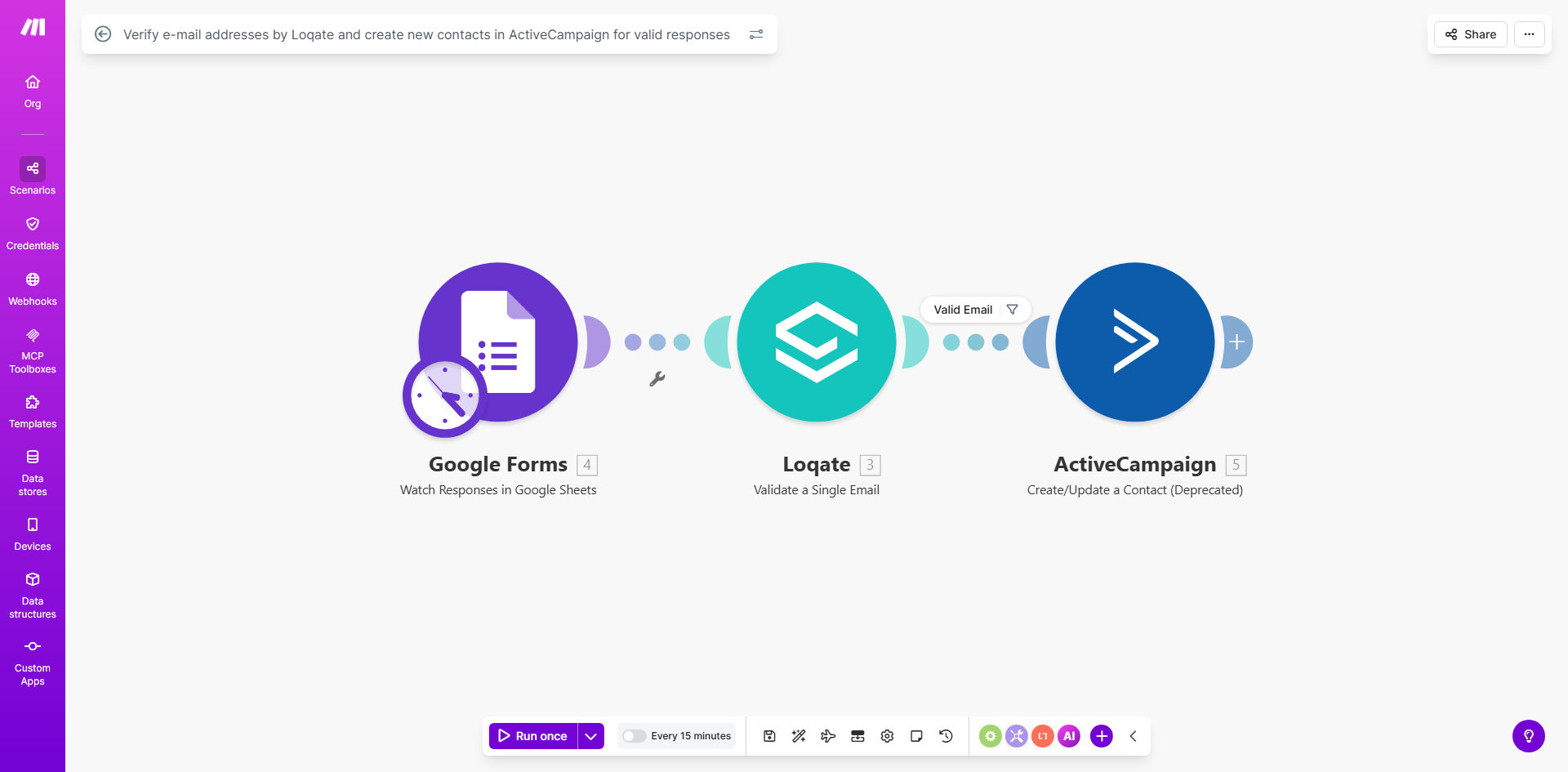
Email verification workflow diagram showing Google Forms to Loqate to ActiveCampaign integration

What This Workflow Does

This automation solves a critical challenge for businesses capturing leads through online forms: ensuring only valid email addresses enter your CRM. When prospects submit information through Google Forms, the workflow automatically verifies each email's deliverability using Loqate's professional validation service before creating contacts in ActiveCampaign.

Invalid email addresses waste marketing resources, skew analytics, and can damage sender reputation. By implementing this automated gatekeeper, you maintain a clean contact database while eliminating manual verification steps that slow down lead processing.

How It Works

1. Form Submission Trigger

The workflow activates whenever a new response is submitted to your connected Google Form. It captures all form fields including the critical email address field.

2. Loqate Email Verification

The submitted email address is sent to Loqate's verification API which checks: syntax validity, domain existence, and mailbox availability. Loqate returns a confidence score indicating whether the address is likely deliverable.

Pro tip: Configure the confidence threshold to match your risk tolerance. Higher thresholds (85%+) reduce false positives but may reject some valid addresses.

3. Conditional Routing

Based on Loqate's verification result, the workflow either: creates a new ActiveCampaign contact (for valid emails) or routes the submission for manual review (for questionable addresses).

4. ActiveCampaign Contact Creation

Verified emails trigger the creation of a fully populated contact record in ActiveCampaign, including all mapped form fields. The contact is automatically added to specified lists and tagged for follow-up.

Who This Is For

This workflow delivers the most value for:

  • Marketing teams running lead generation campaigns
  • Sales organizations prioritizing contact list quality
  • Event managers collecting attendee information
  • Education providers processing student applications
  • Any business using Google Forms with ActiveCampaign

What You'll Need

  1. An active Make.com account
  2. Google Forms with submissions containing email addresses
  3. Loqate API credentials (free tier available)
  4. ActiveCampaign account with API access
  5. Field mapping plan between form fields and ActiveCampaign properties

Quick Setup Guide

  1. Import the template into your Make.com account
  2. Connect your Google Forms account and select the target form
  3. Enter your Loqate API key in the verification module
  4. Configure your ActiveCampaign connection details
  5. Map form fields to corresponding ActiveCampaign contact fields
  6. Set your preferred validation confidence threshold (70-90% recommended)
  7. Test with sample submissions and activate the workflow

Key Benefits

15-20% higher email deliverability by ensuring only valid addresses enter your marketing funnel. Clean lists improve sender reputation and inbox placement.

Eliminate 3-5 hours per week of manual email verification and data entry. The automation handles validation and CRM updates instantly.

Improve sales team productivity by routing only verified leads to your CRM. No more chasing dead-end email addresses.

Enhanced campaign analytics with accurate email metrics. Remove fake signups that distort open and click rates.

Scalable lead processing that handles form submissions 24/7 without staff intervention, perfect for high-volume campaigns.

Frequently Asked Questions

Common questions about email validation and CRM automation

Email verification ensures your CRM contains only valid, deliverable addresses. Invalid emails waste marketing resources, skew analytics, and can hurt sender reputation. Automated verification prevents fake signups and typos from polluting your contact database.

For example, a 10% invalid rate on 1,000 leads means 100 undeliverable emails. At $2 per email in campaign costs, that's $200 wasted per campaign—easily $10,000+ annually for active marketers.

Loqate checks email syntax, domain validity, and mailbox existence without sending test messages. It uses real-time verification APIs to validate addresses against global email standards and domain records, providing instant accuracy scoring.

The service maintains extensive domain knowledge including common disposable email providers and known spam traps. Verification happens in milliseconds, adding negligible delay to your form submission process.

The workflow automatically filters out invalid submissions before they reach ActiveCampaign. You can configure notifications to alert your team about failed verifications or route these cases to a separate review process.

Common options include sending an immediate follow-up asking for corrected information or logging failed attempts for sales team follow-up. The template includes conditional routing to handle these scenarios.

Yes, the workflow maps all form fields to corresponding ActiveCampaign contact properties. You can customize field mappings to include additional data like phone numbers, company details, or survey responses.

The template includes examples for common field types. For advanced implementations, you can add conditional logic to handle different form versions or create custom ActiveCampaign fields on the fly.

Clean email lists increase deliverability rates by 15-20%. Verified contacts receive automated follow-ups faster, improving conversion rates. Accurate data also enables better segmentation and personalization in ActiveCampaign campaigns.

One client saw their lead-to-customer conversion rate jump 32% after implementation, simply because sales reps weren't wasting time on unreachable prospects. Their email open rates improved from 18% to 27% within two campaign cycles.

Most implementations take under 2 hours. The template handles core logic—you just need to connect your Google Forms, Loqate API, and ActiveCampaign account, then test with sample submissions.

Basic setup includes: API connections (30 min), field mapping (20 min), threshold configuration (10 min), and testing (30 min). More complex implementations with custom routing or additional systems may require 3-4 hours.

Absolutely. GrowwStacks specializes in tailored email validation workflows integrated with your specific CRM and marketing tools. We can add conditional logic, multi-step verifications, and custom rejection handling.

Our custom implementations often include: additional fraud checks, progressive profiling for incomplete submissions, integration with your helpdesk for failed verifications, and real-time analytics dashboards. We'll design a solution matching your exact lead management process.

  • Free consultation to assess your needs
  • 2-week typical implementation timeline
  • Ongoing optimization support

Need a Custom Email Verification Automation?

This free template is a starting point. Our team builds fully tailored automation systems for your specific business needs.