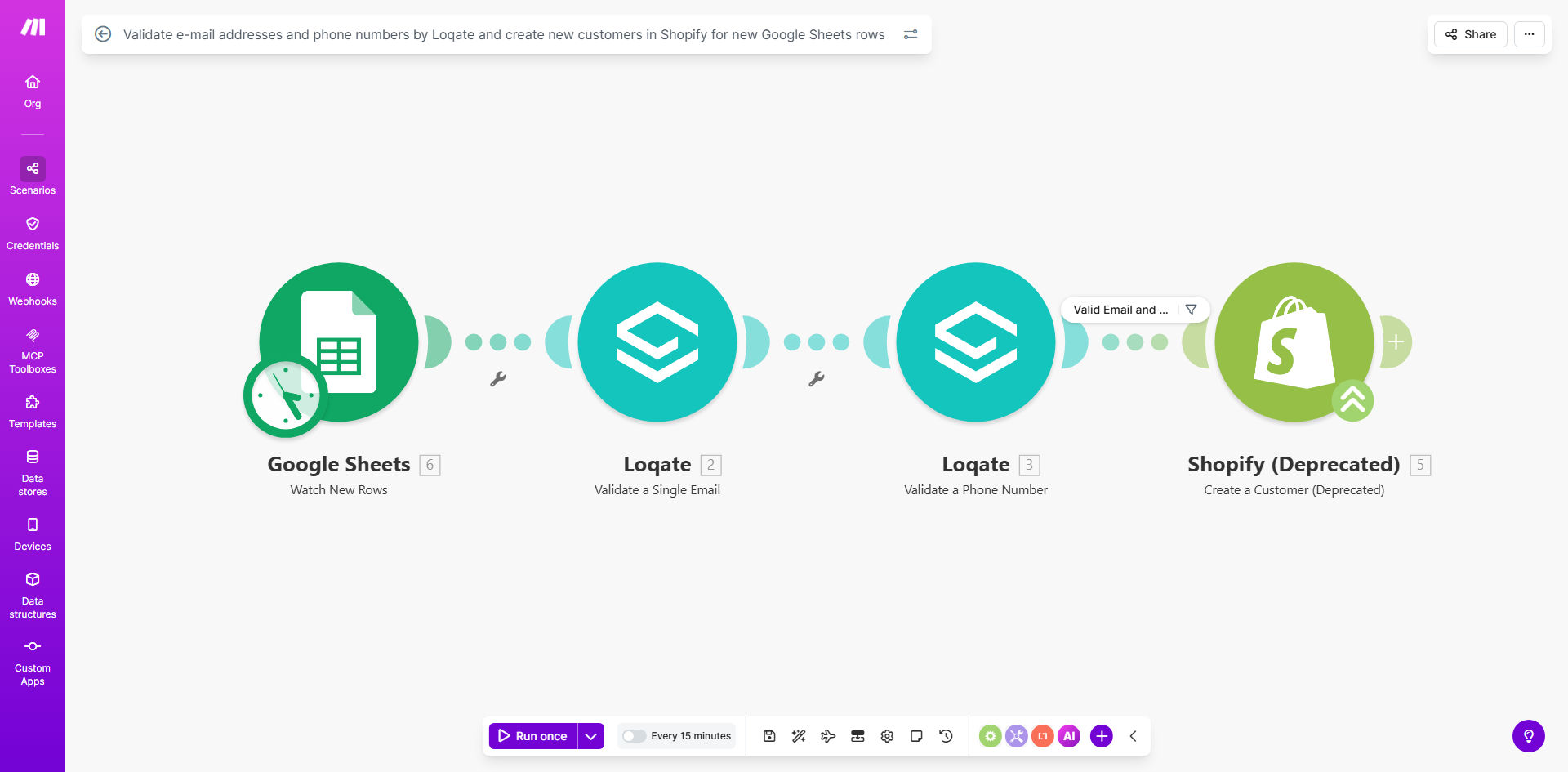
What This Workflow Does
This automation solves a critical ecommerce challenge: ensuring customer contact information is valid before creating Shopify customer profiles. Every time a new row is added to your Google Sheet (from order forms, lead captures, or wholesale applications), the workflow:
1. Validates email addresses through Loqate's verification service to confirm proper formatting and domain existence
2. Checks phone numbers for correct country codes and formatting
3. Only creates Shopify customers for records passing validation
4. Optionally flags invalid entries for review
How It Works
1. New Row Detection
Make.com monitors your Google Sheet for new rows added, typically from order forms, event registrations, or wholesale applications.
2. Loqate Validation
Each new row's email and phone fields are sent to Loqate's verification API. The service checks email syntax, domain validity, and phone number formatting.
3. Conditional Processing
Based on Loqate's validation results, the workflow either proceeds to create a Shopify customer or routes invalid records to a separate processing path.
4. Shopify Customer Creation
Validated customer data is mapped to Shopify's customer fields, creating complete customer profiles with verified contact information.
Pro tip: Add a "Validation Notes" column to your Sheet where the workflow can record why certain records failed verification for easy troubleshooting.
Who This Is For
This workflow is ideal for:
- Ecommerce stores receiving bulk customer imports from wholesale orders
- Businesses syncing leads from events/conferences to Shopify
- Stores integrating with marketplaces that provide customer lists
- Companies running promotions that collect customer data via forms
What You'll Need
- A Google Sheet with customer data columns (minimum: email, phone)
- Make.com account (free tier available)
- Shopify store admin access
- Loqate API key (free tier available)
Quick Setup Guide
- Duplicate the example spreadsheet or prepare your own
- Connect your Google Sheets account in Make.com
- Add your Loqate API credentials
- Configure Shopify connection with your store credentials
- Map spreadsheet columns to Shopify customer fields
- Set validation thresholds (what constitutes "valid")
- Test with sample data before going live
Key Benefits
Eliminate invalid customer records by catching typos, fake emails, and incorrect phone numbers before they enter your Shopify database.
Reduce manual verification work by automating what would otherwise require hours of manual checking for each batch of new customers.
Improve email deliverability by ensuring only valid email addresses are added to your marketing lists, protecting your sender reputation.
Maintain clean customer data which becomes increasingly valuable as your store grows and you rely on segmentation and analytics.