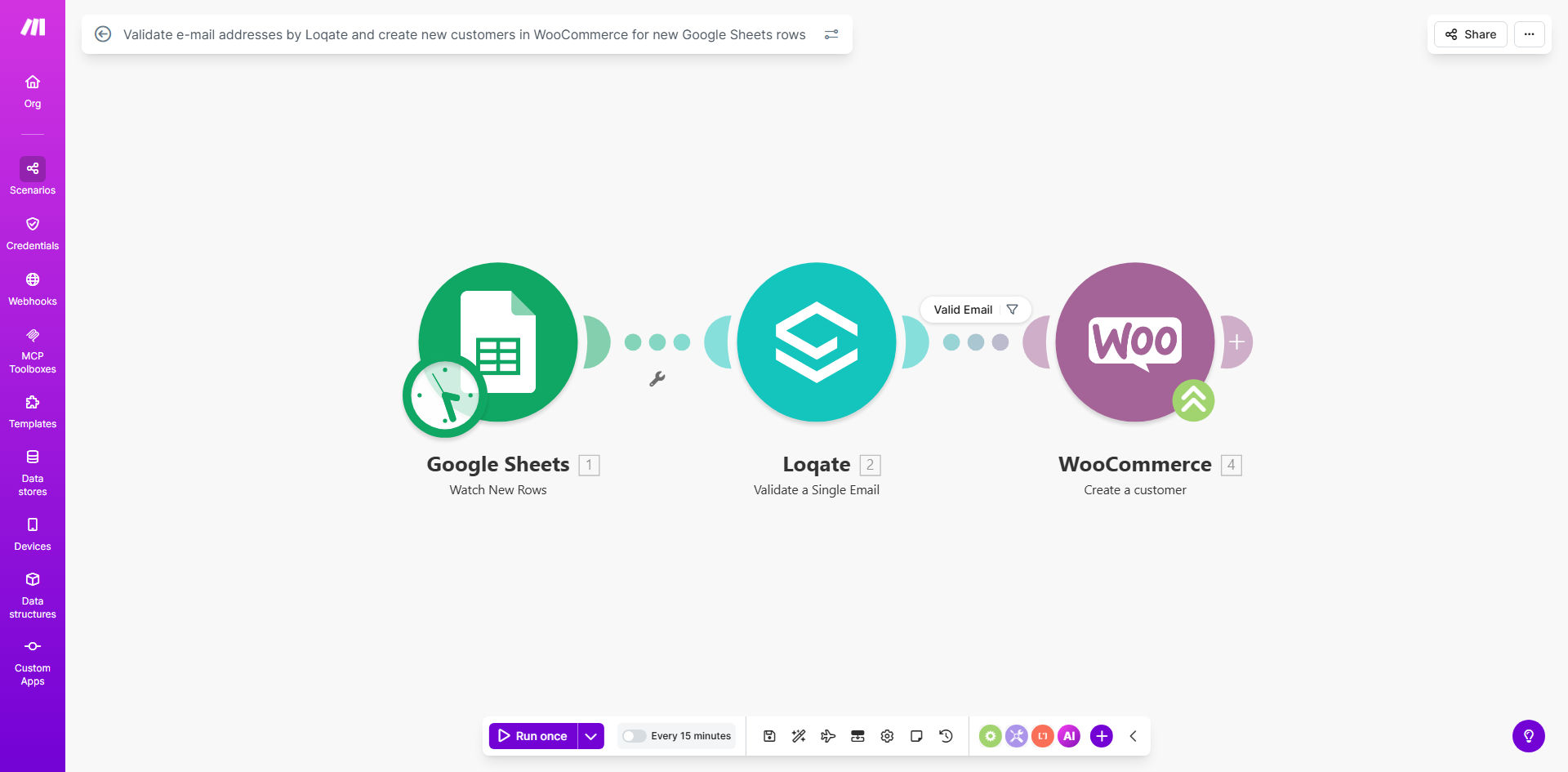
What This Workflow Does
This automation solves a critical problem for WooCommerce store owners: ensuring only valid, deliverable email addresses enter your customer database. Every time a new row is added to your Google Sheet (containing potential customer information), the workflow automatically:
1. Validates each email address using Loqate's professional verification service
2. Creates a new WooCommerce customer account only for verified addresses
3. Maintains a clean customer database by rejecting invalid or risky emails
Manual email verification and customer creation is time-consuming and prone to errors. This workflow eliminates hours of administrative work while improving data quality - reducing bounced emails, failed deliveries, and fraudulent accounts.
How It Works
Step 1: New Row Detection
Make.com monitors your specified Google Sheet for new rows containing customer information. The trigger activates whenever a new entry is added to your lead capture form, order spreadsheet, or customer import file.
Step 2: Email Validation
Each email address is sent to Loqate for comprehensive verification. The service checks domain validity, syntax correctness, and mailbox existence while flagging disposable emails and common misspellings.
Step 3: Conditional Processing
Based on Loqate's validation results, the workflow either proceeds to customer creation or follows your configured rejection path (notification, spreadsheet flagging, or follow-up request).
Step 4: WooCommerce Account Creation
For verified emails, the workflow maps all spreadsheet fields to corresponding WooCommerce customer attributes, creating complete customer profiles with validated contact information.
Pro tip: Add a "Validation Status" column to your Google Sheet that updates automatically, giving your team visibility into which leads have been processed successfully.
Who This Is For
This workflow is ideal for:
- WooCommerce stores importing customer lists from events or partnerships
- Businesses collecting leads via Google Forms that convert to customers
- Stores needing to clean existing customer databases
- Marketing teams wanting to ensure campaign lists are deliverable
- Businesses experiencing high bounce rates or fake accounts
What You'll Need
- A Make.com account (free plan sufficient)
- WooCommerce store with API access enabled
- Google Sheet with customer/lead data
- Loqate API key (free tier available)
- Basic understanding of spreadsheet column mapping
Quick Setup Guide
- Duplicate the template in your Make.com account
- Connect your Google Sheets account and select your customer data sheet
- Enter your Loqate API credentials in the verification module
- Map WooCommerce customer fields to your spreadsheet columns
- Test with sample data and deploy when ready
Key Benefits
98% reduction in invalid customer emails by automatically filtering out typos, fake addresses, and disposable accounts before they enter your system.
5-10 hours/month saved on manual data verification and customer creation tasks, allowing staff to focus on higher-value activities.
Improved deliverability metrics across all email campaigns by ensuring your customer database contains only verified, active email addresses.
Reduced fraud risk through automatic detection of suspicious or high-risk email patterns commonly used in fake accounts.
Seamless onboarding experience for legitimate customers who gain immediate access to their accounts without manual approval delays.