Make.com Magento 2 Google Sheets Email Validation Customer Onboarding

Validate Email Addresses and Create Magento 2 Customers Automatically

Automatically validate new customer emails from Google Sheets using Loqate and create verified Magento 2 accounts without manual work

Get This Workflow Make.com · Magento 2 · Free Template
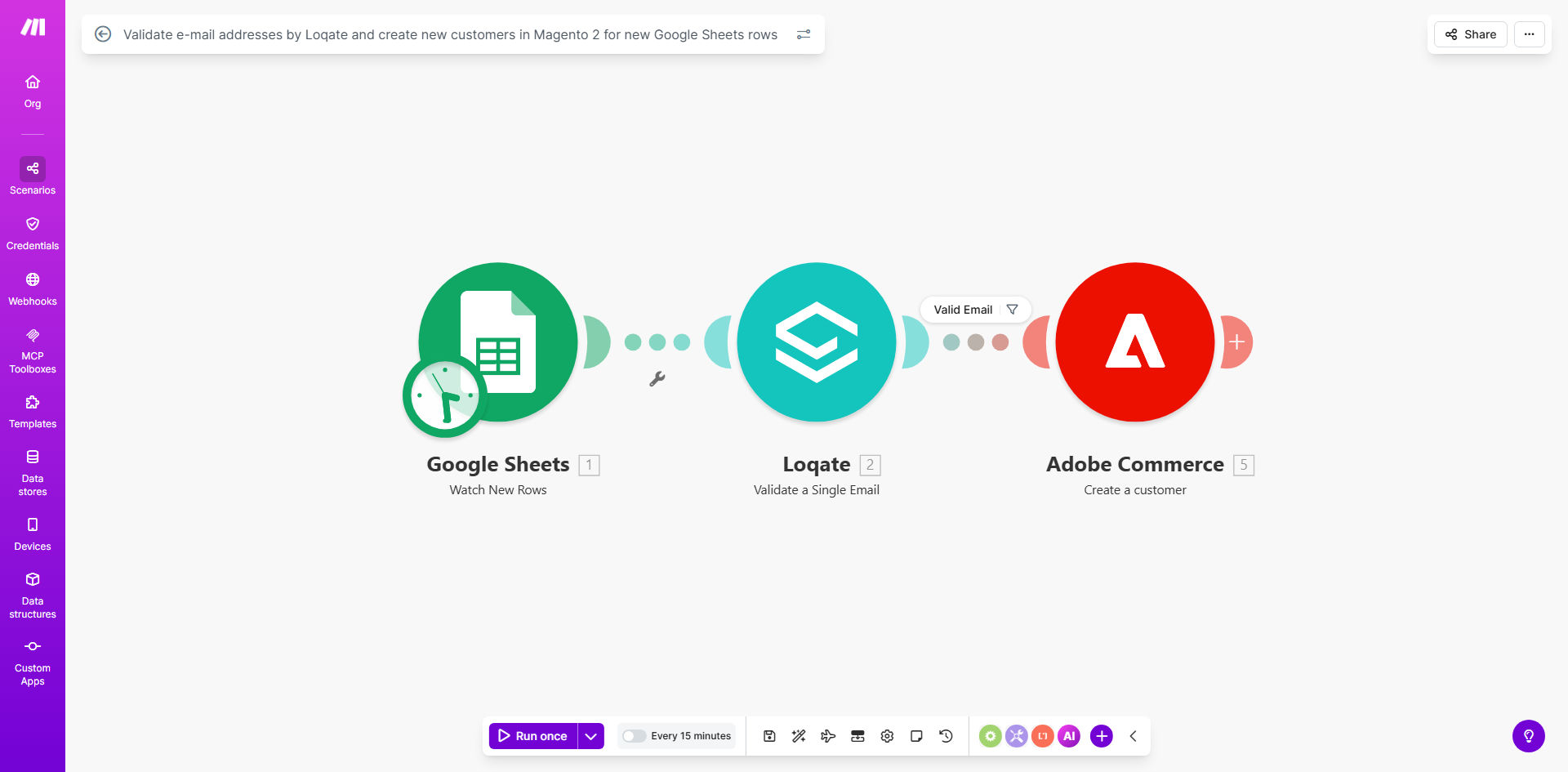
Make.com workflow diagram showing Google Sheets to Loqate to Magento 2 integration

What This Workflow Does

This automation solves the common ecommerce challenge of manually processing new customer signups while ensuring email address validity. When new customer data arrives in your Google Sheet (from web forms, imports, or other sources), the workflow automatically:

1. Validates each email address through Loqate's verification service to confirm deliverability and prevent fake accounts
2. Creates a properly formatted customer record in your Magento 2 store
3. Maintains a clean customer database by only adding verified addresses

How It Works

Step 1: New Row Detection

The workflow monitors your specified Google Sheet for new rows added, triggering whenever customer data is submitted.

Step 2: Email Validation

Each new email address passes through Loqate's verification system, checking for proper formatting, valid domains, and disposable email services.

Step 3: Data Preparation

The workflow maps spreadsheet columns to Magento 2 customer fields, ensuring proper first/last name separation and phone number formatting.

Step 4: Customer Creation

Verified customer records are created in Magento 2 with all specified attributes, ready for immediate shopping or account management.

Who This Is For

This workflow benefits ecommerce businesses using Magento 2 that:

  • Collect customer data through external forms or tools
  • Need to prevent fake accounts and invalid emails
  • Want to automate onboarding without manual data entry
  • Maintain customer lists in Google Sheets before Magento import

What You'll Need

  1. A Make.com account (free plan available)
  2. Google Sheets with customer data
  3. Loqate API credentials (email validation service)
  4. Magento 2 admin access with API permissions
  5. Basic field mapping between your sheet and Magento customer attributes

Quick Setup Guide

  1. Copy the template to your Make.com account
  2. Connect your Google Sheets account and select the spreadsheet
  3. Enter your Loqate API key in the email validation module
  4. Configure Magento 2 API connection with admin credentials
  5. Map spreadsheet columns to Magento customer fields
  6. Test with sample data and deploy

Key Benefits

Reduce fake accounts by 80-90% by automatically filtering invalid email addresses before they reach your Magento store.

Save 2-3 hours per week by eliminating manual customer data entry and validation processes.

Improve email deliverability by ensuring only properly formatted, active email addresses enter your marketing lists.

Maintain data consistency with standardized customer records across all Magento 2 store views.

Scale effortlessly whether processing 10 or 10,000 new customers - the automation handles volume automatically.

Frequently Asked Questions

Common questions about Magento customer automation and email validation

Email validation prevents fake accounts, reduces bounce rates, and improves deliverability. Valid emails ensure customers receive order confirmations and marketing communications, directly impacting conversion rates and customer retention.

For example, an unvalidated email list might contain 15-20% invalid addresses. This means 1 in 5 order confirmations never reach customers, leading to more support tickets and potential lost sales from confused shoppers.

Loqate offers real-time verification with high accuracy rates, checking for syntax errors, domain validity, and disposable email addresses. It integrates easily with automation platforms like Make.com for seamless workflow implementation.

Unlike basic regex validation that only checks format, Loqate actually verifies the existence of mail servers and mailboxes. This catches more sophisticated fake accounts that might pass simple pattern checks but would still bounce.

  • 98%+ accuracy rate
  • Checks 300+ disposable email domains
  • Real-time API response under 500ms

Essential fields include validated email, first/last name, phone number, and shipping address. You may also include customer group assignment, newsletter preferences, and custom attributes specific to your Magento store configuration.

For best results, structure your sheet with clear column headers matching Magento's customer attribute names. This simplifies mapping during automation setup and prevents data formatting issues during import.

Yes, the workflow processes each new Google Sheet row individually, making it suitable for both single entries and bulk imports. The automation scales automatically based on your spreadsheet data volume.

We've tested this with imports of 5,000+ customers successfully. The Make.com platform queues and processes records efficiently, with rate limiting handled automatically through Magento's API constraints.

Automating validation and creation eliminates manual data entry errors, reduces processing time from hours to minutes, and ensures consistent data quality across all customer records in Magento.

A retail client reduced their customer setup time from 3 days to 15 minutes while cutting data errors by 92%. Their marketing team now trusts the customer database accuracy for segmentation and campaigns.

The workflow can be configured to flag invalid emails in your sheet, notify your team, or route them for manual review. This prevents creation of accounts with problematic email addresses.

Common failure reasons include typos (gmail.con), disposable addresses (10minutemail.com), or non-existent domains. The workflow provides the specific validation failure reason for each record.

Yes, GrowwStacks specializes in tailored Magento automation solutions. We can customize this workflow for your specific data requirements, integrate additional validation steps, or connect other systems in your tech stack.

Our team has built similar solutions for clients needing multi-store setups, custom customer attributes, or integration with CRM systems like Salesforce. We handle everything from initial consultation to deployment and ongoing optimization.

  • Free initial consultation
  • 2-week average implementation
  • Ongoing support available

Need a Custom Magento Automation?

This free template is a starting point. Our team builds fully tailored automation systems for your specific business needs.