Make.com Lead Capture CRM Integration Marketing Automation Facebook Ads

Automatically Sync Facebook Lead Ads to MailerLite & HubSpot CRM

Capture leads once and distribute them to both marketing and sales systems instantly

Get This Workflow Make.com · Lead Capture · Free Template
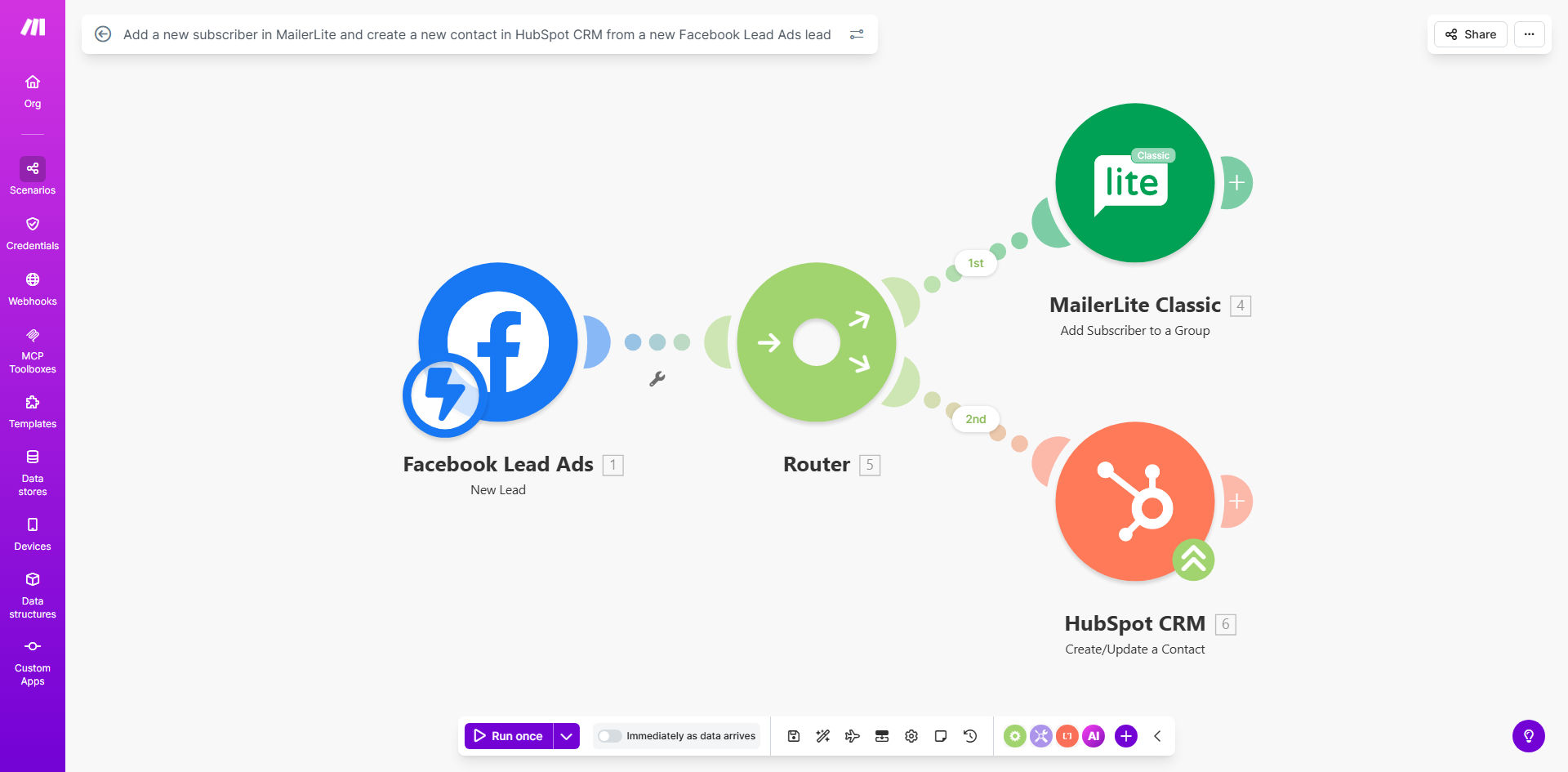
Visual diagram showing Facebook Lead Ads connecting to both MailerLite and HubSpot CRM

What This Workflow Does

This automation solves a common problem for businesses running Facebook lead generation campaigns - the need to manually transfer leads between marketing and sales systems. When a potential customer submits information through your Facebook Lead Ad, this workflow automatically creates a subscriber in your MailerLite email marketing platform while simultaneously adding them as a contact in HubSpot CRM.

The solution eliminates duplicate data entry, ensures immediate follow-up from both marketing and sales teams, and maintains data consistency across systems. By syncing leads in real-time, you can trigger targeted email nurturing sequences while giving your sales team fresh, qualified leads to pursue.

How It Works

1. Facebook Lead Ads Trigger

The workflow activates whenever someone submits your Facebook Lead Ad form. It captures all form field data including email, name, phone number, and any custom fields you've configured.

2. Data Processing

The system maps Facebook form fields to corresponding fields in MailerLite and HubSpot. You can customize this mapping to ensure data lands in the right places in each system.

3. Dual System Sync

The workflow simultaneously creates a new subscriber in your MailerLite account (adding them to specified groups) and creates a new contact record in HubSpot CRM (with proper lifecycle stage and owner assignment).

4. Confirmation & Error Handling

The system verifies successful creation in both platforms and can notify your team if any issues occur during the sync process.

Pro tip: Add a delay module before the HubSpot step to give MailerLite time to process the subscriber before your sales team reaches out.

Who This Is For

This workflow is ideal for:

  • Marketing agencies managing Facebook ads for clients
  • B2B companies running lead generation campaigns
  • E-commerce brands collecting subscriber leads
  • Businesses using both email marketing and CRM systems
  • Teams wanting to eliminate manual lead distribution

What You'll Need

  1. A Facebook Lead Ads account with an active lead form
  2. A MailerLite account with API access enabled
  3. A HubSpot CRM account with developer permissions
  4. A Make.com account (formerly Integromat)
  5. Facebook form fields that collect at minimum an email address

Quick Setup Guide

  1. Clone the template in your Make.com account
  2. Connect your Facebook Lead Ads account
  3. Authenticate your MailerLite and HubSpot accounts
  4. Map form fields between systems (email → email, etc.)
  5. Specify MailerLite groups and HubSpot properties
  6. Test with a sample lead submission
  7. Activate the scenario for live processing

Key Benefits

Eliminate manual data entry - Save 5-10 minutes per lead by automatically distributing contact information rather than copying/pasting between systems.

Improve lead response time - Sales teams receive fresh leads in HubSpot within seconds, allowing faster follow-up while interest is highest.

Maintain marketing nurture streams - Email sequences begin immediately in MailerLite, keeping your brand top-of-mind with new leads.

Reduce human error - Automated field mapping ensures data consistency across platforms compared to manual transcription.

Gain full visibility - Marketing can track email engagement while sales tracks deal progression - all from the same original lead source.

Frequently Asked Questions

Common questions about Facebook Lead Ads automation and integration

Connecting both systems ensures your marketing team can nurture leads via email campaigns while sales teams have full CRM visibility. This eliminates manual data entry between departments and ensures no leads fall through the cracks.

For example, when a lead comes in, marketing can immediately add them to a nurture sequence while sales can see the complete interaction history in HubSpot before making their first call.

  • Maintains single source of truth
  • Aligns marketing and sales efforts
  • Provides complete customer journey visibility

At minimum collect email addresses. For best results also request first name, last name, and phone number. These standard fields map perfectly to both MailerLite and HubSpot contact records.

We recommend keeping forms short (3-5 fields max) to maximize conversions while collecting enough information for effective follow-up. Conditional logic can show additional fields based on initial responses.

  • Email is mandatory for both systems
  • Phone enables sales outreach
  • Name allows personalization

The workflow triggers instantly when a new lead is submitted, typically syncing data to both systems in under 30 seconds. This real-time processing means your teams can follow up while leads are hottest.

In comparison, manual lead distribution often creates delays of hours or even days, significantly reducing conversion rates. Automated processing ensures no lead sits unattended.

  • 30-second sync vs hours/days manually
  • Immediate email nurturing
  • Sales can call while interest is fresh

Yes, you can extend the template to send welcome emails, assign sales reps, or trigger internal notifications. Make.com's visual editor makes it easy to add conditional logic and additional app connections.

Common extensions include adding Slack notifications for sales teams, creating tasks in project management tools, or initiating SMS follow-up sequences. The base template provides the core integration you can build upon.

  • Add Slack/Teams notifications
  • Trigger SMS sequences
  • Create follow-up tasks

The workflow can be configured to either update existing records or skip duplicates. By default it creates new records, but you can modify this behavior based on your business requirements.

For marketing, you might want to resubscribe unsubscribed emails. For sales, you may prefer to create new contact records for each lead ad submission to track multiple touchpoints from the same person.

  • Default: Create new records
  • Option: Update existing contacts
  • Flexible configuration

Facebook's native integrations only connect to one platform at a time. This workflow provides a unified solution that syncs to both systems simultaneously while allowing custom field mapping and data transformations.

Native integrations also lack advanced features like conditional logic, error handling, and the ability to add additional steps. This automation gives you complete control over how leads flow through your systems.

  • Dual sync vs single destination
  • Custom field mapping
  • Advanced error handling

Absolutely. Our team at GrowwStacks specializes in building tailored lead capture automations that connect Facebook Lead Ads to your specific marketing stack and CRM workflows.

We can create custom solutions that integrate with your unique tech stack, add conditional logic based on lead responses, implement lead scoring, and connect additional systems like your helpdesk or billing platform.

  • Tailored to your tech stack
  • Custom lead routing logic
  • Ongoing support and optimization

Need a Custom Facebook Lead Ads Automation?

This free template is a starting point. Our team builds fully tailored automation systems for your specific business needs.