Make.com App Integration Workflow Automation Business Process

Automation Software: Connect Apps & Design Workflows

Streamline your business operations by automating data flows between your essential apps

Get This Workflow → Make.com · App Integration · Free Template
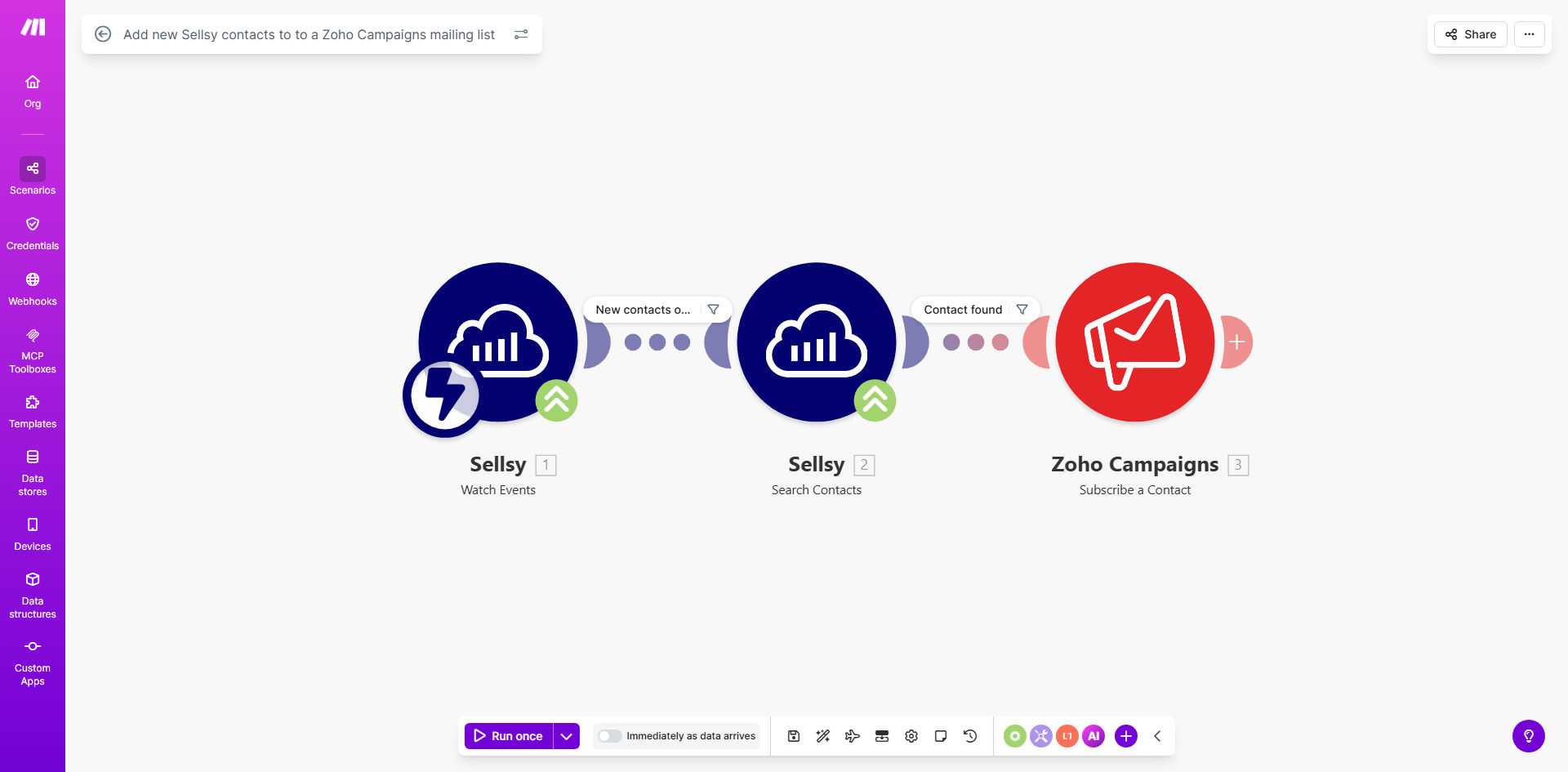
Make.com workflow automation interface showing app connections

What This Workflow Does

This automation template helps businesses eliminate manual data entry by connecting different applications and automating workflows between them. It solves the common problem of information silos where employees waste time copying data between systems or dealing with inconsistent records across platforms.

The workflow demonstrates how to automatically sync contact information between business apps like Sellsy and Zoho Campaigns. This ensures your marketing lists always contain up-to-date customer data without manual updates, reducing errors and saving valuable time.

How It Works

Step 1: Trigger Setup

The workflow begins when a new contact is added to your Sellsy CRM. The automation detects this new entry and captures all relevant contact details.

Step 2: Data Processing

The system processes the contact information, formatting it appropriately for the destination system and applying any business rules you've configured.

Step 3: Destination Sync

The formatted contact data is automatically added to your Zoho Campaigns mailing list, ensuring your marketing communications reach the right audience.

Pro tip: You can modify this template to connect nearly any two business apps - just replace the trigger and action modules with your preferred applications.

Who This Is For

This workflow benefits any business using multiple software applications that don't natively integrate well. It's particularly valuable for:

  • Marketing teams managing contacts across CRM and email platforms
  • Sales organizations needing to sync lead data between systems
  • Small businesses with limited IT resources looking to automate processes
  • Operations teams tired of manual data entry between disconnected apps

What You'll Need

  1. A Make.com account (free tier available)
  2. Access to both source and destination applications (Sellsy and Zoho in this example)
  3. API keys or login credentials for the apps you want to connect
  4. Basic understanding of the data fields you want to sync between systems

Quick Setup Guide

  1. Duplicate the template in your Make.com account
  2. Connect your Sellsy account in the trigger module
  3. Configure which contact fields to capture
  4. Connect your Zoho Campaigns account in the action module
  5. Map the Sellsy fields to corresponding Zoho fields
  6. Test with a sample contact to verify the sync works
  7. Activate the workflow for live use

Key Benefits

Eliminate manual data entry - Save hours previously spent copying information between systems while reducing human error in the process.

Keep systems in sync - Ensure all your business applications work with the same up-to-date customer information.

Scale operations efficiently - Handle increasing data volumes without proportionally increasing administrative overhead.

Improve data accuracy - Automated transfers reduce the risk of typos, omissions, and inconsistent formatting.

Focus on high-value work - Free your team from repetitive tasks to concentrate on strategic initiatives.

Frequently Asked Questions

Common questions about app automation and integration

Connecting apps through automation eliminates manual data entry, reduces errors, and saves significant time. Businesses typically see a 30-50% reduction in administrative tasks when automating workflows between apps.

For example, automatically syncing customer data between your CRM and email marketing tool ensures campaigns always target the right audience without requiring staff to export and import lists manually.

Modern automation platforms like Make.com have simplified integration with pre-built connectors and drag-and-drop interfaces. While some technical understanding helps, most business users can implement basic workflows with minimal training.

Complex integrations may require developer assistance for custom API connections or advanced data transformations, but the template approach makes common integrations accessible to non-technical users.

Common automations include lead management, customer onboarding, invoice processing, inventory updates, and marketing campaign triggers. Any repetitive task involving data transfer between systems is a prime candidate.

Sales teams often automate follow-up sequences when leads meet certain criteria, while HR departments automate new employee provisioning across multiple systems.

Prioritize integrations between apps where you experience the most manual data transfer pain points. Start with high-volume processes like CRM to email marketing syncs or ecommerce to accounting connections.

Focus on workflows that currently consume significant employee time or cause frequent errors. These typically offer the quickest ROI when automated.

Always verify the automation platform uses secure API connections with proper encryption. Implement role-based access controls so only authorized users can modify workflows.

Audit data flows regularly to ensure sensitive information isn't being shared unnecessarily between systems. Many platforms offer data masking features for confidential fields.

Most businesses save 5-15 hours per employee weekly by automating repetitive tasks. Customer support teams often see the biggest gains from automating ticket routing and response templates.

Marketing teams benefit from automated lead nurturing sequences that run 24/7 without manual intervention, while accounting departments reduce errors in invoice processing.

Yes, GrowwStacks specializes in building custom automation solutions tailored to your specific business needs. Our team analyzes your current workflows and designs optimized integrations that maximize efficiency.

We handle everything from initial consultation to implementation and ongoing support. Whether you need simple app connections or complex multi-system workflows, we can develop a solution that fits your requirements.

  • Free initial workflow assessment
  • Customized to your tech stack
  • Ongoing maintenance available

Need a Custom App Automation?

This free template is a starting point. Our team builds fully tailored automation systems for your specific business needs.