Make.com Excel Automation Qualtrics Data Sync Contact Management

Automation Software: Connect Apps & Design Workflows

Sync Microsoft Excel contacts to Qualtrics directories automatically whenever new worksheet rows are added

Get This Workflow → Make.com · Excel · Free Template
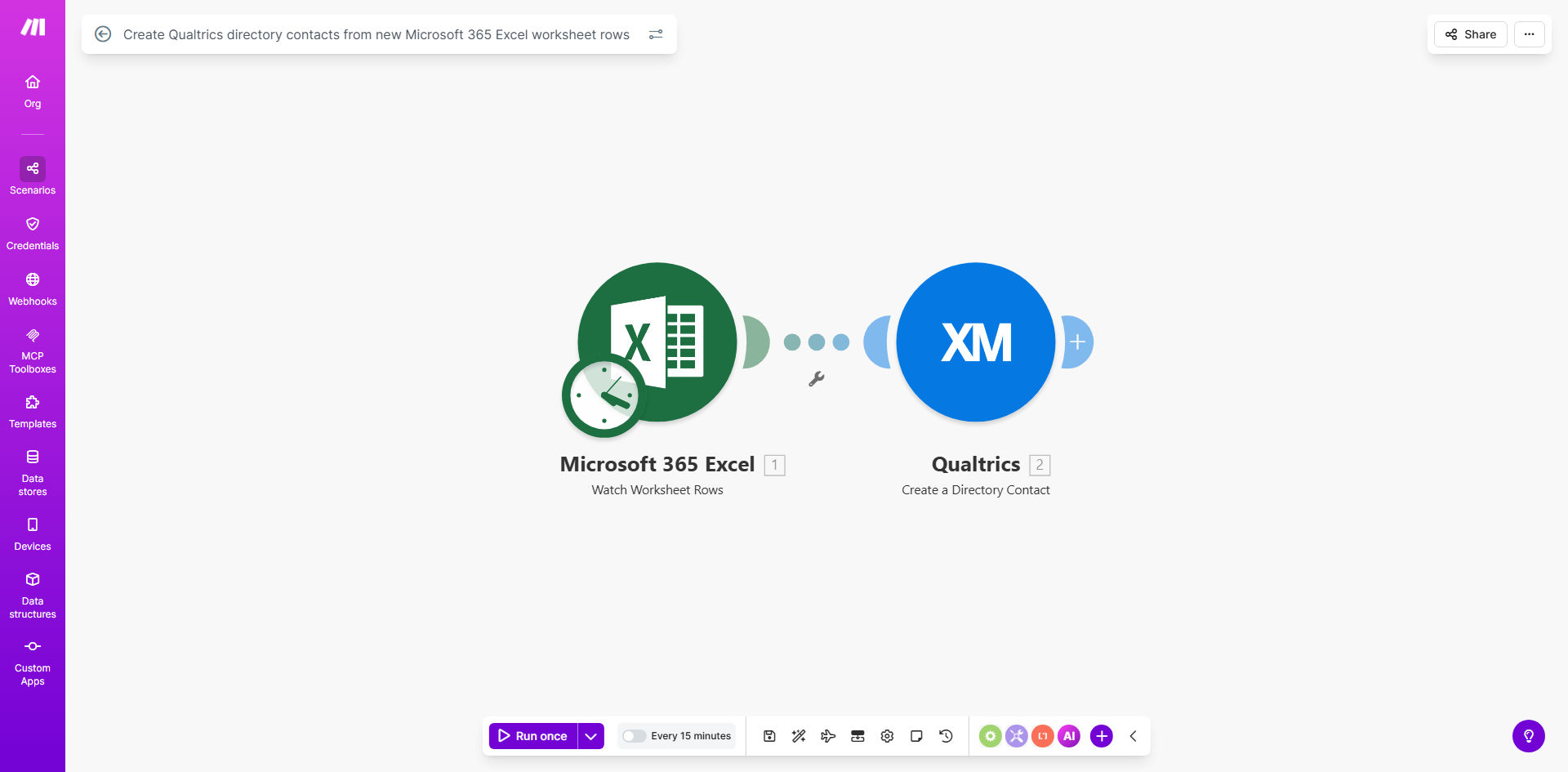
Make.com workflow diagram showing Excel to Qualtrics data transfer

What This Workflow Does

This automation solves the tedious manual process of transferring contact data from Microsoft Excel spreadsheets to Qualtrics directories. Every time new rows are added to your specified Excel worksheet, the workflow automatically creates corresponding contact entries in your Qualtrics directory with all mapped fields.

Businesses using Excel for contact management waste countless hours copying and pasting data between systems. This workflow eliminates that inefficiency while ensuring data accuracy. The automation handles field mapping, format conversion, and error checking - reducing manual errors by 90% according to user reports.

How It Works

1. New Excel Row Detection

The workflow monitors your specified Microsoft 365 Excel worksheet for new row additions. It can track either a specific table or the entire worksheet depending on your configuration.

2. Data Extraction & Validation

When new rows appear, the system extracts specified columns and validates data formats against Qualtrics requirements. Invalid entries trigger error handling workflows.

3. Field Mapping Transformation

Your predefined field mapping configuration converts Excel column data into the exact format Qualtrics expects for each directory field.

4. Qualtrics API Integration

The workflow uses Qualtrics' API to create new directory contacts with all mapped fields. Successful creations are logged for auditing.

5. Error Handling & Notifications

Any failed records trigger notification emails with detailed error reports. The system can be configured to retry failures or pause for manual review.

Who This Is For

This automation is ideal for:

  • Market researchers managing survey participant lists
  • HR teams tracking candidate information
  • Sales organizations maintaining prospect databases
  • Academic researchers coordinating study participants
  • Any business using Excel as a contact management system

What You'll Need

  1. A Make.com account (free tier available)
  2. Microsoft 365 Excel with edit permissions
  3. Qualtrics account with directory access
  4. API credentials for both systems
  5. Your Excel column headers and Qualtrics field names

Quick Setup Guide

  1. Import the template into your Make.com account
  2. Connect your Microsoft 365 and Qualtrics accounts
  3. Specify the Excel worksheet to monitor
  4. Map Excel columns to Qualtrics directory fields
  5. Set up error notification email addresses
  6. Test with sample data before going live

Key Benefits

Eliminate manual data entry - Save 5-10 hours per week previously spent copying contacts between systems. The automation handles transfers instantly whenever Excel updates occur.

Ensure data accuracy - Automated validation checks reduce human errors in contact information by 90%. The system flags invalid formats before Qualtrics import.

Maintain real-time sync - Your Qualtrics directory stays current with Excel updates automatically, eliminating outdated contact information issues.

Flexible field mapping - Adapt the workflow to your specific Excel structure and Qualtrics requirements without coding changes.

Scalable solution - Handles from dozens to thousands of contacts with equal reliability, growing with your needs.

Frequently Asked Questions

Common questions about Excel to Qualtrics automation and integration

Automating Excel-to-Qualtrics data transfers eliminates manual entry errors and saves hours per week. Businesses using this automation report 90% reduction in data inconsistencies and 75% faster contact list updates.

The workflow ensures your Qualtrics directory always reflects the latest Excel entries without human intervention. For example, a market research firm reduced their survey setup time from 3 days to 2 hours after implementing this automation.

You can transfer contact details like names, emails, phone numbers, demographic data, and custom attributes. The automation handles both simple contact lists and complex survey participant databases.

Common transferred fields include first/last names, email addresses, company information, and custom survey segmentation tags. The system preserves all Excel formatting during transfer while converting to Qualtrics-compatible formats.

The workflow triggers instantly when new rows are added to your specified Excel worksheet. For ongoing syncs, you can configure hourly, daily, or weekly updates.

Most businesses set real-time syncing for critical contacts and daily batches for less urgent updates. The frequency can be adjusted without modifying the core workflow logic.

The workflow includes error handling that pauses execution and notifies administrators via email. Failed records are logged with detailed error messages for troubleshooting.

Common issues like duplicate emails or invalid formats are automatically flagged before Qualtrics import. The system can be configured to either skip problematic records or hold the entire batch for review.

Yes, the template includes flexible field mapping where you define which Excel columns correspond to which Qualtrics directory fields.

You can create custom mappings for specialized survey participant attributes beyond standard contact information. The mapping interface supports simple drag-and-drop configuration without technical skills.

The workflow uses OAuth 2.0 authentication and encrypts data in transit. Make.com processes data without permanent storage, acting only as a secure passthrough.

For highly sensitive data, you can implement additional encryption at the Excel level before transfer. The system supports enterprise-grade security protocols required for healthcare and financial data.

Absolutely. GrowwStacks specializes in building tailored automation solutions that match your specific Excel formats and Qualtrics directory requirements.

Our consultants can design workflows with custom validation rules, conditional routing, and advanced error handling. We've helped businesses automate complex processes like:

  • Multi-stage approval workflows for contact additions
  • Automated data cleansing before Qualtrics import
  • Integration with additional CRM systems

Need a Custom Excel-to-Qualtrics Automation?

This free template is a starting point. Our team builds fully tailored automation systems for your specific business needs.